
1. Introduction
The Pyramid PS7KX is a compact, linear, and regulated bench power supply designed to convert AC power to a stable 13.8V DC output. It provides a constant source of DC voltage, making it suitable for various applications including component testing, device operation, and hobbyist projects. This manual provides essential information for the safe and efficient use of your PS7KX power supply.
2. Safety Information
WARNING: This product contains chemicals known to the State of California to cause cancer and birth defects or other reproductive harm.
- Always ensure the power supply is placed on a stable, level surface with adequate ventilation.
- Do not expose the unit to moisture or extreme temperatures.
- Ensure proper polarity when connecting DC devices to avoid damage to the power supply or the connected equipment.
- Do not attempt to open or service the unit yourself. Refer all servicing to qualified personnel.
- The unit is fuse protected with auto-reset and includes electronic overload, short circuit, and over-temperature protection. However, always operate within specified limits.
3. What's in the Box
Upon unpacking, please verify that the following item is included:
- 1 x Pyramid PS7KX Universal Compact Bench Power Supply
4. Product Features
- Linear / Regulated Design: Provides stable and clean DC power.
- AC-to-DC Power Conversion: Converts 115V AC input to 13.8V DC output.
- 5 Amp Constant / 7 Amp Surge: Delivers reliable current for various devices.
- Screw-Type Terminals: Universal hardwired terminals for secure connections.
- Safety Protections: Fuse protected with auto-reset, electronic overload, short circuit, and over-temperature protection.
- Built-in Cooling Fan: Ensures optimal operating temperature and prevents overheating.
- Durable Housing: Rugged construction with a cabinet heatsink for longevity.
- Power ON/OFF Switch: Convenient control for operation.
5. Setup
- Unpacking: Carefully remove the power supply from its packaging. Inspect the unit for any signs of damage.
- Placement: Place the power supply on a flat, stable, and well-ventilated surface. Ensure that the cooling fan vents are not obstructed.
- AC Power Connection: Connect the power cord to the AC input on the back of the unit, then plug it into a standard 115V AC, 60Hz wall outlet.
- DC Device Connection:
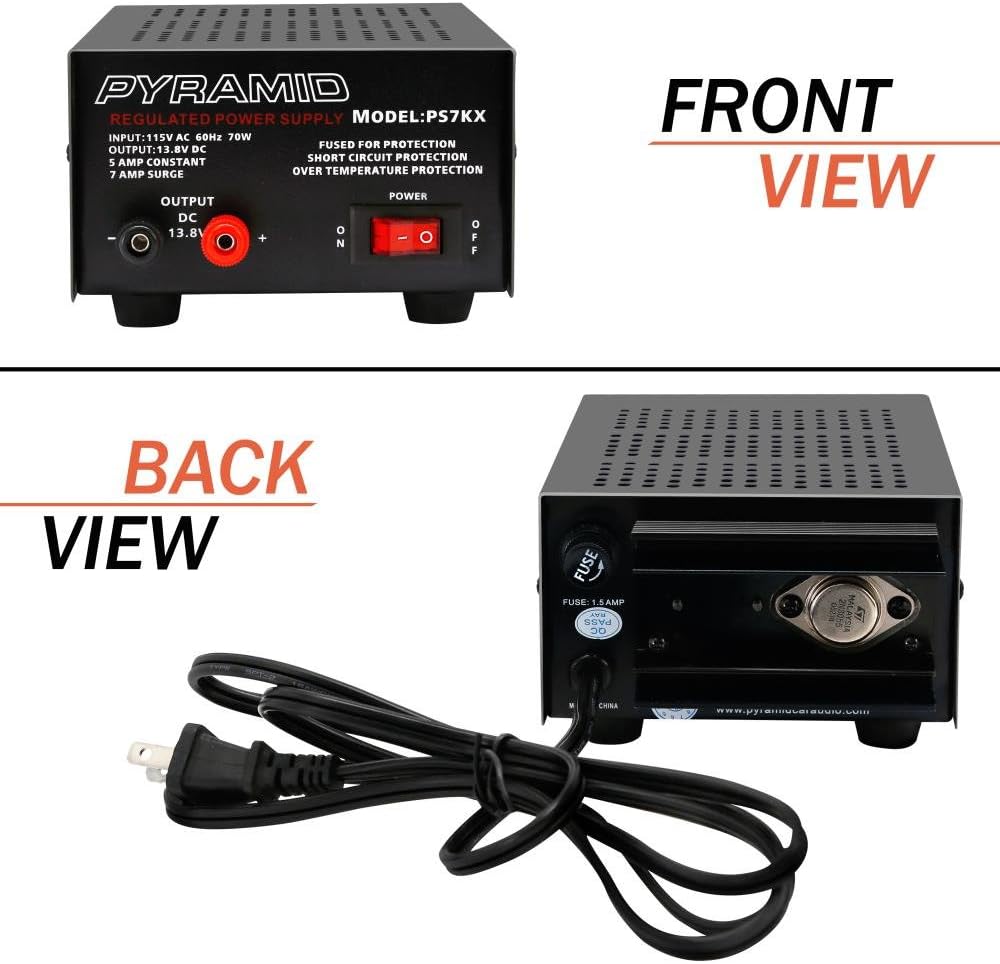
This image displays the front panel of the Pyramid PS7KX power supply, highlighting the power switch and the DC output terminals. The red terminal is for positive (+) connection, and the black terminal is for negative (-) connection.

This image shows the rear panel of the Pyramid PS7KX power supply, featuring the AC power input socket and the fuse holder. The power cord connects here to supply AC power to the unit.
- Identify the positive (+) and negative (-) screw-type terminals on the front panel of the power supply. The red terminal is positive (+), and the black terminal is negative (-).
- Connect the positive wire from your DC device to the red (+) terminal and the negative wire to the black (-) terminal. Ensure connections are secure to prevent accidental disconnections or short circuits.
- Always double-check the polarity requirements of your device before connecting to avoid damage.
6. Operating Instructions
- Powering On: After connecting your device, press the power ON/OFF switch located on the front panel to the 'ON' position. The power indicator light will illuminate.

This diagram highlights key features of the PS7KX power supply, including its durable case, built-in cooling fan, easy-to-use DC output terminals, and the power ON/OFF button.
- Output Voltage: The power supply provides a fixed output of 13.8V DC.
- Current Capacity: The unit can supply a constant current of 5 Amps and a surge current of 7 Amps. Do not exceed these limits to ensure stable operation and prevent activation of protection circuits.
- Cooling Fan: The built-in cooling fan will activate automatically as needed to maintain optimal operating temperature. Ensure the fan vents are clear.
- Powering Off: When finished, switch the power ON/OFF switch to the 'OFF' position. Disconnect your DC device and then unplug the AC power cord from the wall outlet.
7. Maintenance
- Cleaning: Use a soft, dry cloth to clean the exterior of the power supply. Do not use liquid cleaners or solvents.
- Ventilation: Regularly check that the cooling fan vents are free from dust and obstructions to ensure proper airflow.
- Storage: When not in use for extended periods, store the power supply in a cool, dry place, away from direct sunlight and moisture.
- Fuse: The unit features an auto-reset fuse. If the unit repeatedly trips, consult the troubleshooting section or contact support. Do not attempt to replace the fuse yourself.
8. Troubleshooting
- No Power:
- Ensure the AC power cord is securely plugged into both the power supply and a working wall outlet.
- Verify that the power ON/OFF switch is in the 'ON' position.
- Check the wall outlet with another device to confirm it is supplying power.
- No DC Output:
- Confirm that the power supply is turned on and the power indicator is lit.
- Check the connections to your DC device for proper polarity and secure contact.
- The unit may have activated its overload or short circuit protection. Disconnect the load, turn the unit off, wait a few minutes, and then turn it back on. Reconnect the load carefully.
- Overheating:
- Ensure the cooling fan vents are not obstructed and there is adequate airflow around the unit.
- Reduce the load on the power supply if it is operating near its maximum current capacity for extended periods.
9. Specifications
| Feature | Specification |
|---|---|
| Model Number | PS7KX |
| Input Voltage | 115V AC, 60Hz |
| Output Voltage | 13.8V DC |
| Constant Amperage | 5.0 AMP |
| Surge Amperage | 7.0 AMP |
| Output Wattage | 70 Watts |
| Connector Type | Screw-Terminal |
| Protection Features | Fuse Protected (Auto-Reset), Electronic Overload, Short Circuit, Over-Temperature |
| Cooling | Built-in Cooling Fan |
| Dimensions (L x W x H) | 7.5'' x 4.9'' x 3.0'' inches |
| Item Weight | 5.4 pounds |
10. Applications
The Pyramid PS7KX power supply is versatile and can be used to power various 12V DC devices. Common applications include:
- Cellular Phones (with appropriate adapters)
- CB Radios
- Scanners
- HAM Radios
- Other 12V DC electronic equipment within the specified current limits.

This image illustrates the versatility of the Pyramid PS7KX power supply, demonstrating its compatibility with a range of electronic devices such as cellular phones, CB radios, scanners, and HAM radios.
11. Warranty and Support
For warranty information or technical support, please refer to the documentation provided with your purchase or contact Pyramid customer service directly. Keep your purchase receipt as proof of purchase.


