1. Introduction
The Plextor PX-716UF is an external DVD+/-R/RW drive designed for high-speed data recording and playback. It features both IEEE 1394 (FireWire) and Hi-Speed USB 2.0 connectivity, offering versatile compatibility with various computer systems. This drive supports dual-layer DVD media, allowing for increased storage capacity, and incorporates advanced technologies for reliable and high-quality disc burning.

Figure 1: Front view of the Plextor PX-716UF external DVDRW drive, showing the disc tray and eject button.
2. Key Features
- Dual-Layer Support: Enables storage of up to 8.5 GB of data or 4 hours of high-quality MPEG-2/DVD video on a single disc.
- High-Speed Connectivity: Equipped with both Hi-Speed USB 2.0 and IEEE 1394 (FireWire) interfaces for fast data transfer.
- Intelligent Recording Technology: Optimizes recording quality and speed for various media types.
- AUTOSTRATEGY Writing Technology: Adapts writing strategies for unknown media, ensuring consistent quality.
- Intelligent Tilt: Utilizes precise laser control and three-dimensional tilt adjustment for reliable recording on uneven disc surfaces.
- PoweRec Technology: Advanced write strategy for superior recording quality at maximum speed.
- Buffer Underrun Proof Technology: Prevents buffer underrun errors during the burning process.
- 8MB Buffer Memory: Enhances data flow stability during recording.
- High Write Performance: Achieves 16x write speed for recommended 8x DVD+/-R media.
- Versatile Disc Format Support: Supports DVD+RW background format and DVD±VR format for direct disc recording.
- Flexible Mounting: Can be used in both horizontal and vertical orientations.
3. Package Contents
Verify that all items are present in the package:
- Plextor PX-716UF DVD Drive
- User's Manual (this document)
- Quick-Start Guide
- Software CDs (Plextools Professional, Roxio Easy Media Creator 7, Dantz Retrospect trial, Roxio Toast 6 Lite for Mac)
- 1 DVD+R Blank Media
- AC Power Adapter and Cable
- FireWire Cable
- USB Cable
- Warranty Information
4. System Requirements
Ensure your computer meets the following minimum requirements for optimal performance:

Figure 2: Product packaging displaying system requirements and specifications.
For Windows Systems:
- Operating System: Windows 98SE/Me/2000/XP
- Processor: Pentium III 500MHz or higher
- RAM: 128MB or more
- Hard Disk Space: 1GB free space
- Interface: Available Hi-Speed USB 2.0 port or IEEE 1394 port
- Software: Roxio Easy Media Creator 7 (Windows 2000/XP only)
For Macintosh Systems:
- Operating System: Mac OS 9.1 or above (Mac OS 10.2 or above for Roxio Toast 6 Lite)
- Processor: PowerPC G3 500MHz or higher
- RAM: 128MB or more
- Hard Disk Space: 1GB free space
- Interface: Available Hi-Speed USB 2.0 port or IEEE 1394 port
5. Setup
5.1 Connecting the Drive
- Connect Power: Plug the AC power adapter into the drive's power input port and then into a standard electrical outlet.
- Connect to Computer: Choose one of the following connection methods:
- USB 2.0: Connect one end of the USB cable to the USB port on the drive and the other end to an available Hi-Speed USB 2.0 port on your computer.
- FireWire (IEEE 1394): Connect one end of the FireWire cable to the IEEE 1394 port on the drive and the other end to an available IEEE 1394 port on your computer.
- Power On: Press the power button on the drive. The operating system should detect the drive automatically.

Figure 3: AC power adapter and connection cables.

Figure 4: Rear view of the drive, highlighting the USB and IEEE 1394 (FireWire) ports.
5.2 Mounting Options
The PX-716UF drive can be used in both horizontal and vertical orientations. A stand is provided for vertical mounting to ensure stability and proper airflow.
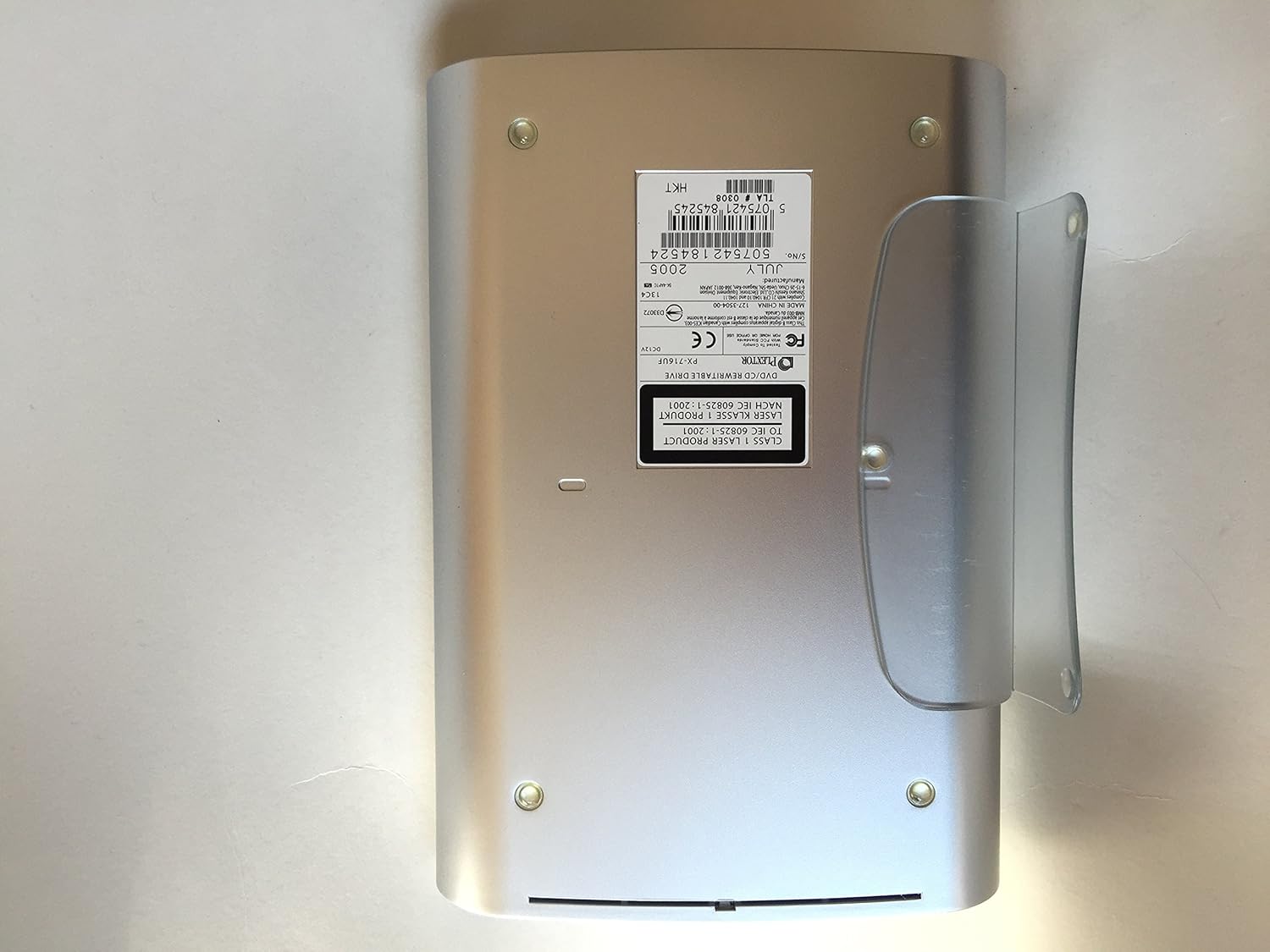
Figure 5: Bottom view of the drive with the vertical stand in place.
5.3 Software Installation
Insert the included software CDs into the drive and follow the on-screen instructions to install the bundled applications. These include Plextools Professional, Roxio Easy Media Creator 7 (for Windows), Dantz Retrospect (trial), and Roxio Toast 6 Lite (for Mac).
6. Operating the Drive
6.1 Inserting and Ejecting Discs
- To Insert: Press the eject button on the front of the drive. The disc tray will open. Place the disc gently onto the tray with the label side facing up. Push the tray back into the drive until it clicks shut.
- To Eject: Press the eject button on the front of the drive, or use the eject command from your operating system's file explorer or burning software.
6.2 Disc Types Supported
The Plextor PX-716UF supports a wide range of optical media:
- DVD-ROM, DVD-R, DVD+R, DVD-RW, DVD+RW, DVD-R DL, DVD+R DL
- CD-ROM, CD-R, CD-RW
6.3 Using Bundled Software
Refer to the individual software manuals or help files for detailed instructions on using Plextools Professional, Roxio Easy Media Creator, Dantz Retrospect, and Roxio Toast Lite for burning, reading, and managing your optical media.
7. Maintenance
7.1 Cleaning the Drive
- Keep the drive's exterior clean with a soft, dry cloth.
- Do not use liquid cleaners or abrasive materials.
- Avoid opening the drive casing. For internal cleaning, consult a qualified technician.
7.2 Disc Care
- Handle discs by their edges to avoid fingerprints and scratches.
- Store discs in their cases when not in use, away from direct sunlight and extreme temperatures.
- Clean dirty discs with a soft, lint-free cloth, wiping from the center outwards.
8. Troubleshooting
This section addresses common issues you might encounter with your PX-716UF drive.
| Problem | Possible Cause | Solution |
|---|---|---|
| Drive not recognized by computer. | Loose cable connection, power off, driver issue, incompatible port. | Ensure power cable is securely connected and drive is powered on. Check USB/FireWire cable connections. Try a different port. Restart computer. For older OS, verify drivers are installed. |
| "Incompatible Media" error during burning. | Disc not supported, low-quality media, media not approved by Plextor. | Use high-quality, reputable brand media. Refer to Plextor's website for a list of approved media. Ensure the disc type matches the operation (e.g., DVD+R for DVD+R burning). |
| Burning process fails or produces errors. | Buffer underrun, dirty/scratched disc, software conflict, media quality. | Ensure no other demanding applications are running during burning. Clean the disc. Try a different brand of media. Update burning software or try Plextools Professional. |
| Disc tray does not open/close. | Mechanical obstruction, power issue. | Check for any physical obstructions. Ensure the drive is powered on. If stuck, locate the emergency eject hole (usually a small pinhole on the front panel) and gently insert a straightened paperclip to manually open the tray. |
9. Specifications
Technical specifications for the Plextor PX-716UF drive:

Figure 6: Bottom label of the drive showing model and serial information.
| Feature | Detail |
|---|---|
| Model Number | PX-716UF/SW |
| Manufacturer | Plextor |
| Optical Storage Write Speed | DVD: 16x (DVD+/-R), 8x (DVD+/-RW, DVD+/-R DL) CD: 48x (CD-R), 24x (CD-RW) |
| Optical Storage Read Speed | DVD: 16x (DVD-ROM), 8x (DVD+/-R, DVD+/-RW, DVD+/-R DL) CD: 48x (CD-ROM, CD-R, CD-RW) |
| Hardware Interface | Hi-Speed USB 2.0, IEEE 1394 (FireWire) |
| Buffer Memory | 8 MB |
| Power Input | DC 12V |
| Dimensions (Approx.) | 12.3 x 10.1 x 5.9 inches (Package Dimensions) |
| Item Weight (Approx.) | 5.5 pounds |
| Special Features | Horizontal Mountable, Vertical Mountable |
| Language Support | English, French |
| Serial Number (Example) | 5075421845245 |
| Manufacturing Year (Example) | 2005 |
10. Warranty and Support
10.1 Warranty Information
The Plextor PX-716UF drive comes with a one-year full warranty covering parts and labor. Please refer to the separate warranty information document included in your product package for complete terms and conditions.
10.2 Technical Support
For additional information, technical assistance, or to download the latest drivers and firmware updates, please visit the official Plextor website:
When contacting support, please have your drive's model number (PX-716UF) and serial number ready.


