1. Introduction
The Irritrol RD600-EXT-R Rain Dial 6 Station Outdoor Irrigation Controller is designed to provide efficient and reliable automatic irrigation for your landscape. This controller features a 6-station capacity, offering flexible programming to meet diverse watering needs.
Key Features:
- Remote control ready, compatible with CRR (Contractor Residential Remote) remote series.
- Rain sensor ready with a sensor bypass switch and dedicated terminal for sensor hookup.
- Three independent programs provide programming flexibility for a wide variety of plant material on the landscape site.
- Water well recovery (delay between stations) option for pump circuit on or off during operation.
2. Safety Information
Always prioritize safety when working with electrical devices. Before performing any installation, maintenance, or troubleshooting, ensure the power to the irrigation controller is completely disconnected at the main circuit breaker panel. Failure to do so may result in electrical shock or damage to the unit.
3. Setup and Installation
3.1. Unboxing and Initial Inspection
Upon opening the package, inspect the controller for any visible damage. The main unit, as shown below, features the control panel and a protective housing.
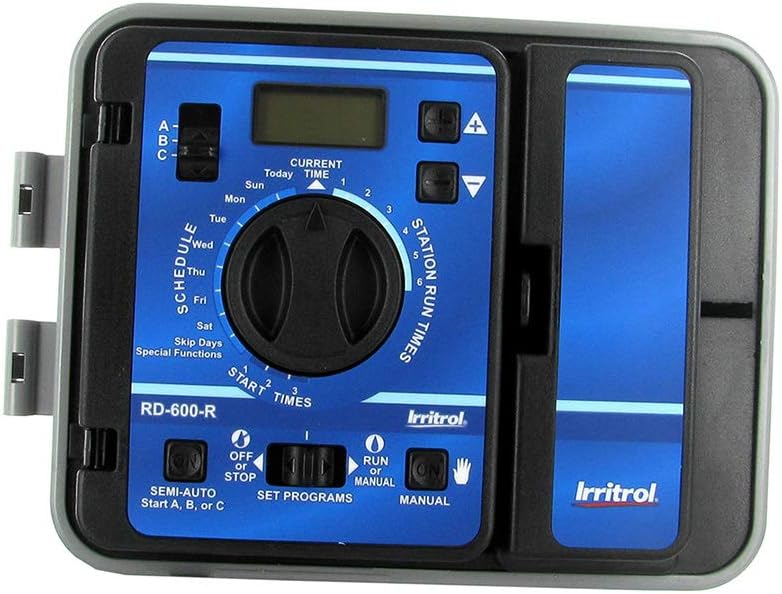
Figure 1: Front view of the Irritrol RD600-EXT-R Rain Dial controller.
3.2. Mounting the Controller
The controller is designed for outdoor installation. Ensure it is mounted in a location protected from direct sunlight and extreme weather conditions. The back of the unit, as depicted, provides mounting points.

Figure 2: Back view of the Irritrol Rain Dial controller.
3.3. Wiring Connections
Access the wiring compartment by opening the controller's front panel. The side view below illustrates the general form factor of the unit.

Figure 3: Side view of the Irritrol Rain Dial controller.
Before making any wiring connections, ensure the main power to the controller is OFF at the circuit breaker. Locate the terminal board inside the controller. There are four Phillips head screws holding the terminal wiring board in place. Use a Phillips head screwdriver to loosen these screws.
Important: Before disconnecting any wires, take a digital photo or clearly label each wire to ensure correct re-installation. This is crucial for proper operation.
Once the terminal board is accessible, disconnect the 24 VAC wires. These wires must be isolated to prevent electrical hazards. You can use electrical tape to cover the copper ends or use electrical nuts for secure isolation. Alternatively, and most safely, turn off the circuit breaker supplying power to the unit before proceeding with any wiring changes.
4. Operating Instructions
4.1. Basic Programming
The Irritrol RD600-EXT-R features three independent programs (A, B, C) allowing for flexible scheduling. Each program can be set with specific start times and watering durations for individual stations. Refer to the quick reference card provided with your unit for detailed programming steps.
4.2. Manual Operation
The controller supports manual operation for individual stations or all programmed stations. Use the manual control options on the dial to initiate watering outside of the programmed schedule.
4.3. Rain Sensor Integration
If a rain sensor is connected, the controller will automatically suspend watering during rainfall. The unit includes a sensor bypass switch, allowing you to override the rain sensor if needed.
5. Maintenance
Regular maintenance ensures the longevity and optimal performance of your irrigation controller. Periodically inspect the internal components for any signs of water damage, corrosion, or loose connections. Keep the unit's exterior clean and free from debris. Ensure the protective housing is securely closed to prevent moisture ingress.
6. Troubleshooting
Common Issues:
- No Power: Check the circuit breaker supplying power to the controller. Verify that the 24 VAC connections are secure and properly isolated.
- Zones Not Watering: Inspect the wiring for the affected zones and ensure they are securely connected to the terminal board. Check the solenoid valves at each zone for proper function.
- Programming Errors: Refer to the detailed programming instructions in the official user guide or the quick reference card to ensure all settings are correctly configured.
7. Specifications
| Attribute | Value |
|---|---|
| Product Dimensions | 7.75 x 4 x 10.75 inches |
| Item Weight | 4 pounds |
| Manufacturer | Irritrol |
| Item Model Number | RD600-EXT-R |
8. Warranty and Support
Irritrol offers various protection plans for your irrigation controller. For detailed warranty information and terms, please refer to the official documentation provided with your product or visit the Irritrol brand page.
An official user guide in PDF format is available for comprehensive instructions and support:


