
1. Introduction
The Hunter ICM-800 is an 8-station expansion module designed to increase the zone capacity of Hunter ICC2 and HCC irrigation controllers. This module allows for quick and efficient system upgrades without the need for specialized tools or complex rewiring. It integrates seamlessly with advanced irrigation technologies like Hydrawise and Solar Sync, providing enhanced control and water management capabilities.
2. Setup and Installation
2.1 Unpacking and Inspection
Carefully remove the ICM-800 module from its packaging. Inspect the module for any signs of damage during transit. If damage is observed, contact your supplier immediately.
2.2 Module Installation
The ICM-800 module is designed for simple plug-in installation. No tools are required for this process.
- Ensure the irrigation controller (ICC2 or HCC) is powered off before beginning installation.
- Locate an available expansion slot within the controller cabinet.
- Align the ICM-800 module with the expansion slot and gently push it into place until it is securely seated.
- Once the module is installed, power on the irrigation controller. The controller should automatically detect the new stations.
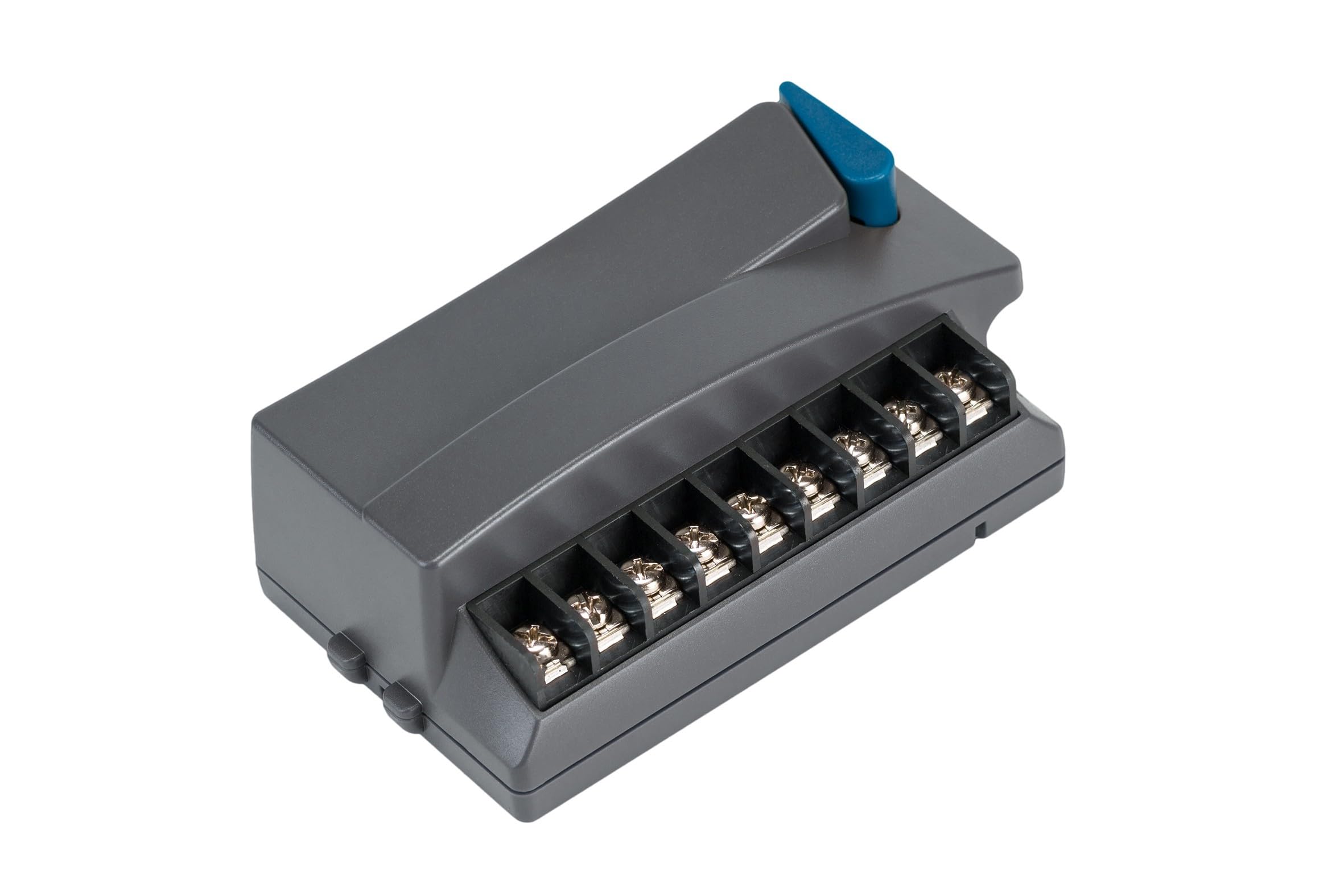
Image: Hunter ICM-800 8 Station Expansion Module installed inside an irrigation controller cabinet. The image shows the module plugged into a slot, with wiring connected to terminals, demonstrating a typical installation within the controller's housing.
2.3 Wiring Connections
Each ICM-800 module includes an independent common terminal. The module delivers 24VAC, 0.56 amps per station, capable of running two Hunter solenoids simultaneously.
- Connect the common wire from your irrigation valves to the common terminal on the ICM-800 module.
- Connect the individual zone wires from your irrigation valves to the corresponding station terminals on the ICM-800 module.
3. Operating the Module
3.1 Basic Operation
The ICM-800 module integrates with your existing ICC2 or HCC controller's interface. You can initiate a one-touch manual start and advance for individual stations or programs directly from the controller.
3.2 Programming Watering Schedules
The controller, with the ICM-800 module, supports flexible programming options:
- Programs: Utilize up to four independent programs.
- Start Times: Each program can have up to eight start times.
- Station Delays: Customize delays between stations for up to 10 hours.
- Rain Delays: Set rain delays for up to seven days.
- Seasonal Adjustments: Adjust watering duration from 10% to 150% for seasonal changes.
3.3 Smart Features Integration
The ICM-800 module is compatible with Hunter's smart irrigation technologies:
- Hydrawise: Integrate with Hydrawise smart irrigation software for remote scheduling, flow monitoring, and weather-based water adjustments.
- Solar Sync: Connect with Solar Sync weather sensors for automatic daily adjustments to watering schedules based on local weather conditions.
- Advanced Control: Supports Centralus cloud control, SRR (Short-Range Remote), and ICR (Long-Range Remote) systems for enhanced management.
- Sensor Inputs: Includes dedicated sensor inputs for Hunter flow and weather sensors.
4. Maintenance
The ICM-800 module is designed for reliable operation with minimal maintenance.
- Memory Backup: The module features built-in memory backup to retain programming in case of power outages.
- Self-Diagnostic Circuit Breaker: A self-diagnostic circuit breaker protects the module from electrical overloads.
- Hunter Quick Check: Utilize the Hunter Quick Check feature on your controller for rapid field troubleshooting of wiring and station issues.
5. Troubleshooting
If you encounter issues with your ICM-800 module or connected stations, consider the following:
- No Station Activation: Verify that the module is securely seated in its slot and that the controller is powered on. Check wiring connections for continuity.
- Controller Not Recognizing Module: Power cycle the controller. If the issue persists, ensure the module is correctly installed and compatible with your controller model (ICC2 or HCC).
- Electrical Issues: The self-diagnostic circuit breaker will trip in case of an overload. Check for short circuits in the wiring to the affected station. Use the Hunter Quick Check feature to identify specific wiring faults.
- Programming Errors: Review your controller's programming for correct start times, run times, and assigned stations.
For further assistance, consult your controller's main instruction manual or contact Hunter Industries technical support.
6. Specifications
| Model Number | ICM-800 |
| Stations | 8 per module |
| Compatibility | Hunter ICC2 and HCC Irrigation Controllers |
| Max Stations (Plastic Cabinet) | 38 |
| Max Stations (Metal Enclosure/Pedestal) | 54 |
| Power Output per Station | 24VAC, 0.56 Amps |
| Common Terminal | Independent per module |
| Product Dimensions | 17.32 x 12.6 x 15 inches |
| Item Weight | 4 ounces |
| Certifications | UL listed, NEMA 3R rated |
7. Warranty and Support
Hunter Industries products are manufactured to high-quality standards. For specific warranty information, please refer to the documentation provided with your main irrigation controller or visit the official Hunter Industries website. For technical support, contact Hunter Industries customer service or your authorized dealer.


