
Shinco SDP1200
Contents
Shinco SDP1200 Portable DVD Player
User Instruction Manual
1. Introduction
This manual provides comprehensive instructions for the safe and efficient operation of your Shinco SDP1200 Portable DVD Player. Please read this manual thoroughly before using the device and retain it for future reference. The Shinco SDP1200 is a versatile portable media player featuring a 10.2-inch TFT-LCD screen, supporting various disc and file formats including DivX, DVD, CD, MP3, and JPEG.
2. Safety Information
- Do not expose the unit to rain or moisture to prevent fire or electric shock.
- Avoid placing the unit near heat sources such as radiators, heat registers, stoves, or other apparatus (including amplifiers) that produce heat.
- Use only attachments/accessories specified by the manufacturer.
- Unplug this unit during lightning storms or when unused for long periods of time.
- Refer all servicing to qualified service personnel. Servicing is required when the unit has been damaged in any way.
- Do not block any ventilation openings. Install in accordance with the manufacturer's instructions.
3. Package Contents
Please check that all the following items are included in your package:
- Shinco SDP1200 Portable DVD Player
- AC Power Adapter
- Rechargeable Lithium-Ion Battery
- Car Cigarette Lighter Adapter
- Audio Cable
- Composite Video Cable
- Progressive Scan Cable
- Stereo In-Ear Earphone
- User Manual (this document)
4. Product Overview
Familiarize yourself with the components of your Shinco SDP1200 Portable DVD Player.
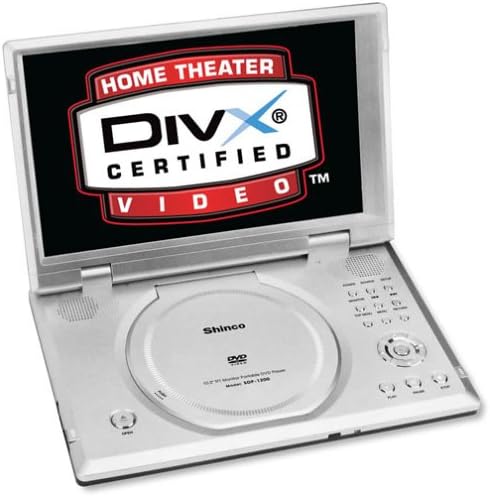
Image: The Shinco SDP1200 Portable DVD Player shown open, revealing the 10.2-inch screen with a "DivX Certified Video" logo, the DVD disc tray labeled "Shinco", and various control buttons on the right side of the base unit.
Key Components:
- 10.2-inch TFT-LCD Screen: For clear video playback.
- DVD/CD Disc Tray: Located on the main unit for disc insertion.
- Control Buttons: Play, Pause, Stop, Fast Forward, Rewind, Menu, Volume, etc., typically located on the right side of the base.
- Integrated Speakers: For audio playback without external devices.
- Input/Output Ports: (Detailed in Specifications section)
5. Setup
5.1 Charging the Battery
Before first use, fully charge the Lithium-Ion battery. Connect the AC Power Adapter to the DC IN port on the player and then to a wall outlet. The charging indicator will illuminate. A full charge provides up to 3 hours of video playback.
5.2 Connecting to External Devices
- Headphones: Insert 3.5mm headphone jacks into the two headphone output ports.
- TV (Composite Video): Use the supplied composite video cable to connect the player's A/V OUT port to the A/V IN ports on your television.
- TV (Progressive Scan): Use the supplied progressive scan cable to connect the player's Progressive Scan OUT port to the corresponding input on your television for higher quality video.
- Audio System (Coaxial Digital Audio): Connect a coaxial digital audio cable from the player's Coaxial Digital Audio OUT port to your home theater system for Dolby Digital or DTS audio.
- External Video Source (Camcorder/Digital Camera): Connect an external video source to the player's video input port for viewing on the player's screen.
6. Operating Instructions
6.1 Basic Playback
- Open the disc tray and carefully place a DVD or CD with the label side facing up.
- Close the disc tray. The player will automatically begin reading the disc.
- Use the Play/Pause, Stop, Fast Forward, and Rewind buttons to control playback.
- Adjust the volume using the dedicated volume controls.
6.2 Supported Formats
The Shinco SDP1200 supports a wide range of formats:
- Video: MPEG-4, DivX 3.11, DivX 4.x Pro, DivX 5.x Pro, Xvid, BivX 2 Tracks, DVD, DVD+R/RW, DVD-R/RW, SVCD, VCD.
- Audio: MP3, WMA, CD, CD-R/RW, Dolby Digital, DTS.
- Image: Kodak Picture CD, JPEG.
6.3 Special Playback Features
- Zoom: Magnify the image by 2x, 3x, 4x, 1/2x, 1/3x, or 1/4x.
- Fast Forward/Rewind: Speeds of 2x, 4x, 8x, 16x, and 32x.
- Slow Motion: Playback at 1/2x, 1/4x, 1/8x, or 1/16x speed.
- Multi-Angle: For DVDs that support it, switch between up to 4 camera angles.
- Program Playback: Create a custom playback order for tracks or chapters.
7. Maintenance
- Cleaning the Unit: Use a soft, dry cloth to clean the exterior of the player. For stubborn stains, dampen the cloth slightly with water. Do not use abrasive cleaners or solvents.
- Cleaning the Disc Tray: Keep the disc tray free of dust and debris. Use a soft brush or compressed air if necessary.
- Disc Care: Handle discs by their edges. Store them in their cases when not in use to prevent scratches. Clean discs with a soft, lint-free cloth, wiping from the center outwards.
- Storage: When not in use for extended periods, store the player in a cool, dry place away from direct sunlight and extreme temperatures.
8. Troubleshooting
| Problem | Possible Cause | Solution |
|---|---|---|
| No power | Battery drained; AC adapter not connected properly. | Charge the battery; ensure AC adapter is securely connected to the player and power outlet. |
| Disc not playing | Disc inserted incorrectly; disc is dirty or scratched; unsupported format. | Reinsert disc label-side up; clean disc; try a different disc; check supported formats. |
| No sound | Volume too low; headphones not connected properly; external audio system issues. | Increase volume; ensure headphones are fully inserted; check connections to external audio system. |
| No picture on external TV | Incorrect cable connection; TV input not selected correctly. | Verify video cable connections; select the correct A/V input on your TV. |
9. Specifications
| Screen Type | 10.2-inch (25.90 cm) TFT-LCD Active Matrix |
| Supported Formats | MPEG-4, DivX 3.11, DivX 4.x Pro, DivX 5.x Pro, Xvid, BivX 2 Tracks, DVD, DVD+R/RW, DVD-R/RW, SVCD, VCD, MP3, WMA, CD, CD-R/RW, Kodak Picture CD, JPEG, Dolby Digital, DTS |
| Headphone Outputs | 2 |
| Video Outputs | 1x Progressive Scan, 1x S-Video, 1x Composite Audio/Video |
| Audio Outputs | 1x Coaxial Digital Audio (Dolby Digital / DTS) |
| Video Input | 1x Switchable Video Input (for camcorders, digital cameras) |
| TV Standards | PAL / NTSC |
| Battery | Rechargeable Lithium-Ion, up to 3 hours video playback |
| Speakers | Integrated |
| Dimensions (W x H x D) | 257 x 170 x 29 mm (10.1 x 6.7 x 1.1 inches) |
| Weight | 1.180 Kg (2.6 lbs) |
10. Warranty and Support
For warranty information and technical support, please refer to the warranty card included with your product or contact your local retailer or authorized service center. Keep your proof of purchase for warranty claims.
Documents and downloads
Ask a question about this manual
Ask about setup, troubleshooting, compatibility, parts, safety, or missing instructions. Manuals+ will review the question and use this page’s manual context to help answer it.