
Important Safeguards
When using electrical appliances, basic safety precautions should always be followed to reduce the risk of fire, electric shock, and/or injury to persons, including the following:
- Read all instructions before using the iron.
- Use the iron only for its intended use.
- To avoid the risk of electric shock, do not immerse the iron in water or other liquids.
- Always turn the iron OFF before plugging or unplugging from the electrical outlet. Never yank cord to disconnect from outlet; instead, grasp plug and pull to disconnect.
- Do not allow cord to touch hot surfaces. Let iron cool completely before putting away. Loop cord loosely around iron when storing.
- Always disconnect iron from electrical outlet when filling with water or emptying, and when not in use.
- Do not operate iron with a damaged cord or if the iron has been dropped or damaged. To avoid the risk of electric shock, do not disassemble the iron.
- Close supervision is necessary for any appliance being used by or near children. Do not leave iron unattended while connected or on an ironing board.
- Burns can occur from touching hot metal parts, hot water, or steam. Use caution when you turn a steam iron upside down – there may be hot water in the reservoir.
- This appliance is not intended for use by persons (including children) with reduced physical, sensory, or mental capabilities, or lack of experience and knowledge, unless they have been given supervision or instruction concerning use of the appliance by a person responsible for their safety.
Product Overview
The Hamilton Beach 14560T Steam Storm Iron is designed to efficiently remove wrinkles from various fabrics. It features a powerful steam blast, vertical steam capability, and a nonstick soleplate for smooth gliding. The iron also includes a self-clean system for easy maintenance and an auto-shut off feature for safety.
Key Features:
- Lightweight design for comfortable handling.
- Vertical steaming for hanging garments.
- Adjustable steam rate to suit different fabric types.
- Auto-shut off for enhanced safety.
- Nonstick soleplate for effortless ironing.
- Self-clean system for prolonged iron life.
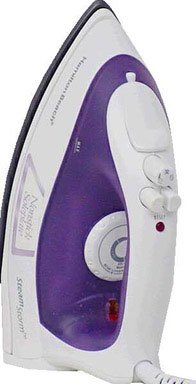
Figure 1: Front view of the Hamilton Beach 14560T Steam Storm Iron, showcasing its ergonomic handle and soleplate.
Setup
Before First Use:
- Remove any labels or protective covers from the soleplate.
- It is recommended to iron an old piece of fabric (e.g., a towel) for a few minutes to remove any manufacturing residues.
Filling the Water Reservoir:
- Ensure the iron is unplugged from the electrical outlet.
- Set the steam control to the "DRY" position.
- Open the water fill cover.
- Using the provided filling cup, pour tap water into the water reservoir up to the "MAX" fill line. Do not overfill.
- Close the water fill cover securely.
Note: For best results and to prolong the life of your iron, use distilled or demineralized water, especially in areas with hard water.
Operating Instructions
Dry Ironing:
- Ensure the water reservoir is empty or the steam control is set to "DRY".
- Plug the iron into a suitable electrical outlet.
- Turn the temperature dial to the desired setting for your fabric type. Refer to garment care labels.
- Allow the iron to heat up until the indicator light turns off, signaling it has reached the set temperature.
- Begin ironing.
Steam Ironing:
- Fill the water reservoir as described in the "Setup" section.
- Plug the iron into a suitable electrical outlet.
- Set the temperature dial to a steam-appropriate setting (usually cotton, linen, or higher). Steam will not be produced at lower temperatures.
- Allow the iron to heat up until the indicator light turns off.
- Adjust the steam control to the desired steam level.
- Begin ironing.
Vertical Steam:
The vertical steam feature is ideal for removing wrinkles from hanging garments, drapes, or upholstery.
- Ensure the water reservoir is filled and the iron is heated to a high temperature setting.
- Hold the iron in a vertical position, a few inches away from the fabric.
- Press the steam burst button repeatedly to release bursts of steam.
Spray Mist:
The spray mist function helps to dampen stubborn wrinkles for easier removal.
- Ensure the water reservoir is filled.
- Point the spray nozzle towards the fabric and press the spray mist button.
Maintenance
Cleaning the Soleplate:
- Ensure the iron is unplugged and completely cool.
- Wipe the soleplate with a damp cloth and a non-abrasive cleaner if necessary.
- Do not use abrasive scouring pads or metal cleaners as these can scratch the nonstick surface.
Self-Clean System:
The self-clean feature helps to flush out mineral deposits from the steam vents.
- Fill the water reservoir to the "MAX" line.
- Plug in the iron and set the temperature dial to the highest setting.
- Allow the iron to heat up until the indicator light turns off.
- Unplug the iron.
- Hold the iron horizontally over a sink.
- Press and hold the self-clean button (if available, otherwise refer to specific model instructions for self-clean activation). Hot water and steam will flush out of the soleplate vents.
- Gently rock the iron back and forth until the reservoir is empty.
- Allow the iron to cool completely before storing.
Storage:
- Ensure the iron is unplugged and completely cool.
- Empty any remaining water from the reservoir.
- Store the iron upright on its heel rest to prevent soleplate damage.
- Wrap the power cord loosely around the cord wrap area (if available) or secure it with a cord strap.
Troubleshooting
| Problem | Possible Cause | Solution |
|---|---|---|
| Iron does not heat up. | Not plugged in; power outlet not working; temperature dial set to OFF or too low; auto-shut off activated. | Ensure iron is securely plugged in. Check power outlet with another appliance. Adjust temperature dial to desired setting. Move iron to reactivate if auto-shut off engaged. |
| No steam or insufficient steam. | Water reservoir empty; temperature too low for steam; steam control set to DRY; steam vents clogged. | Fill water reservoir. Set temperature to a steam-appropriate setting (e.g., Cotton/Linen). Adjust steam control to desired steam level. Perform self-clean cycle to clear vents. |
| Water leaks from soleplate. | Water reservoir overfilled; temperature too low for steam; iron not hot enough before steam function used; iron left horizontal with water. | Do not overfill past MAX line. Allow iron to fully heat up before using steam. Ensure temperature is set high enough for steam. Store iron upright when not in use. |
| Soleplate is sticking or dirty. | Residue from fabric or starch buildup. | Clean soleplate as described in the "Maintenance" section. Avoid ironing over zippers or metal embellishments. |
Specifications
| Feature | Detail |
|---|---|
| Brand | Hamilton Beach |
| Model Number | 14560T |
| Special Features | Auto Shutoff, Vertical Steam |
| Colour | White |
| Wattage | 14560 watts (Note: This wattage seems unusually high for an iron and might be a data entry error. Please refer to the product label for accurate wattage.) |
| Recommended Uses | Vertical Steam |
| Style | Classic |
| Base Material | Ceramic |
| Unit Count | 1 Count |
| Manufacturer | Hamilton Beach |
| UPC / GTIN | 040094145607 |
| Frequency | 50 Hz |
Specifications are subject to change without notice.
Warranty and Support
This product is covered by a limited warranty. For detailed warranty information, please refer to the warranty card included with your purchase or visit the official Hamilton Beach website. For technical support, replacement parts, or service inquiries, please contact Hamilton Beach customer service.
Hamilton Beach Customer Service:
- Website: www.hamiltonbeach.com
- Contact information may vary by region. Please check the website for local support details.