1. Introduction
This manual provides essential information for the safe and effective operation of your Kodak K4500-C+1 Ni-MH Rapid Battery Charger. Please read this manual thoroughly before using the charger and retain it for future reference. This charger is designed to rapidly charge Ni-MH AA batteries.
2. Safety Information
- Read all instructions: Before using the charger, read all instructions and cautionary markings on the charger, batteries, and product using the batteries.
- Use only specified batteries: This charger is designed exclusively for Ni-MH (Nickel-Metal Hydride) AA rechargeable batteries. Do not attempt to charge other types of batteries, such as alkaline, carbon-zinc, or Ni-Cd, as this may cause personal injury or damage to the charger and batteries.
- Indoor use only: Do not expose the charger to rain or moisture. Use it only in dry, indoor conditions.
- Avoid extreme temperatures: Do not operate the charger in direct sunlight or in areas with extremely high or low temperatures.
- Proper ventilation: Ensure adequate ventilation around the charger during operation. Do not cover the charger.
- Unplug when not in use: Disconnect the charger from the power outlet when not in use or before cleaning.
- Do not disassemble: Do not attempt to disassemble or modify the charger. Refer all servicing to qualified service personnel.
- Keep out of reach of children: This appliance is not intended for use by persons (including children) with reduced physical, sensory or mental capabilities, or lack of experience and knowledge, unless they have been given supervision or instruction concerning use of the appliance by a person responsible for their safety.
- Damaged charger/batteries: Do not operate the charger if it has been damaged in any way. Do not charge leaking, corroded, or damaged batteries.
3. Package Contents
Verify that all items are present in your package:
- Kodak K4500-C+1 Ni-MH Rapid Battery Charger
- 2100 mAh Ni-MH AA Battery Pack (2 batteries)
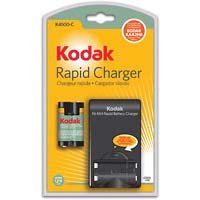
Image 1: Kodak K4500-C+1 Ni-MH Rapid Battery Charger. This image displays the Kodak K4500-C+1 Ni-MH Rapid Battery Charger, a compact black unit designed for charging AA Ni-MH batteries. The charger features a slot for battery insertion and an indicator light. Included with the charger are two AA Ni-MH rechargeable batteries.
4. Setup
- Unpack: Carefully remove the charger and batteries from their packaging.
- Inspect: Check the charger and batteries for any visible damage. Do not use if damaged.
- Placement: Place the charger on a flat, stable, non-flammable surface away from direct sunlight, heat sources, and moisture. Ensure there is adequate ventilation.
- Power Connection: Plug the charger into a standard electrical outlet (refer to specifications for voltage requirements).
5. Operating Instructions
5.1 Charging Batteries
- Insert Batteries: Insert one or two AA Ni-MH rechargeable batteries into the charging slots. Ensure the positive (+) and negative (-) terminals of the batteries align correctly with the markings inside the charger. Incorrect insertion can damage the batteries and charger.
- Charging Indicator: The charger features an indicator light to show the charging status.
- Amber/Red Light: Indicates that batteries are charging.
- Green Light: Indicates that batteries are fully charged.
- Charging Time: The charger is designed for rapid charging. A fully depleted 2100 mAh Ni-MH AA battery pack typically takes approximately 2.5 hours to fully charge. Charging times may vary based on battery capacity and discharge level.
- Remove Batteries: Once the indicator light turns green, the batteries are fully charged. Unplug the charger from the power outlet and carefully remove the charged batteries.
5.2 Battery Refresh Feature
The charger may include a battery refresh feature to optimize battery performance and extend lifespan. Consult the specific product labeling or additional documentation for details on activating and using this feature, if available.
6. Maintenance
6.1 Cleaning
- Always unplug the charger before cleaning.
- Use a soft, dry cloth to wipe the exterior of the charger.
- Do not use liquid cleaners, solvents, or abrasive materials.
- Keep the charging contacts clean and free of dust or debris.
6.2 Storage
- Store the charger and batteries in a cool, dry place away from direct sunlight and extreme temperatures.
- Remove batteries from the charger when storing for extended periods.
7. Troubleshooting
| Problem | Possible Cause | Solution |
|---|---|---|
| Charger indicator light does not turn on. |
|
|
| Batteries do not charge or charge slowly. |
|
|
| Charger or batteries become excessively hot. |
|
|
8. Specifications
- Model: K4500-C+1
- Compatible Battery Types: Ni-MH AA rechargeable batteries
- Input Voltage: 240 Volts (Note: Actual operating voltage may vary by region; check product label for specific input voltage range.)
- Charging Time: Approximately 2.5 hours for 2100 mAh Ni-MH AA batteries
- Product Dimensions: 9.9 x 5.9 x 2.5 inches
- Item Weight: 8.8 ounces
- Manufacturer: Kodak
- Item Model Number: 8065997
9. Warranty and Support
For warranty information, technical support, or service inquiries, please refer to the official Kodak website or contact Kodak customer service directly. Retain your proof of purchase for warranty claims.


