Introduction
This instruction manual provides important information for the safe and efficient operation of your Honeywell HT8002 Twin Pack Turbo High Performance Fan. Please read this manual thoroughly before use and retain it for future reference.
Important Safety Instructions
When using electrical appliances, basic precautions should always be followed to reduce the risk of fire, electric shock, and injury to persons, including the following:
- Read all instructions before using this fan.
- Use this fan only as described in this manual. Other uses not recommended by the manufacturer may cause fire, electric shock, or injury to persons.
- To protect against electrical shock, do not place fan in window, immerse unit, plug or cord in water or spray with liquids.
- Close supervision is necessary when any appliance is used by or near children.
- Unplug fan from outlet when not in use, when moving fan from one location to another, and before cleaning.
- Do not operate any fan with a damaged cord or plug, or after the fan malfunctions or has been dropped or damaged in any manner.
- Do not let cord hang over edge of table or counter, or touch hot surfaces.
- Do not insert or allow fingers or foreign objects to enter any ventilation or exhaust opening as it may cause an electric shock or fire, or damage the fan.
- Do not block air intakes or exhaust in any manner. Do not use on soft surfaces, like a bed, where openings may become blocked.
- Always place fan on a stable, flat, level surface when operating.
- This product is intended for household use ONLY and not for commercial or industrial use.
Package Contents
- 2 x Honeywell HT8002 Turbo High Performance Fans
- Instruction Manual
Product Overview
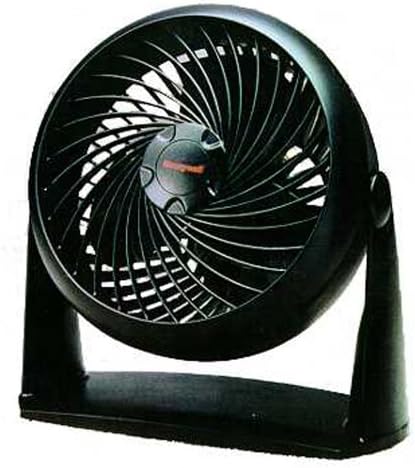
Figure 1: Front view of the Honeywell HT8002 Turbo High Performance Fan. The fan features a black housing, a distinctive turbo grille design, and a central Honeywell logo on the fan hub. It is mounted on a sturdy base, allowing for stable placement on flat surfaces.
The Honeywell HT8002 is a compact, high-performance fan designed for versatile air circulation. Its aerodynamic wind tunnel design and high-intensity max velocity blades provide dynamic power for personal cooling or whole-room air circulation. The fan also includes a wall mount feature for flexible placement.
Setup
- Unpacking: Carefully remove the fan from its packaging. Retain packaging for storage if desired.
- Placement: Place the fan on a firm, level surface. Ensure there is adequate space around the fan for proper air intake and exhaust.
- Wall Mounting (Optional): The fan features a wall mount option. Locate the keyhole slots on the base of the fan. Use appropriate screws (not included) to secure the fan to a wall stud or use suitable wall anchors. Ensure the fan is securely mounted before operation.
- Power Connection: Plug the fan's power cord into a standard 120V AC electrical outlet.
Operating Instructions
- Power On/Off: Locate the control buttons on the fan. Press the power button to turn the fan on. Press it again to turn the fan off.
- Adjusting Fan Speed: The fan features a 3-speed motor. Use the speed control buttons to select your desired airflow: Low, Medium, or High.
- Adjusting Fan Angle: The fan head can be manually tilted to direct airflow upwards or downwards. Gently adjust the fan head to the desired angle.
- Oscillation: The fan oscillates at 90 degrees for full room air circulation. Locate the oscillation button (if present, otherwise assume automatic or manual swivel). Press to activate or deactivate oscillation.
Maintenance
Regular cleaning will help maintain the fan's performance and extend its lifespan.
- Before Cleaning: Always unplug the fan from the electrical outlet before cleaning.
- Cleaning the Exterior: Use a soft, damp cloth to wipe the exterior surfaces of the fan. Do not use abrasive cleaners or solvents.
- Cleaning the Grille and Blades: Use a vacuum cleaner with a brush attachment to remove dust and debris from the front grille and fan blades. Do not attempt to disassemble the fan for cleaning the blades.
- Storage: When not in use for extended periods, store the fan in a cool, dry place, preferably in its original packaging.
Troubleshooting
| Problem | Possible Cause | Solution |
|---|---|---|
| Fan does not turn on. | No power to the unit. | Ensure the fan is securely plugged into a working electrical outlet. Check the circuit breaker. |
| Reduced airflow. | Dust accumulation on grille or blades. | Unplug the fan and clean the grilles and blades as described in the Maintenance section. |
| Fan makes unusual noise. | Fan not on a level surface; foreign object in fan. | Place fan on a stable, level surface. Unplug and inspect for any foreign objects. If noise persists, discontinue use and contact customer support. |
Specifications
- Model: HT8002
- Brand: Honeywell
- Color: Black
- Electric Fan Design: Table Fan
- Power Source: Corded Electric
- Number of Speeds: 3
- Special Feature: Oscillating, Wall Mount
- Product Dimensions: 13.07 x 11.77 x 11.6 inches
- Item Weight: 8 Pounds
- Manufacturer: Kaz
- UPC: 092926342111
Warranty Information
This product comes with a 5-year limited warranty. For detailed warranty terms and conditions, please refer to the warranty card included with your product or contact Honeywell customer support.
Customer Support
For assistance with your Honeywell HT8002 fan, please visit the official Honeywell website or contact their customer service department. Please have your model number (HT8002) and proof of purchase available when contacting support.
Online Support: www.honeywell.com


