
1. Introduction
This manual provides detailed instructions for the proper installation, operation, and maintenance of your Lanzar RBHTG414 Heritage 600 Watt 4-Channel MOSFET Amplifier. To ensure optimal performance and safety, please read this manual thoroughly before attempting to install or operate the amplifier. Keep this manual for future reference.
2. Safety Instructions
Always observe the following safety precautions during installation and operation:
- Disconnect the vehicle's negative battery terminal before beginning any installation work to prevent electrical shorts.
- Ensure all wiring is properly routed and secured to prevent damage from sharp edges or moving parts.
- Use appropriate gauge wiring for power and ground connections as specified in the installation section.
- Install the amplifier in a location that allows for adequate ventilation to prevent overheating.
- Avoid mounting the amplifier in areas exposed to moisture or excessive vibration.
- Do not attempt to repair or modify the amplifier yourself. Refer all servicing to qualified personnel.
3. Product Overview
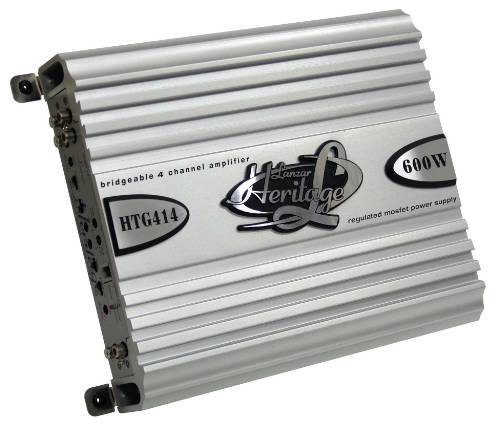
The Lanzar RBHTG414 Heritage amplifier is a 600 Watt, 4-channel MOSFET amplifier designed to deliver powerful and clear audio performance for your car audio system. It features a regulated MOSFET power supply and is bridgeable, offering flexible configuration options for various speaker setups.
4. Setup and Installation
Proper installation is crucial for the performance and longevity of your amplifier. The Lanzar RBHTG414 is designed for surface mounting.
4.1 Pre-Installation Checklist
- Ensure you have all necessary tools and wiring kits (power wire, ground wire, remote turn-on wire, RCA cables, speaker wire, fuses, terminals).
- Choose a mounting location that is dry, well-ventilated, and secure.
- Plan your wiring routes to avoid interference and potential damage.
4.2 Wiring Connections
The following outlines general wiring procedures. Consult a professional installer if you are unsure about any steps.
- Power Connection (BATT+): Connect a heavy-gauge power cable (e.g., 8-gauge or 4-gauge depending on total system power) directly from the vehicle's positive battery terminal to the amplifier's BATT+ terminal. Install an in-line fuse holder within 18 inches (45 cm) of the battery.
- Ground Connection (GND): Connect a heavy-gauge ground cable of the same length as the power cable from the amplifier's GND terminal to a clean, unpainted metal surface on the vehicle's chassis. Ensure a solid, low-resistance connection.
- Remote Turn-On (REM): Connect a smaller gauge wire (e.g., 18-gauge) from the amplifier's REM terminal to the remote turn-on output of your head unit. This wire signals the amplifier to turn on and off with your car's audio system.
- RCA Input Connections: Connect RCA audio cables from your head unit's pre-amp outputs to the amplifier's RCA input jacks. For 4-channel operation, use two pairs of RCA cables (Front L/R, Rear L/R).
- Speaker Connections: Connect your speakers to the amplifier's speaker output terminals.
- 4-Channel Stereo Mode: Connect each speaker to its corresponding channel output (e.g., Front Left speaker to CH1+, CH1-, Front Right to CH2+, CH2-, etc.).
- Bridged Mode (2-Channel): For higher power output to subwoofers or a pair of speakers, the RBHTG414 can be bridged. Refer to the amplifier's terminal markings for specific bridged connection points (typically CH1+ and CH2- for one bridged channel, and CH3+ and CH4- for the second). Ensure your speakers are rated for the increased power output in bridged mode.
4.3 Mounting
Securely mount the amplifier to a solid surface using appropriate screws. Ensure there is sufficient space around the amplifier for air circulation, especially around the heat sink fins, to prevent thermal shutdown.
5. Operating Instructions
Once installed, the amplifier will turn on automatically with your head unit. Adjustments should be made carefully to achieve optimal sound quality.
- Gain Control: The gain control matches the amplifier's input sensitivity to the output level of your head unit. Start with the gain set to minimum, then slowly increase it until you hear distortion, then back off slightly. This is not a volume control.
- Crossover Settings: If your amplifier includes crossover controls (e.g., High-Pass Filter (HPF), Low-Pass Filter (LPF)), adjust them according to your speaker type. HPF is used for full-range speakers to block low frequencies, while LPF is used for subwoofers to block high frequencies.
- Bass Boost: Use the bass boost feature sparingly, if available, as excessive boosting can lead to distortion and potential speaker damage.
6. Maintenance
Regular maintenance helps ensure the longevity and performance of your amplifier.
- Cleaning: Periodically clean the amplifier's exterior with a soft, dry cloth. Ensure the heat sink fins are free of dust and debris to maintain proper cooling.
- Connections: Occasionally check all wiring connections for tightness and corrosion. Loose connections can cause poor performance or damage.
- Ventilation: Ensure that the amplifier's mounting location remains clear of obstructions that could impede airflow.
7. Troubleshooting
If you experience issues with your amplifier, refer to the following common problems and solutions before seeking professional service.
| Problem | Possible Cause | Solution |
|---|---|---|
| Amplifier does not turn on | Blown fuse; loose power/ground/remote wire; no power from head unit remote output. | Check in-line fuse and amplifier fuses; verify all power, ground, and remote connections are secure; test remote wire for 12V when head unit is on. |
| No sound output | Loose RCA cables; incorrect gain setting; speaker wires disconnected; amplifier in protect mode. | Check RCA connections at both amplifier and head unit; ensure gain is set correctly; verify speaker wire connections; check for protect light indicator. |
| Distorted sound | Gain set too high; improper crossover settings; damaged speaker; poor ground connection. | Reduce gain setting; adjust crossover filters; inspect speakers for damage; ensure ground connection is solid. |
| Amplifier overheats | Insufficient ventilation; impedance mismatch; prolonged high-power operation. | Ensure adequate airflow around the amplifier; verify speaker impedance matches amplifier's rating; reduce volume or operating time. |
8. Specifications
The following are key specifications for the Lanzar RBHTG414 Heritage Amplifier:
- Brand: Lanzar
- Model Number: RBHTG414
- Number of Channels: 4
- Power Output: 600 Watts (Peak)
- Amplifier Class: MOSFET
- Mounting Type: Surface Mount
- Product Dimensions (L x W x H): 2 x 2 x 2 inches
- Item Weight: 10.89 pounds
- UPC: 068888725088
- Color: BLACK (Unit shown in image is silver, but product data indicates BLACK)
9. Warranty and Support
Lanzar products are designed for reliability and performance. For information regarding warranty coverage, technical support, or service, please refer to the warranty card included with your product or visit the official Lanzar website. Please have your model number (RBHTG414) and purchase information ready when contacting support.


