
Introduction
This manual provides essential information for the proper use and maintenance of your Olympus VN-480PC Digital Voice Recorder. Please read this manual thoroughly before using the device to ensure optimal performance and longevity. The Olympus VN-480PC is designed for clear audio recording and playback, featuring a built-in speaker and USB connectivity for easy file transfer.
Setup
1. Battery Installation
The Olympus VN-480PC requires two AAA batteries for operation. Follow these steps to install them:
- Locate the battery compartment cover on the back of the device.
- Slide the cover in the direction indicated by the arrow to open it.
- Insert two AAA batteries, ensuring the positive (+) and negative (-) terminals align correctly with the markings inside the compartment.
- Close the battery compartment cover by sliding it back until it clicks into place.
2. Initial Power On
After installing the batteries, press and hold the PLAY button to turn on the device. The LCD screen will illuminate, indicating the device is ready for use.
Operating Instructions
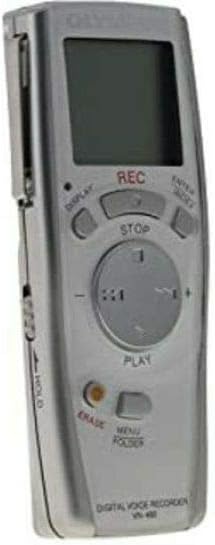
Figure 1: Front view of the Olympus VN-480PC Digital Voice Recorder, highlighting the LCD display, REC, STOP, PLAY, and navigation buttons.
Recording Audio
- To begin recording, press the REC button. The recording indicator will light up, and the recording time will start counting on the LCD.
- Speak clearly into the built-in microphone. Ensure the microphone is not obstructed.
- To pause recording, press the REC button again. Press it once more to resume.
- To stop recording, press the STOP button. The recorded file will be saved automatically.
Playing Back Recordings
- Press the PLAY button to start playback of the current or last recorded file.
- Use the FORWARD (fast forward) and REWIND (rewind) buttons to navigate through files or fast forward/rewind within a file.
- Adjust the volume using the + and - buttons on the navigation pad.
- To stop playback, press the STOP button.
Managing Files
- Erasing Files: Select the file you wish to erase, then press the ERASE button. Confirm the deletion when prompted.
- Connecting to PC: Use a USB cable (not included) to connect the device to your computer. The device will appear as a removable storage drive, allowing you to transfer files.
Maintenance
- Cleaning: Wipe the device with a soft, dry cloth. Do not use liquid cleaners or solvents.
- Battery Care: Remove batteries if the device will not be used for an extended period to prevent leakage. Use only the specified type of batteries (AAA).
- Storage: Store the device in a cool, dry place away from direct sunlight and extreme temperatures.
Troubleshooting
If you encounter issues with your Olympus VN-480PC, refer to the following common problems and solutions:
- Device does not power on:
- Check if the batteries are inserted correctly with the correct polarity.
- Replace old or depleted batteries with new ones.
- Ensure the HOLD switch (if present, typically on the side) is not engaged.
- Poor recording quality:
- Ensure the microphone is not covered or obstructed.
- Record in a quiet environment to minimize background noise.
- Check the recording level settings (if adjustable).
- No sound during playback:
- Increase the volume using the '+' button.
- Ensure headphones are properly connected if using them.
- Verify that a recording exists and is not corrupted.
- Cannot connect to PC:
- Ensure the USB cable is securely connected to both the device and the computer.
- Try a different USB port on your computer.
- Restart your computer and the voice recorder.
Specifications
| Feature | Specification |
|---|---|
| Brand | Olympus |
| Model Number | 141725 |
| Dimensions (L x W x H) | 9.9 x 3.9 x 2.15 cm |
| Weight | 68 grams |
| Power Source | 2 x AAA Batteries |
| Hardware Interface | USB |
| Microphone Form Factor | Integrated |
| Microphone Operating Mode | Mono |
| Digital Recording Time | 7.5 hours |
| Screen Size | 1.54 Inches |
| Built-in Speaker | Yes |
Warranty and Support
For warranty information and technical support, please refer to the official Olympus website or contact their customer service department. Keep your proof of purchase for warranty claims.
For further assistance, you may visit the Olympus Global Website.