
1. Introduction
This manual provides essential information for the safe operation, setup, maintenance, and troubleshooting of your DEWALT DW840 7-Inch Corded Angle Grinder. Please read and understand all instructions before using the tool. Proper use and adherence to safety guidelines will ensure optimal performance and user safety.
2. Safety Instructions
Always follow basic safety precautions to reduce the risk of fire, electric shock, and personal injury.
- Wear Eye Protection: Always wear safety goggles or safety glasses with side shields.
- Wear Hearing Protection: Use earplugs or earmuffs during operation.
- Wear Respiratory Protection: Use a dust mask or respirator, especially when grinding materials that produce fine dust.
- Secure Workpiece: Always clamp or otherwise secure the workpiece to prevent movement during operation.
- Maintain a Firm Grip: Hold the grinder firmly with both hands during operation.
- Keep Work Area Clean: Cluttered areas invite accidents.
- Avoid Accidental Starting: Ensure the switch is in the OFF position before plugging in the tool.
- Inspect Tool Before Use: Check for damaged parts, misalignment, or any condition that may affect operation.
- Use Correct Accessories: Only use accessories specifically designed for this grinder and rated for its speed.
- Disconnect Power: Always disconnect the tool from the power source before making any adjustments, changing accessories, or performing maintenance.
3. Package Contents
Verify that all items are present upon unpacking your DEWALT DW840 Angle Grinder:
- DEWALT DW840 Angle Grinder
- 7-inch Grinding Wheel
- 7-inch Type 27 Guard
- Side Handle
- Hex Key
- Inner Flange
- Outer Flange
4. Product Features
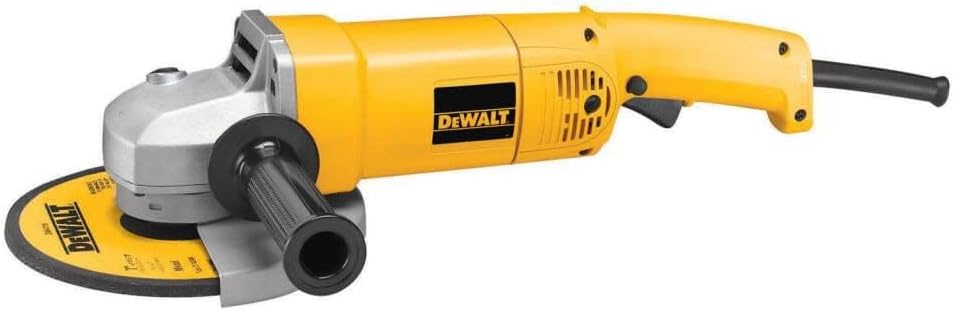
The DEWALT DW840 Angle Grinder is engineered for demanding grinding and cutting tasks:
- Powerful 13 Amp Motor: Delivers robust performance for various applications.
- High Speed Operation: Achieves up to 8,000 RPM for efficient material removal.
- Adjustable Type 27 Guard: Allows redirection of sparks away from the user for enhanced safety.
- Spindle Lock Button: Facilitates quick and easy wheel changes with a single wrench.
- AC/DC Compatibility: Operates on both AC and DC power sources for versatility.
- Dust Ejection System: Designed to protect internal components from harmful dust and debris.
- Two-Position Side Handle: Provides optimal control and comfort for various working angles.
5. Setup
Follow these steps to prepare your angle grinder for use:
- Install Side Handle: Thread the side handle into either of the two threaded holes on the gear case, depending on your preferred working position. Tighten securely.
- Attach Guard: Position the 7-inch Type 27 guard over the spindle housing. Ensure it is oriented to deflect sparks away from you. Tighten the guard clamp screw with the hex key provided.
- Mount Grinding Wheel:
- Place the inner flange onto the spindle.
- Place the grinding wheel onto the spindle, ensuring it sits flush against the inner flange.
- Thread the outer flange onto the spindle and tighten it by hand.
- Press the spindle lock button and use the provided wrench to firmly tighten the outer flange. Release the spindle lock.
6. Operating Instructions
Always ensure you are wearing appropriate personal protective equipment (PPE) before operating the grinder.
- Power Connection: Plug the grinder into a suitable 120V AC or DC power outlet. Ensure the switch is in the OFF position before plugging in.
- Starting the Grinder: Depress the trigger switch to start the grinder. For continuous operation, engage the lock-on button (if present) after depressing the trigger.
- Grinding Technique:
- Allow the wheel to reach full speed before contacting the workpiece.
- Apply light, even pressure. Do not force the tool.
- Maintain a slight angle between the grinding wheel and the workpiece (typically 15-30 degrees for grinding).
- Move the grinder smoothly across the surface to ensure even material removal and prevent gouging.
- Cutting Technique (with appropriate cutting wheel and guard):
- Ensure a cutting-specific guard is installed.
- Hold the grinder at a 90-degree angle to the workpiece for straight cuts.
- Apply minimal pressure, allowing the wheel to do the work.
- Avoid twisting or binding the wheel in the cut.
- Stopping the Grinder: Release the trigger switch. If the lock-on button was engaged, press and release the trigger to disengage it. Wait for the wheel to come to a complete stop before setting the tool down.

7. Maintenance
Regular maintenance ensures the longevity and safe operation of your grinder.
- Cleaning: Regularly clean the tool's ventilation openings to prevent overheating. Use compressed air to clear dust from the motor housing.
- Brush Inspection: The DW840 features external brush doors for easy access. Inspect carbon brushes periodically for wear. Replace both brushes when either is worn down to approximately 1/4 inch (6mm).
- Cord Inspection: Check the power cord for any damage, cuts, or fraying. Replace a damaged cord immediately.
- Accessory Inspection: Before each use, inspect grinding and cutting wheels for cracks, chips, or excessive wear. Replace damaged or worn accessories.
- Lubrication: This tool is factory lubricated and does not require additional lubrication.
- Storage: Store the grinder in a dry, secure location out of reach of children.
8. Troubleshooting
Refer to the table below for common issues and their solutions.
| Problem | Possible Cause | Solution |
|---|---|---|
| Grinder does not start | No power supply Faulty switch Worn carbon brushes | Check power outlet and cord Contact authorized service center Replace carbon brushes |
| Excessive vibration | Damaged or unbalanced wheel Loose flanges Internal component issue | Replace wheel Tighten flanges securely Contact authorized service center |
| Overheating | Blocked air vents Overloading the tool | Clean air vents Reduce pressure and allow tool to cool |
| Sparks directed towards user | Guard improperly positioned | Adjust guard to deflect sparks away from user |
9. Specifications
Technical data for the DEWALT DW840 Angle Grinder:
| Specification | Value |
|---|---|
| Model Number | DW840 |
| Power Source | Corded Electric |
| Voltage | 120V AC/DC |
| Amperage | 13 Amps |
| Wattage | 1560 Watts |
| Maximum Rotational Speed | 8,000 RPM |
| Wheel Diameter | 7 inches (180mm) |
| Horsepower | 3.02 HP |
| Item Weight | 12.05 Pounds (5.47 kg) |
| Product Dimensions (L x W x H) | 21.6" x 9.1" x 4.4" (54.9cm x 23.1cm x 11.2cm) |
| Material | Blend (Plastic/Metal) |
10. Warranty and Support
DEWALT provides a manufacturer's warranty for this product. For specific warranty terms, conditions, and duration, please refer to the warranty card included with your purchase or visit the official DEWALT website. For technical assistance, service, or to locate an authorized service center, please contact DEWALT customer support through their official channels.
Online Support: www.dewalt.com/support


