
1. Introduction
Thank you for purchasing the jWIN JXM20BLK PLL Digital Tuning AM/FM Pocket Radio and Alarm Clock. This manual provides detailed instructions for the safe and efficient use of your device. Please read this manual thoroughly before operation and retain it for future reference.
2. Product Overview
The jWIN JXM20BLK is a compact and portable radio featuring PLL digital tuning for precise station reception, an integrated alarm clock, and built-in speakers. It is designed for convenience and clear audio performance.
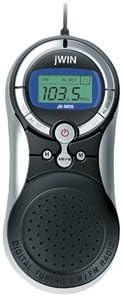
Figure 1: Front view of the jWIN JXM20BLK pocket radio, displaying its digital screen, control buttons, and integrated speaker. The screen shows '103.5 FM'.
Key Features:
- PLL Digital Tuning AM/FM Radio
- 20 preset memory (10 AM / 10 FM)
- Integrated Alarm Clock function
- X-BBS (Extra Bass Boost System) function button
- Tuner LED indicator and real-time clock display
- Built-in Hi-fi Speakers
- Compact and portable design
3. Setup
Battery Installation:
- Locate the battery compartment cover on the back of the unit.
- Slide or unclip the cover to open the compartment.
- Insert two (2) AA batteries (not included) according to the polarity indicators (+ and -) inside the compartment.
- Replace the battery compartment cover, ensuring it clicks securely into place.
Note: Ensure batteries are inserted correctly. Incorrect insertion can damage the device. Do not mix old and new batteries, or different types of batteries.
4. Operating Instructions
Power On/Off:
- Press the POWER button (often marked with a circle and vertical line symbol) to turn the radio on or off.
Radio Tuning (AM/FM):
- With the radio powered on, press the AM/FM button to select the desired band.
- Use the TUNE + or TUNE - buttons to manually adjust the frequency.
- To auto-scan for stations, press and hold the TUNE + or TUNE - button for a few seconds. The radio will stop at the next strong signal.
Setting and Recalling Presets:
- Tune to the desired station using the tuning method above.
- Press the MEM (Memory) button. The preset number will flash on the display.
- Use the TUNE + or TUNE - buttons to select the desired preset number (P01-P10 for each band).
- Press the MEM button again to confirm and save the station to the selected preset.
- To recall a preset station, press the M+ or M- buttons to cycle through your saved stations.
Setting the Alarm Clock:
Refer to the specific instructions provided with your unit for detailed alarm setting procedures, as button labels may vary slightly. Generally, this involves:
- Pressing an ALARM SET button.
- Using HOUR and MINUTE buttons (or tuning buttons) to set the desired alarm time.
- Confirming the setting, and selecting the alarm source (e.g., buzzer or radio).
X-BBS Function:
- Press the X-BBS button to activate or deactivate the Extra Bass Boost System for enhanced low-frequency audio.
Clock Display:
- The digital display shows the real-time clock when the radio is off, or can be toggled to show the time while the radio is on, depending on the model's specific controls.
5. Maintenance
- Cleaning: Use a soft, dry cloth to clean the exterior of the radio. Do not use liquid cleaners or abrasive materials.
- Battery Care: Remove batteries if the unit will not be used for an extended period to prevent leakage and damage.
- Storage: Store the radio in a cool, dry place away from direct sunlight and extreme temperatures.
- Water Exposure: This device is not waterproof. Avoid exposure to water or high humidity.
6. Troubleshooting
| Problem | Possible Cause | Solution |
|---|---|---|
| No power | Batteries are dead or incorrectly inserted. | Replace batteries with new AA batteries, ensuring correct polarity. |
| Poor radio reception | Weak signal; antenna not extended; interference. | Extend the telescopic antenna fully. Move the radio to a different location. Avoid placing near electronic devices that may cause interference. |
| Alarm does not sound | Alarm not set correctly; volume too low. | Verify alarm time and activation. Increase volume. |
| Display is blank or flickering | Low battery power. | Replace batteries. |
7. Specifications
- Model: JXM20BLK
- Power Source: 2 x AA Batteries (not included)
- Tuner Type: PLL Digital Tuning
- Radio Bands: AM/FM (2-Band)
- Preset Memory: 20 (10 AM, 10 FM)
- Special Features: Alarm Clock, X-BBS Function, Real-time Clock Display
- Connectivity Technology: USB (Note: Functionality may vary; typically for charging or data transfer if applicable)
- Dimensions (approx.): 4.29 x 25.81 x 17.78 cm
- Weight (approx.): 136 g (without batteries)
- Material: Graphite
8. Warranty and Support
jWIN products are designed for reliability and performance. For information regarding warranty coverage, technical support, or service inquiries, please refer to the warranty card included with your purchase or visit the official jWIN website. Please have your model number (JXM20BLK) and purchase date available when contacting support.
This manual is subject to change without notice.


