
1. Introduction
This manual provides detailed instructions for the safe and effective operation of your Flashpoint 1220M 600 Watt AC/DC Monolight Strobe. The Flashpoint 1220M is a professional-grade lighting unit designed for consistent, high-quality illumination in various photography settings, including studio and on-location shoots. Please read this manual thoroughly before using the product to ensure proper function and longevity.
2. Safety Information
WARNING: To prevent fire or electric shock, do not expose this appliance to rain or moisture. Do not open the casing. Refer servicing to qualified personnel only.
- Always ensure the power switch is in the OFF position before connecting or disconnecting the power cord.
- Use only the specified power cords and accessories.
- Do not operate the unit if it has been dropped or damaged.
- Keep the unit away from water and other liquids.
- Ensure adequate ventilation around the unit during operation to prevent overheating.
- The flash tube and modeling lamp can become very hot during use. Allow them to cool before handling.
- Avoid direct eye exposure to the flash.
- When changing from higher to lower power settings, the unit performs an auto-discharge. This is normal.
- Always select the correct power source (AC or DC) using the switch on the control panel before connecting power.
3. Package Contents
Verify that all items are present in your package:
- Flashpoint 1220M Monolight
- Power Cord
- Sync Cord
- Flashtube Transport Cover
- Carry Case (as depicted in image)

Figure 3.1: Flashpoint branded carry case for the monolight and accessories.
4. Product Overview
The Flashpoint 1220M is a powerful 600 Watt-second (WS) AC/DC monolight strobe, designed for versatility and performance. It features a robust build and intuitive controls for various photographic applications.
4.1 Key Features
- 600 WS Output: Provides ample illumination for diverse photography needs.
- Rapid Recycle Times: Under 2 seconds on AC power and under 3.5 seconds on DC battery.
- Consistent Color Temperature: Stable 5600K for accurate color reproduction.
- Optimized Flash Duration: 1/1500 to 1/800 sec for freezing motion.
- Variable Power Setting: From 1/32 to full output.
- 250-Watt Modeling Lamp: Can be linked to power settings.
- Built-in Optical Slave: For wireless triggering.
- Self-Bleed Circuitry: Ensures smooth power adjustments.
- Visual and Switchable Audio Verification: For recycle signals.
- Replaceable Flash Tube: For extended product life.
4.2 Component Identification

Figure 4.1: Front-side view of the Flashpoint 1220M Monolight with standard reflector attached. This image shows the main body, handle, mounting bracket, and the reflector with the modeling lamp visible inside.
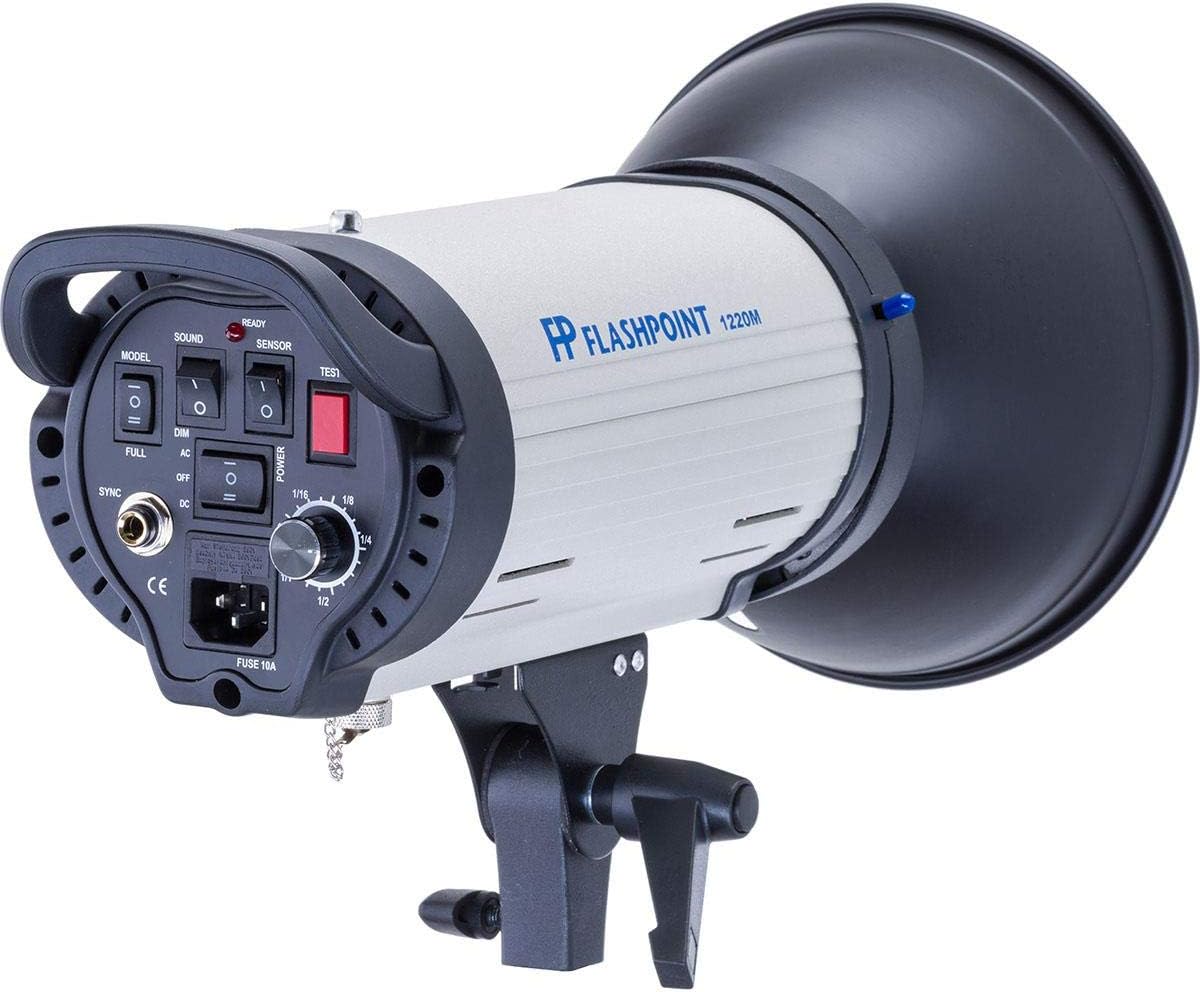
Figure 4.2: Rear control panel of the Flashpoint 1220M Monolight. This panel includes switches for MODEL, SOUND, SENSOR, and POWER, a TEST button, a power adjustment dial, SYNC port, AC/DC power selection switch, and the main power input with fuse.
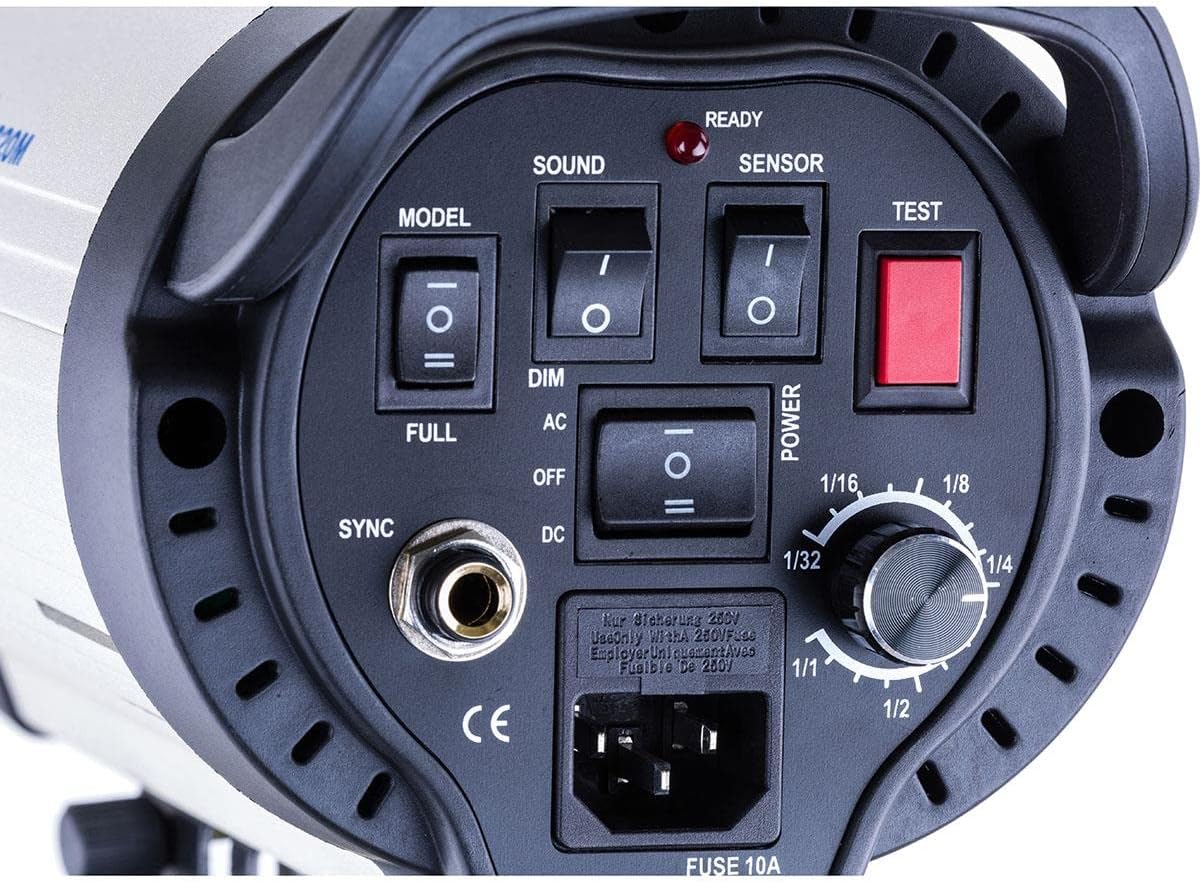
Figure 4.3: Close-up view of the Flashpoint 1220M Monolight's flash tube and modeling lamp assembly, located within the reflector. This shows the clear flash tube and the incandescent modeling lamp bulb.
5. Setup
5.1 Mounting the Monolight
- Attach the monolight to a sturdy light stand using the integrated mounting bracket. Ensure the bracket is securely tightened.
- Adjust the tilt angle of the monolight as needed and lock it in place.
5.2 Power Connection
- Ensure the monolight's main power switch is in the OFF position.
- Locate the AC/DC switch on the rear control panel (Figure 4.2).
- For AC Power: Set the switch to 'AC'. Connect the provided power cord to the monolight's AC input and then to a suitable wall outlet.
- For DC Power: Set the switch to 'DC'. Connect the appropriate DC power source (e.g., Flashpoint M Battery PowerPack, sold separately) to the DC input port.
- Once connected, you may switch the main power to ON.
6. Operating Instructions
6.1 Power Adjustment
- Turn the POWER adjustment dial (Figure 4.2) to select the desired flash output. The power is continuously variable from 1/32 to full power.
- When reducing power, the unit will automatically discharge excess energy. This is indicated by a brief flash.
6.2 Modeling Lamp
- The 250-watt modeling lamp assists in visualizing lighting effects.
- Use the MODEL switch (Figure 4.2) to select:
- FULL: Modeling lamp operates at full brightness.
- DIM: Modeling lamp brightness is linked to the flash power setting.
- OFF: Modeling lamp is off.
6.3 Triggering the Flash
- Test Button: Press the red TEST button (Figure 4.2) to manually fire the flash.
- Sync Cord: Connect a sync cord from your camera or trigger to the SYNC port (Figure 4.2) on the monolight.
- Optical Slave: Activate the SENSOR switch (Figure 4.2) to enable the built-in optical slave. The monolight will fire when it detects a flash from another strobe or camera's built-in flash.
6.4 Audio and Visual Indicators
- The READY indicator light (Figure 4.2) illuminates when the unit is fully recycled and ready to fire.
- The SOUND switch (Figure 4.2) enables or disables an audible beep to indicate when the unit has recycled.
7. Maintenance
7.1 Cleaning
- Ensure the unit is powered off and unplugged before cleaning.
- Use a soft, dry cloth to wipe the exterior of the monolight.
- For the flash tube and modeling lamp, use a clean, lint-free cloth, possibly dampened with a small amount of glass cleaner, then wipe dry. Avoid touching the flash tube directly with bare hands as oils can reduce its lifespan.
7.2 Flash Tube Replacement
The Flashpoint 1220M features a replaceable flash tube. If the flash tube fails or its performance degrades, it can be replaced by a qualified technician or by following these steps carefully:
- Power Off and Unplug: Absolutely ensure the monolight is turned off and unplugged from all power sources. Allow several minutes for any residual charge to dissipate.
- Remove Reflector: Carefully remove any attached reflector or light modifier.
- Access Flash Tube: The flash tube is typically held in place by small clips or screws. Refer to Figure 4.3 for the location of the flash tube.
- Remove Old Tube: Gently unclip or unscrew the old flash tube and carefully pull it straight out from its socket. Avoid touching the glass part of the tube.
- Install New Tube: Holding the new flash tube by its base, align the pins with the socket and push it firmly into place until it clicks or is secured.
- Reassemble: Reattach any clips or screws, and then re-mount the reflector.
- Test: Connect power and perform a test flash to ensure proper operation.
Note: If you are unsure about replacing the flash tube, contact Flashpoint customer support or a qualified service center.
8. Troubleshooting
| Problem | Possible Cause | Solution |
|---|---|---|
| Monolight does not power on. |
|
|
| Flash does not fire. |
|
|
| Modeling lamp not working. |
|
|
| Unit overheats. |
|
|
9. Specifications
| Feature | Detail |
|---|---|
| Model | 1220M |
| Flash Output | 600 Watt Seconds (WS) |
| Power Adjustment | 1/32 to Full Power (Variable) |
| Guide Number | 230 (ISO100/ft) |
| Recycle Time (AC) | Under 2 seconds |
| Recycle Time (DC) | Under 3.5 seconds |
| Flash Duration | 1/1500 to 1/800 seconds |
| Color Temperature | 5600K |
| Modeling Lamp | 250 Watt |
| Triggering Methods | Sync Cord, Optical Slave, Test Button |
| Power Source | AC or DC (via optional battery pack) |
| Product Dimensions | 19.75 x 11.5 x 9.5 inches |
| Item Weight | 9.4 pounds |
| Manufacturer | Flashpoint |
10. Warranty and Support
For warranty information, technical support, or service inquiries regarding your Flashpoint 1220M Monolight, please contact Flashpoint customer service or refer to the official Flashpoint website. Keep your purchase receipt as proof of purchase for any warranty claims.
Online Support: Visit the Flashpoint section on Adorama's website
