
Denon AVR-550SDS
Denon AVR-550SD-S AV Surround Receiver User Manual
Model: AVR-550SD-S | Brand: Denon
1. Introduction
This manual provides detailed instructions for the safe and efficient operation of your Denon AVR-550SD-S AV Surround Receiver. Please read this manual thoroughly before using the unit and keep it for future reference. The Denon AVR-550SD-S is designed to deliver high-quality audio and video performance for your home entertainment system, supporting various audio formats and connectivity options.
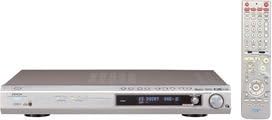
Figure 1.1: The Denon AVR-550SD-S AV Surround Receiver (silver unit) and its accompanying remote control (right).
2. Safety Information
Always observe the following safety precautions to prevent electric shock, fire, or damage to the unit:
- Power Source: Connect the unit only to an AC outlet of the specified voltage.
- Ventilation: Ensure adequate ventilation. Do not block ventilation openings. Maintain at least 10 cm (4 inches) of clear space around the unit.
- Water and Moisture: Do not expose the unit to rain or moisture. Do not place objects filled with liquids, such as vases, on the unit.
- Heat: Avoid placing the unit near heat sources such as radiators, heat registers, stoves, or other apparatus (including amplifiers) that produce heat. The top panel can become quite warm during operation.
- Cleaning: Unplug the unit from the wall outlet before cleaning. Use a dry cloth for cleaning.
- Servicing: Do not attempt to service this product yourself. Refer all servicing to qualified service personnel.
3. Package Contents
Upon opening the package, ensure all the following items are present:
- Denon AVR-550SD-S AV Surround Receiver
- Remote Control Unit
- Power Cord
- User Manual (this document)
- Batteries for Remote Control (if included)
If any items are missing or damaged, please contact your dealer immediately.
4. Setup
4.1. Connecting Your Speakers
The AVR-550SD-S supports 6.1 channel surround sound. Connect your speakers to the corresponding terminals on the rear panel. Ensure correct polarity (+ to + and - to -) for optimal sound quality.
- Front Speakers (L/R): Connect your main left and right speakers.
- Center Speaker: Connect your center channel speaker for clear dialogue.
- Surround Speakers (L/R): Connect your left and right surround speakers.
- Surround Back Speaker: Connect your surround back speaker for 6.1 channel audio.
- Subwoofer: Connect an active subwoofer to the SUBWOOFER PRE OUT terminal.
4.2. Connecting Audio/Video Components
The receiver offers various input options for your audio and video sources:
- Digital Audio Inputs:
- Optical (x2): For devices like CD players, game consoles, or TVs with optical digital output.
- Coaxial (x1): For devices with coaxial digital output.
- Analog Audio Inputs: RCA stereo inputs for devices like CD players, tape decks, or older game consoles.
- Video Inputs:
- Composite Video: Standard definition video input.
- S-Video: Higher quality standard definition video input.
- Component Video (D-terminal): For higher definition video signals (Y, Pb, Pr).
- HDMI: Note that this model does not feature HDMI inputs/outputs.
Connect the audio and video outputs from your source devices (e.g., DVD player, game console, cable box) to the corresponding inputs on the AVR-550SD-S. Then, connect the video output from the receiver to your TV or projector.
4.3. Initial Configuration
After connecting all components, power on the receiver and your display device. Use the on-screen display (if available) or the front panel controls to perform initial setup, including:
- Speaker Setup: Configure speaker size (small/large), distance, and level for each channel to optimize surround sound.
- Input Assignment: Assign specific audio/video inputs to the corresponding source selectors (e.g., DVD, CD, TV).
- Sound Mode Selection: Choose default sound modes for different input types.
5. Operating Instructions
5.1. Basic Operation
- Power On/Off: Press the POWER button on the front panel or remote control.
- Input Selection: Use the INPUT SELECTOR knob on the front panel or the dedicated input buttons on the remote (e.g., DVD, CD, TV) to switch between connected sources.
- Volume Control: Adjust the master volume using the large VOLUME knob on the front panel or the VOLUME +/- buttons on the remote.
- Mute Function: Press the MUTE button on the remote to temporarily silence the audio. Press again to restore.
5.2. Advanced Features and Sound Modes
The AVR-550SD-S supports various surround sound formats and processing modes to enhance your listening experience:
- Dolby Digital EX: Provides a 6.1 channel experience from Dolby Digital sources by deriving a surround back channel.
- DTS-ES: Similar to Dolby Digital EX, DTS-ES Discrete 6.1 offers a dedicated surround back channel, while DTS-ES Matrix 6.1 derives it.
- DSP Surround Modes: The receiver includes various Digital Signal Processing (DSP) modes to simulate different acoustic environments (e.g., Hall, Stadium, Rock Arena). Use the SURROUND MODE buttons on the remote to cycle through these options.
- Tone Control: Adjust Bass and Treble levels to suit your preference using the tone control knobs or menu options.
6. Maintenance
Proper maintenance ensures the longevity and optimal performance of your Denon AVR-550SD-S:
- Cleaning:
- Wipe the exterior surfaces with a soft, dry cloth.
- For stubborn stains, dampen the cloth with a mild, non-abrasive cleaner and wipe gently, then dry with a clean cloth.
- Do not use volatile liquids such as alcohol, paint thinner, or benzine, as they may damage the finish.
- Ventilation: Regularly check that the ventilation openings on the top and sides of the unit are not obstructed by dust or other objects. Proper airflow prevents overheating.
- Power Cord: Periodically inspect the power cord for any signs of damage. If damaged, contact qualified service personnel for replacement.
- Storage: If storing the unit for an extended period, disconnect it from the power outlet and store it in a cool, dry place away from direct sunlight and extreme temperatures.
7. Troubleshooting
Before contacting service, please check the following common issues and their solutions:
| Problem | Possible Cause | Solution |
|---|---|---|
| No power | Power cord disconnected; Power outage; Unit in standby mode. | Ensure power cord is securely plugged in; Check household circuit breaker; Press the POWER button. |
| No sound | Volume too low; Mute function active; Incorrect input selected; Speaker wires disconnected; Incorrect speaker setup. | Increase volume; Deactivate MUTE; Select correct input source; Check speaker connections; Verify speaker setup in menu. |
| No picture | Incorrect video input selected on TV; Video cables disconnected; Incorrect input selected on receiver. | Switch TV to correct video input; Check all video cable connections; Select correct input source on receiver. |
| Remote control not working | Batteries depleted or inserted incorrectly; Obstruction between remote and receiver; Remote sensor blocked. | Replace batteries, ensuring correct polarity; Remove any obstructions; Ensure remote sensor on receiver is clear. |
If the problem persists after trying these solutions, please contact Denon customer support or a qualified service technician.
8. Specifications
Key technical specifications for the Denon AVR-550SD-S AV Surround Receiver:
- Model Number: AVR-550SDS
- Brand: Denon
- Channels: 6.1 Channel
- Maximum Output Power: 100W x 6 (into 6 ohms, 1kHz, 0.7% THD) - Note: Product specifications list 125W and 600W output, but 100W x 6 is a common configuration for 6.1 channel receivers. Using the more specific feature bullet.
- Supported Surround Formats: DOLBY DIGITAL EX, DTS-ES
- Digital Audio Inputs: Optical x 2, Coaxial x 1
- HDMI: Not supported
- Connectivity Technology: HDMI (Note: While the feature bullets state HDMI is not supported, the detailed feature bullets explicitly state that this model has no HDMI inputs, outputs, or link functionality. Please rely on the detailed feature bullet information for connectivity.)
- Color: Silver
- Product Weight: 4.7 kg
- First Available Date on Amazon.co.jp: April 19, 2005
Note on HDMI: While "HDMI" is listed under connectivity technology in some specifications, the detailed feature bullets explicitly state that this model has no HDMI inputs, outputs, or link functionality. Please rely on the detailed feature bullet information for connectivity.
9. Warranty and Support
For warranty information, please refer to the warranty card included with your product or visit the official Denon website. Denon provides customer support for product inquiries, technical assistance, and service requests.
Denon Official Website: www.denon.com
Please have your model number (AVR-550SD-S) and serial number ready when contacting support.
Related documentsAVR-550SDS


Ask a question about this manual
Ask about setup, troubleshooting, compatibility, parts, safety, or missing instructions. Manuals+ will review the question and use this page’s manual context to help answer it.