
Introduction
This manual provides essential information for the safe and effective operation of your Traynor YCV20WR Guitar Amplifier. Please read these instructions thoroughly before using the amplifier to ensure optimal performance and longevity.

Image: Front view of the Traynor YCV20WR Guitar Amplifier. This image displays the amplifier's front panel, including the speaker grille and the Traynor logo. The amplifier features a wine red finish.
Important Safety Instructions
- Read these instructions.
- Keep these instructions.
- Heed all warnings.
- Follow all instructions.
- Do not use this apparatus near water.
- Clean only with a dry cloth.
- Do not block any ventilation openings. Install in accordance with the manufacturer's instructions.
- Do not install near any heat sources such as radiators, heat registers, stoves, or other apparatus (including amplifiers) that produce heat.
- Do not defeat the safety purpose of the polarized or grounding-type plug. A polarized plug has two blades with one wider than the other. A grounding-type plug has two blades and a third grounding prong. The wide blade or the third prong are provided for your safety. If the provided plug does not fit into your outlet, consult an electrician for replacement of the obsolete outlet.
- Protect the power cord from being walked on or pinched, particularly at plugs, convenience receptacles, and the point where they exit from the apparatus.
- Only use attachments/accessories specified by the manufacturer.
- Unplug this apparatus during lightning storms or when unused for long periods of time.
- Refer all servicing to qualified service personnel. Servicing is required when the apparatus has been damaged in any way, such as power-supply cord or plug is damaged, liquid has been spilled or objects have fallen into the apparatus, the apparatus has been exposed to rain or moisture, does not operate normally, or has been dropped.
Key Features
- Class "A" Cathode bias amplifier design.
- Fully regulated power supply with tube rectifier emulation.
- Equipped with a Classic Celestion G12M "Greenback" speaker.
- Includes a speaker jack and a selectable defeat switch for disabling the internal speaker.
- DC filaments on preamp tubes to eliminate hum.
- Two discrete footswitchable channels with independent gain and volume controls.
- Master three-band EQ (Treble, Mid, Bass).
- Integrated effects loop.
- Internal spring reverb.
- Bright switch on the clean channel.
- Boost switch on the lead channel.
Setup
Unpacking and Placement
- Carefully remove the amplifier from its packaging.
- Inspect the amplifier for any signs of damage. If damage is found, contact your dealer immediately.
- Place the amplifier on a stable, level surface. Ensure adequate ventilation around the unit. Do not block the rear panel or any vents.
- Keep the amplifier away from direct sunlight, heat sources, and excessive moisture.
Power Connection
- Ensure the amplifier's power switch is in the OFF position.
- Connect the supplied AC power cord to the power inlet on the rear panel of the amplifier.
- Plug the other end of the power cord into a grounded electrical outlet of the correct voltage for your region.
Instrument Connection
- Connect your guitar or other instrument to the INPUT jack on the front panel using a high-quality instrument cable.
External Speaker Connection (Optional)
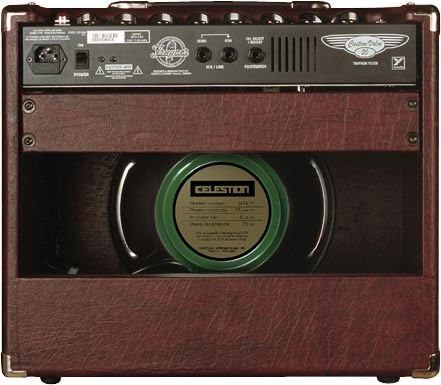
Image: Rear view of the Traynor YCV20WR Guitar Amplifier. This image highlights the rear panel connections, including the power inlet, speaker output, and effects loop. The internal Celestion speaker is visible.
- The YCV20WR is equipped with an internal speaker. If you wish to use an external speaker cabinet, connect it to the EXTERNAL SPEAKER jack on the rear panel.
- Ensure the external speaker cabinet has the correct impedance (typically 8 or 16 ohms) and power handling capacity for the amplifier.
- The internal speaker can be defeated using the SPEAKER DEFEAT switch on the rear panel if you only want to use an external cabinet.
Operating Instructions
Powering On
- Ensure all volume controls are set to minimum.
- Flip the POWER switch to the ON position.
- Wait approximately 30-60 seconds for the tubes to warm up.
- Flip the STANDBY switch to the ON position. The amplifier is now ready for use.
Channel Selection and Controls
The YCV20WR features two discrete, footswitchable channels: Clean and Lead.
- CHANNEL SWITCH: Toggles between the Clean and Lead channels. This can also be controlled via the optional footswitch.
- CLEAN CHANNEL:
- GAIN: Adjusts the input sensitivity and amount of overdrive for the clean channel.
- VOLUME: Controls the overall output level of the clean channel.
- BRIGHT SWITCH: Adds high-frequency sparkle to the clean tone.
- LEAD CHANNEL:
- GAIN: Adjusts the input sensitivity and amount of overdrive for the lead channel.
- VOLUME: Controls the overall output level of the lead channel.
- BOOST SWITCH: Engages an additional gain stage for increased saturation and sustain.
- MASTER EQ (TREBLE, MID, BASS): These controls globally shape the tonal characteristics of both channels.
- REVERB: Adjusts the amount of internal spring reverb applied to the signal.
Effects Loop
The effects loop (SEND and RETURN jacks on the rear panel) allows you to connect external effects pedals or processors after the preamp section and before the power amp section. This is ideal for time-based effects like delay and modulation.
- Connect the SEND jack to the input of your effects unit.
- Connect the output of your effects unit to the RETURN jack.
Powering Off
- Flip the STANDBY switch to the OFF position.
- Wait a few seconds, then flip the POWER switch to the OFF position.
- Unplug the power cord from the wall outlet if the amplifier will not be used for an extended period.
Maintenance
Cleaning
- Always unplug the amplifier from the power outlet before cleaning.
- Use a soft, dry cloth to wipe down the exterior of the amplifier.
- Do not use abrasive cleaners, solvents, or waxes, as these can damage the finish.
Tube Replacement
Vacuum tubes have a finite lifespan and will eventually need replacement. If you notice a decrease in performance, loss of tone, or unusual noise, it may be time to replace the tubes. Tube replacement should ideally be performed by a qualified technician. If you choose to replace them yourself, ensure the amplifier is unplugged and the tubes have cooled completely. Handle tubes carefully, avoiding contact with the glass.
Storage
- When not in use, store the amplifier in a dry, temperature-controlled environment.
- Protect the amplifier from dust and physical damage, ideally with a protective cover.
Troubleshooting
| Problem | Possible Cause | Solution |
|---|---|---|
| No power | Power cord not connected; outlet not working; fuse blown. | Check power cord connection; test outlet with another device; replace fuse (refer to qualified technician). |
| No sound | Instrument cable faulty; volume controls at zero; standby switch off; speaker defeat engaged; faulty tubes. | Check/replace instrument cable; increase volume; turn standby switch on; disengage speaker defeat; consult technician for tube check. |
| Weak or distorted sound | Worn tubes; incorrect impedance for external speaker; input gain too high. | Consult technician for tube replacement; ensure correct external speaker impedance; adjust gain settings. |
| Excessive hum or noise | Ground loop; faulty instrument cable; proximity to other electronic devices; worn preamp tubes. | Try a different power outlet; use shielded cables; move away from other electronics; consult technician for tube check. |
If the problem persists after attempting these solutions, please contact qualified service personnel.
Specifications
| Model | YCV20WR |
| Brand | Traynor |
| Output Wattage | 20 Watts |
| Speaker | Classic Celestion G12M "Greenback" |
| Compatible Devices | Guitar |
| Connector Type | 6.35mm Jack |
| Power Source | Corded Electric |
| Item Weight | 41.6 pounds (18.87 kg) |
| Package Dimensions | 21.2 x 20.5 x 12.3 inches (53.8 x 52.1 x 31.2 cm) |
| Color | Wine Red |
Warranty Information
Traynor products are designed for reliability and performance. For specific warranty terms and conditions applicable to your region, please refer to the warranty card included with your product or visit the official Traynor website. Keep your proof of purchase for any warranty claims.
Customer Support
Should you require technical assistance, service, or have questions regarding your Traynor YCV20WR amplifier, please contact your authorized Traynor dealer or visit the official Traynor website for support resources and contact information.
Website: www.traynoramps.com


