
SEAVIEW 260 SEM-600-SYS
Seaview SEM-600-SYS Offshore System User Manual
Model: 260 SEM-600-SYS | Brand: SEAVIEW
1. Introduction
The Seaview SEM-600-SYS Color & B&W Offshore System is an advanced underwater camera designed for marine observation. This system offers automatic changeover between color and black & white signals, adapting to varying light conditions underwater. Its robust and trollable design makes it ideal for continuous monitoring in diverse aquatic environments.
2. Package Contents
Please ensure all components are present before proceeding with installation:
- SEM-600-SYS Camera Unit
- Integrated Power and Video Cable
- Mounting Clamps (2 units)
- 12V DC Power Adapter (e.g., cigarette lighter plug)
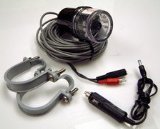
Image: The Seaview SEM-600-SYS Offshore System showing the camera unit, coiled cable, two mounting clamps, and a 12V DC power adapter.
3. Setup and Installation
Follow these steps for proper installation of your Seaview Offshore System:
- Mounting the Camera: Securely attach the camera unit to a suitable location on your vessel using the provided mounting clamps. Ensure the camera is positioned to provide an unobstructed view underwater. The mounting location should be stable and minimize vibration.
- Power Connection: Connect the 12V DC power adapter to a compatible power source on your boat (e.g., a 12V accessory outlet). Ensure the connection is secure.
- Video Connection: Connect the video output cable from the camera unit to your display device (e.g., marine monitor, chartplotter, or TV with video input). Ensure the video input on your display is selected correctly.
- Cable Management: Route all cables safely, away from moving parts or areas where they could be pinched or damaged. Use cable ties or clips to secure them.
4. Operating Instructions
The SEM-600-SYS is designed for straightforward operation:
- Power On: Once all connections are made, apply power to the system. The camera will automatically activate and begin transmitting video.
- Automatic Mode: The system automatically switches between color and black & white modes. In well-lit underwater conditions, the camera will operate in color mode. As light diminishes or in murky water, it will automatically switch to black & white mode to provide clearer images.
- Trolling Use: The system is designed to be trollable, allowing for continuous underwater viewing while your vessel is in motion. Ensure the camera is securely mounted and cables are properly managed to prevent entanglement.
5. Maintenance
Regular maintenance will ensure the longevity and optimal performance of your system:
- Cleaning: After each use, especially in saltwater, rinse the camera unit thoroughly with fresh water to prevent salt buildup and corrosion. Gently wipe the lens with a soft, clean cloth. Avoid using abrasive cleaners or solvents.
- Cable Inspection: Periodically inspect all cables and connections for signs of wear, cuts, or corrosion. Replace any damaged cables immediately.
- Mounting Hardware: Regularly check that all mounting clamps and screws are tight and secure.
- Storage: When not in use for extended periods, store the system in a dry, cool place, away from direct sunlight and extreme temperatures.
6. Troubleshooting
If you encounter issues, refer to the following common problems and solutions:
- No Image on Display:
- Ensure the camera unit is receiving power. Check power connections and the 12V DC source.
- Verify that the video cable is securely connected to both the camera and the display unit.
- Confirm your display unit is set to the correct video input source.
- Poor Image Quality:
- Clean the camera lens. Marine growth, dirt, or debris can obscure the view.
- Consider water clarity. Extremely murky water will naturally reduce image quality.
- Ensure adequate ambient light for optimal color mode performance. The system will switch to B&W in low light.
- Intermittent Power/Signal:
- Inspect the power and video cables for any damage, kinks, or loose connections.
- Check the integrity of the power source and its connection points.
7. Specifications
| Feature | Detail |
|---|---|
| Model Number | 260 SEM-600-SYS |
| Product Dimensions (LxWxH) | 66.04 x 30.48 x 30.48 cm |
| Item Weight | 8.62 kg |
| Signal Type | Color & Black/White (Automatic Changeover) |
| Design Feature | Trollable |
8. Warranty and Support
Warranty Information: For detailed warranty terms and conditions, please refer to the official documentation provided with your purchase or visit the SEAVIEW official website. Warranty coverage typically includes defects in materials and workmanship for a specified period from the date of purchase.
Customer Support: If you require technical assistance, have questions about installation, or need to report a defect, please contact SEAVIEW customer support through their official channels. Have your model number (260 SEM-600-SYS) and purchase information ready when contacting support.
Related documents260 SEM-600-SYS


Ask a question about this manual
Ask about setup, troubleshooting, compatibility, parts, safety, or missing instructions. Manuals+ will review the question and use this page’s manual context to help answer it.