
1. Introduction
The Polder 12453 Dual Oven Meat Thermometer is designed to accurately monitor both internal meat temperature and ambient oven temperature simultaneously. This analog thermometer features an easy-to-read, extra-large dial and a high-heat silicone comfort grip, making it a practical tool for various cooking applications.
2. Safety Information
- Heat Resistance: The silicone comfort grip is heat resistant up to 650°F (343°C). Always use oven mitts or pot holders when handling the thermometer in a hot oven to prevent burns.
- Temperature Shock: Avoid exposing the thermometer to sudden, extreme temperature changes, as this may cause the glass face to crack.
- Placement: Ensure the thermometer is securely placed in the meat and not touching bones or the bottom of the cooking pan, which can lead to inaccurate readings.
- Cleaning: Refer to the 'Care and Maintenance' section for detailed cleaning instructions.
3. Product Overview and Features
The Polder 12453 thermometer combines two essential temperature readings into one convenient device. Its robust design is suitable for continuous monitoring during cooking.
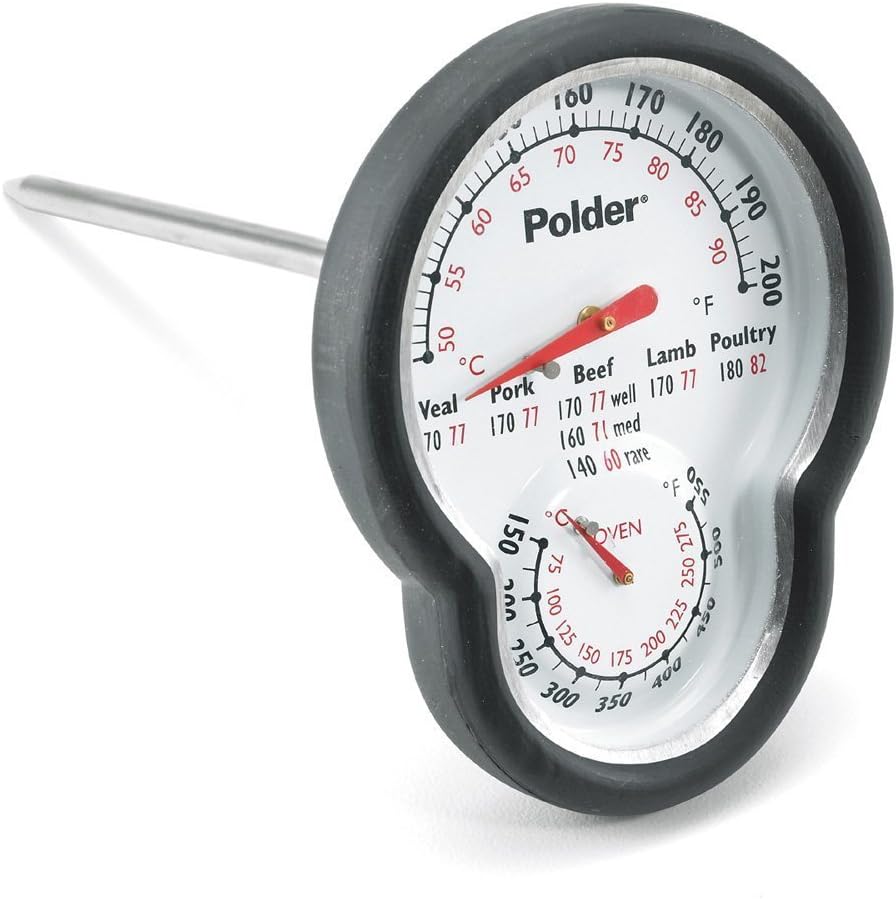
Image 1: Front view of the Polder 12453 Dual Oven Meat Thermometer, showing the large dial with both meat and oven temperature scales.
Key Features:
- Dual Functionality: Monitors both internal meat temperature and ambient oven temperature simultaneously.
- Easy-to-Read Dial: Features an extra-large face for clear visibility through the oven door.
- High-Heat Silicone Grip: Equipped with a comfort grip that is heat resistant up to 650°F (343°C).
- USDA Cooking Chart: Recommended internal temperatures for various meats are printed directly on the thermometer face for quick reference.
- Temperature Ranges:
- Meat: 120°F to 200°F (49°C to 93°C)
- Oven: 150°F to 550°F (66°C to 288°C)
4. Setup
The Polder 12453 Dual Oven Meat Thermometer requires no assembly or batteries. Simply remove all packaging materials before first use.
5. Operating Instructions
Using the Thermometer:
- Meat Placement: Insert the metal probe end of the thermometer into the thickest part of the meat, avoiding bone, fat, or gristle. Ensure at least 2-3 inches of the probe are inserted for an accurate reading.
- Oven Placement: Position the thermometer so that the dial is visible through the oven door. The thermometer should stand upright, either by being inserted into the meat or by resting on the oven rack if only monitoring oven temperature.
- Reading Temperatures:
- The larger, upper dial indicates the internal meat temperature.
- The smaller, lower dial indicates the ambient oven temperature.
- Monitoring: Leave the thermometer in the oven throughout the cooking process. Monitor the temperatures without opening the oven door to maintain consistent heat.
- Target Temperatures: Refer to the USDA cooking chart printed on the thermometer face for recommended safe internal temperatures for various types of meat (e.g., Pork, Veal, Beef, Lamb, Poultry).
- Removal: Once the desired internal meat temperature is reached, carefully remove the thermometer from the oven using oven mitts or pot holders.

Image 2: The Polder 12453 thermometer inserted into a roast cooking in an oven, demonstrating proper usage.
6. Care and Maintenance
- Cleaning: While the product features mention it is dishwasher safe, the manufacturer's care instructions advise hand washing. For optimal longevity and to protect the dial, hand washing with warm, soapy water is recommended. The metal probe can be thoroughly cleaned.
- Drying: Ensure the thermometer is completely dry before storing.
- Storage: Store in a clean, dry place away from extreme temperatures.
- Oven Safe: The thermometer is designed to be oven safe during cooking.
7. Troubleshooting
- Inaccurate Meat Temperature: Ensure the probe is inserted into the thickest part of the meat, away from bones, fat, or gristle. If the meat is too thin, the thermometer may not provide an accurate reading.
- Slow Temperature Response: Analog thermometers typically take longer to register temperature changes compared to digital models. Allow sufficient time for the needle to stabilize.
- Glass Cracking: This can occur due to sudden, extreme temperature changes. Always allow the thermometer to cool gradually after removal from a hot oven.
- Fogging: Condensation inside the dial may occur due to humidity or temperature differences. This usually dissipates as the thermometer cools or warms.
8. Specifications
| Feature | Detail |
|---|---|
| Model Number | 12453 |
| Brand | Polder |
| Meat Temperature Range | 120°F to 200°F (49°C to 93°C) |
| Oven Temperature Range | 150°F to 550°F (66°C to 288°C) |
| Dimensions | 8.5 x 4.6 x 2.5 inches |
| Item Weight | 3.2 ounces |
| Outer Material | Silicone |
| Display Type | Analog |
| Product Care | Hand Wash Only, Oven Safe |
9. Warranty and Support
Polder products are designed for quality and durability. For information regarding warranty coverage or product support, please refer to the documentation included with your purchase or visit the official Polder website. Contacting Polder customer service directly is recommended for any specific inquiries or assistance.
For additional information or to explore other Polder products, please visit the Polder Brand Store.


