The Line 6 DL4 Stompbox Delay Modeler is a versatile effects pedal designed for guitarists and other musicians. It provides a wide range of delay and echo sounds, from vintage tape echoes with adjustable wow and flutter to pristine 24-bit digital delays and real-time reverse delay. The unit offers comprehensive programmable control over all sound parameters, making it suitable for both studio and live performance environments. Its digital modeling technology emulates 15 classic delay and echo effects. Additionally, the integrated Loop Sampler features 14 seconds of memory with an 800ms pre-delay, supporting half-speed and reverse overdubbing capabilities.
2. Key Features
3 Programmable Presets: Store and recall your favorite delay settings instantly.
On-board Tap Tempo: Easily synchronize delay times to the rhythm of your music.
True Bypass Switching: Ensures your instrument's direct tone remains unaltered when the effect is disengaged, preserving signal integrity.
Expression Pedal Input: Allows for real-time control over various effect parameters, including Effect Selector, Delay Time, Repeats, Tweak, Tweez, and Mix.
Discrete Stereo Operation: The DL4 processes signals in discrete stereo for both inputs and outputs, maintaining left and right channel separation. Note: The Loop Sampler sums the signal to mono.
Flexible Power Options: Can be powered by batteries or an optional power adapter.
3. Setup Guide
3.1 Unboxing and Initial Inspection
Carefully remove the Line 6 DL4 from its packaging. Inspect the unit for any signs of damage during transit. Ensure all components listed in the packing slip are present.
3.2 Power Connection
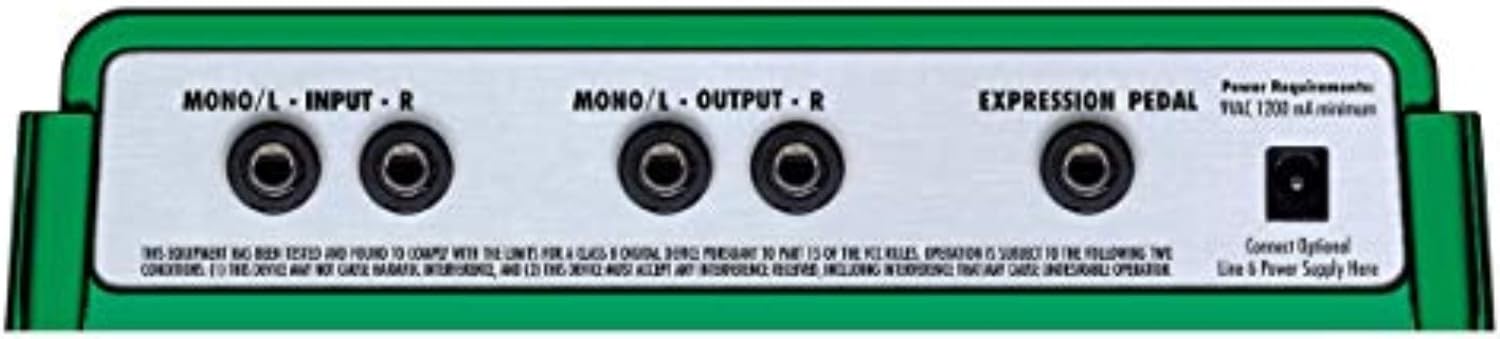
The DL4 can be powered by batteries or an optional 9V AC power adapter (Line 6 PX-2 recommended). If using batteries, ensure they are correctly installed in the battery compartment. For optimal performance and to avoid unexpected power loss during live use, a dedicated power supply is recommended.
Important Note: The DL4 requires a tip-positive power supply, which is different from many standard guitar pedals. Using an incorrect power supply can damage the unit.
Figure 3.2.1: Rear panel of the DL4, highlighting the Mono/L Input, Mono/L Output, Expression Pedal input, and the power input jack. Note the "Power Requirements: 9VAC, 1200mA minimum" label.
3.3 Connecting to Your System
Connect your instrument (e.g., guitar, bass, keyboard) to the "MONO/L - INPUT" jack using a standard 1/4-inch instrument cable. If using a stereo setup, connect the right channel to the "R - INPUT" jack. Connect the "MONO/L - OUTPUT" jack to your amplifier or next effect pedal. For stereo output, connect the "R - OUTPUT" jack as well.
An optional expression pedal can be connected to the "EXPRESSION PEDAL" input for real-time control of various parameters.
4. Operation
4.1 Overview of Controls
The DL4 features a straightforward interface with five main control knobs and four footswitches. The knobs control Delay Time, Repeats, Tweak, Tweez, and Mix. The footswitches (A, B, C, and Tap Tempo) are used for preset selection, engaging/disengaging effects, and controlling the loop sampler.
Figure 4.1.1: Top view of the Line 6 DL4, highlighting the control knobs for Delay Time, Repeats, Tweak, Tweez, and Mix, along with the A, B, C, and Tap Tempo footswitches.
4.2 Selecting Delay Models
The large rotary switch on the left side of the pedal allows you to select from 15 different delay and echo models. Turn the knob to choose your desired effect type, such as Digital Delay, Analog Echo, Tape Echo, Reverse, and more.
Figure 4.2.1: Close-up of the delay model selector knob, showing various delay types available.
4.3 Adjusting Parameters
DELAY TIME: Controls the time between the original signal and the first repeat.
REPEATS: Adjusts the number of echoes or the decay time of the delay.
TWEAK & TWEEZ: These knobs control specific parameters unique to each delay model. Refer to the detailed model descriptions in the full user manual for their exact functions.
MIX: Balances the ratio of the dry (unaffected) signal to the wet (effected) signal.
4.4 Using Tap Tempo
The "TAP TEMPO" footswitch allows you to set the delay time by tapping your foot in rhythm. Tap it two or more times to set the tempo. The LED will flash to indicate the current tempo.
Figure 4.4.1: Close-up of the Tap Tempo footswitch, used for setting delay times rhythmically.
4.5 Loop Sampler Functionality
The DL4 includes a 14-second loop sampler. To record a loop, press the "RECORD/OVERDUB" footswitch. Press it again to stop recording and start playback. You can overdub by pressing "RECORD/OVERDUB" during playback. The "PLAY/STOP" footswitch controls playback, and the "HALF SPEED/REVERSE" footswitch allows for creative manipulation of your loops.
5. Maintenance
To ensure the longevity and optimal performance of your Line 6 DL4, follow these maintenance guidelines:
Cleaning: Use a soft, dry cloth to clean the exterior of the unit. Avoid abrasive cleaners, solvents, or waxes.
Storage: When not in use, store the pedal in a cool, dry place away from direct sunlight and extreme temperatures.
Battery Replacement: If using batteries, replace them promptly when the low battery indicator illuminates or when performance degrades. Remove batteries if the unit will not be used for an extended period to prevent leakage.
Footswitch Care: While durable, the footswitches can wear over time with heavy use. If a footswitch becomes unresponsive, contact Line 6 support for potential replacement or repair.
6. Troubleshooting
If you encounter issues with your DL4, try the following common troubleshooting steps:
Problem
Possible Cause
Solution
No power/Unit does not turn on.
Incorrect power supply, dead batteries, loose connection.
Ensure you are using a 9V AC tip-positive power supply (Line 6 PX-2 or compatible). Replace batteries if using battery power. Check all power connections.
No sound or weak signal.
Incorrect cable connections, faulty cables, effect mix set to dry.
Verify all instrument cables are securely connected to the correct input/output jacks. Test cables. Adjust the MIX knob to blend in the effected signal.
Footswitch unresponsive.
Mechanical wear, internal issue.
Ensure the footswitch is being pressed firmly. If the issue persists, contact Line 6 support for service.
Unwanted noise or hum.
Ground loop, interference from other electronics, faulty power supply.
Try a different power outlet. Use an isolated power supply. Move the pedal away from other electronic devices.
For more detailed troubleshooting, refer to the complete user manual or contact Line 6 customer support.
For detailed warranty information, product registration, and technical support, please refer to the official Line 6 website or the complete user manual.
You can also visit the Line 6 Store on Amazon for more product information and accessories.
Related Documents - 99 DL 4
Line 6 DL4 Delay Modeler User Manual Comprehensive user manual for the Line 6 DL4 Delay Modeler, detailing its features, functions, and operation, including various delay models, loop sampler, and connectivity options.
Line 6 M5 Stompbox Modeler Pilot's Handbook - User Manual Comprehensive user guide and pilot's handbook for the Line 6 M5 Stompbox Modeler, covering setup, operation, presets, MIDI control, and safety instructions. Learn how to connect, configure, and use all features of this versatile effects pedal.
Line 6 M5, M9 & M13 FX Parameters Guide An in-depth guide to the FX Parameters of the Line 6 M5, M9 & M13 Stompbox Modelers, detailing Delay, Modulation, Distortion, Filter, and Reverb effects.
Line 6 DL4 MkII Owner's Manual Comprehensive owner's manual for the Line 6 DL4 MkII delay and reverb effects pedal, covering features, operation, setup, and advanced functions.
Line 6 DL4 MkII 取扱説明書 Line 6 DL4 MkIIは、革新的なディレイ、リバーブ、ルーパー機能を搭載した多機能ギターエフェクトペダルです。Yamaha Guitar Groupが提供するこの取扱説明書では、DL4 MkIIの操作方法、エフェクトモデル、設定、および高度な使用方法について詳しく解説しています。
Line 6 DL4 MkII: Comprehensive Owner's Manual for Guitar Effects Pedal Explore the features, operation, and advanced settings of the Line 6 DL4 MkII delay and reverb effects pedal with this comprehensive owner's manual. Learn about its extensive delay and reverb models, looper functions, MIDI control, and more.