
1. Introduction
The rolls VP29 Phono Preamp is designed to amplify the RIAA equalized signal from a turntable to a standard line level. This allows turntables, which typically output a low-level, RIAA-equalized signal, to be connected to audio systems or receivers that lack a dedicated phono input. The VP29 ensures proper signal amplification and equalization for accurate audio reproduction from vinyl records.
2. Features
- RIAA Equalization: Provides accurate RIAA equalization for vinyl playback.
- Input/Output Connectivity: Features RCA stereo inputs and outputs for standard audio connections.
- Additional Output: Includes a 1/4" TRS stereo output for versatile connectivity options.
- Power Adapter: Comes with a dedicated power adapter for immediate use.
- Signal Amplification: Converts low-level phono signals to line-level signals compatible with most audio equipment.
3. Package Contents
Upon opening the package, please verify that all items are present:
- rolls VP29 Phono Preamp
- Power Adapter (12-16 VDC)
4. Setup and Connections
Follow these steps to properly connect your rolls VP29 Phono Preamp to your audio system.
4.1 Front/Top Panel Overview
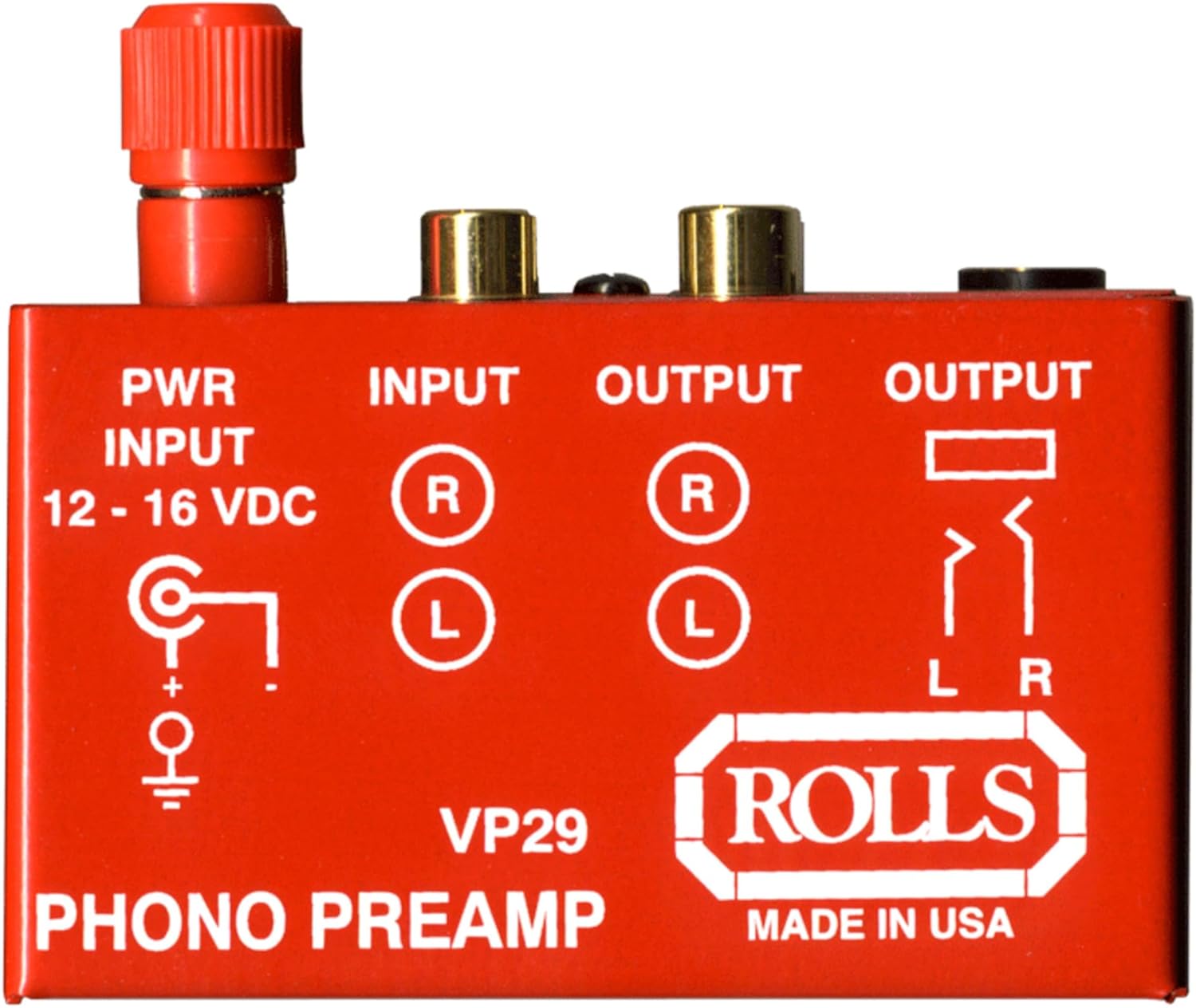
Figure 1: Front/Top Panel of the rolls VP29 Phono Preamp
This image displays the top panel of the rolls VP29, showing the power input, RCA stereo input (labeled R and L), RCA stereo output (labeled R and L), and a 1/4 inch stereo output (labeled L R). The unit is red with white text.
4.2 Rear Panel Connections

Figure 2: Rear Panel Connections of the rolls VP29 Phono Preamp
This image shows the rear panel of the rolls VP29. From left to right, it features the 1/4 inch TRS output jack, the RCA stereo input jacks (red for right, white for left), the RCA stereo output jacks (red for right, white for left), a ground terminal, and the power adapter input jack.
4.3 Connection Procedure
- Connect Turntable: Connect the RCA output cables from your turntable to the INPUT (RCA L/R) jacks on the rolls VP29. Ensure the red cable connects to the 'R' (Right) input and the white/black cable connects to the 'L' (Left) input.
- Ground Connection: If your turntable has a separate ground wire, connect it to the Ground Terminal on the rear panel of the VP29. This helps reduce hum and noise.
- Connect to Audio System: Connect the OUTPUT (RCA L/R) jacks of the VP29 to an available line-level input on your amplifier, receiver, or powered speakers. Use an input labeled 'AUX', 'CD', 'Tuner', or 'Line In' (do not use a 'Phono' input on your receiver, as this would result in double amplification and incorrect equalization). Alternatively, use the 1/4" TRS Output to connect to compatible equipment.
- Power Connection: Connect the provided power adapter to the PWR INPUT (12-16 VDC) jack on the VP29. Then, plug the power adapter into a standard electrical outlet.
Note: If your turntable has a built-in phono preamp, ensure it is switched off or bypassed before connecting to the rolls VP29. Using two phono preamps in series can lead to distorted audio.
5. Operation
Once all connections are securely made and the VP29 is powered on, you can begin playing your vinyl records. The VP29 operates automatically, providing the necessary amplification and RIAA equalization. There are no user-adjustable controls on the unit.
- Place a record on your turntable.
- Lower the tonearm onto the record.
- Adjust the volume on your connected amplifier or receiver to your desired listening level.
6. Specifications
The following are the technical specifications for the rolls VP29 Phono Preamp:
- Model: VP29
- Input: RCA Stereo (L/R)
- Output: RCA Stereo (L/R), 1/4" TRS Stereo
- Equalization: RIAA
- Power Input: 12-16 VDC (Power Adapter Included)
- Compatible Devices: Turntables with phono output and audio systems or speakers with line level input
- Product Dimensions: Approximately 5 x 5 x 5 inches (12.7 x 12.7 x 12.7 cm)
- Item Weight: Approximately 0.8 ounces (22.7 grams)
- Color: Red
6.1 Dimensions Reference

Figure 3: rolls VP29 Phono Preamp Dimensions
This image provides a visual reference for the compact size of the rolls VP29, indicating a dimension of approximately 2.8 inches or 7 cm, likely referring to its height or width.
7. Troubleshooting
If you encounter issues with your rolls VP29 Phono Preamp, refer to the following common problems and solutions:
- No Sound:
- Ensure the power adapter is securely connected to the VP29 and a working electrical outlet.
- Verify all RCA and 1/4" TRS cables are correctly and firmly connected to both the turntable, VP29, and your audio system.
- Check that your audio system is set to the correct input source (e.g., AUX, CD, Line In).
- Confirm your turntable's built-in preamp (if any) is bypassed or switched off.
- Hum or Buzzing Noise:
- Ensure the turntable's ground wire is connected to the VP29's ground terminal.
- Check for loose cable connections.
- Move the VP29 and associated cables away from power cords, transformers, or other electronic devices that may cause interference.
- Test with different RCA cables to rule out faulty cabling.
- Distorted or Overly Loud Sound:
- Ensure you are not connecting the VP29 to a 'Phono' input on your receiver, as this will result in double amplification. Connect to a 'Line In' type input.
- Verify your turntable's output is a standard phono level and not already line-level.
8. Maintenance
The rolls VP29 Phono Preamp requires minimal maintenance. To ensure its longevity and optimal performance:
- Keep the unit clean by wiping it with a soft, dry cloth. Avoid using liquid cleaners or solvents.
- Do not expose the unit to excessive moisture, extreme temperatures, or direct sunlight.
- Ensure proper ventilation and avoid blocking any potential vents (though the VP29 is passively cooled).
- Disconnect power when the unit is not in use for extended periods.
9. Warranty and Support
For warranty information, technical support, or service inquiries regarding your rolls VP29 Phono Preamp, please refer to the official rolls website or contact their customer service department. Specific warranty terms and conditions may vary by region and purchase date.
rolls Official Website: www.rolls.com


