
1. Introduction
This manual provides essential instructions for the proper installation, operation, and maintenance of your Bogen Classic Series Amp C20. Please read this manual thoroughly before using the product to ensure safe and efficient performance. Retain this manual for future reference.
2. Safety Information
WARNING: This product contains chemicals known to the State of California to cause cancer and birth defects or other reproductive harm.
Always observe basic safety precautions when using electrical equipment to reduce the risk of fire, electric shock, and injury to persons.
- Do not expose this appliance to rain or moisture.
- Do not block any ventilation openings. Install in accordance with the manufacturer's instructions.
- Do not install near any heat sources such as radiators, heat registers, stoves, or other apparatus (including amplifiers) that produce heat.
- Only use attachments/accessories specified by the manufacturer.
- Refer all servicing to qualified service personnel.
3. Product Overview
The Bogen Classic Series Amp C20 is a single-channel amplifier designed for various audio applications. It features robust construction and reliable performance.
3.1 Key Features
- Single-channel amplifier
- Surface Mount design
- Input voltage: 120 Volts
- Output Power: 20 Watts
3.2 Package Contents
Upon unpacking, verify that the following items are included:
- Bogen Classic Series Amp C20
- Funnel
- Instruction Manual (this document)
3.3 Front Panel Controls and Indicators

Image 1: Front panel of the Bogen Classic Series Amp C20. This image displays the MIC1, MIC2, AUX, and TREBLE control knobs, along with the POWER switch and the "Classic Series" branding.
- MIC1 Input Level Control: Adjusts the volume for Microphone Input 1.
- MIC2 Input Level Control: Adjusts the volume for Microphone Input 2.
- AUX Input Level Control: Adjusts the volume for the Auxiliary input.
- TREBLE Control: Adjusts the high-frequency response of the audio output.
- POWER Switch: Toggles the amplifier's power on and off.
3.4 Rear Panel Connections
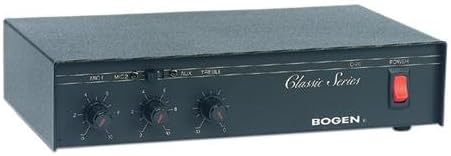
Image 2: Rear panel of the Bogen Classic Series Amp C20. This image shows the various input and output connections, including power input and speaker terminals.
The rear panel contains connections for power, microphone inputs, auxiliary inputs, and speaker outputs. Specific details on these connections are provided in the Setup section.
4. Setup and Installation
4.1 Mounting
The Bogen Classic Series Amp C20 is designed for surface mounting. Ensure the mounting surface is stable and capable of supporting the unit's weight (approximately 4.5 pounds). Allow adequate ventilation around the unit to prevent overheating.
4.2 Electrical Connection
- Ensure the POWER switch on the front panel is in the OFF position.
- Connect the power cord to a standard 120 Volt AC outlet.
4.3 Audio Input Connections
Connect your audio sources to the appropriate inputs on the rear panel:
- Microphones: Connect microphones to the MIC1 and MIC2 input jacks.
- Auxiliary Devices: Connect line-level audio sources (e.g., CD player, media player) to the AUX input jacks.
4.4 Speaker Output Connections
Connect your speakers to the speaker output terminals on the rear panel. Ensure correct polarity (+ to + and - to -) for all speaker connections. Refer to your speaker's manual for impedance matching requirements.
5. Operation
5.1 Powering On/Off
- To power on the amplifier, press the POWER switch on the front panel to the ON position. The power indicator (if present) will illuminate.
- To power off, press the POWER switch to the OFF position.
5.2 Adjusting Input Levels
- Start with all input level controls (MIC1, MIC2, AUX) set to their minimum position.
- Begin playing audio from your desired source.
- Slowly increase the corresponding input level control until the desired volume is achieved.
- Adjust the TREBLE control to fine-tune the high-frequency response to your preference.
5.3 General Usage Tips
- Avoid setting volume levels too high, which can cause distortion and potentially damage speakers.
- Ensure all connections are secure before operating the amplifier.
6. Maintenance
6.1 Cleaning
Wipe the exterior of the amplifier with a soft, dry cloth. Do not use liquid cleaners or aerosol cleaners, as they may damage the finish or internal components.
6.2 Ventilation
Regularly check that the ventilation openings are clear of dust and debris to ensure proper airflow and prevent overheating.
6.3 Servicing
There are no user-serviceable parts inside the amplifier. Refer all servicing to qualified service personnel.
7. Troubleshooting
If you experience issues with your Bogen Classic Series Amp C20, consult the following table before contacting support.
| Problem | Possible Cause | Solution |
|---|---|---|
| No sound output. |
|
|
| Distorted sound. |
|
|
| Static or crackling from knobs. | Dust or oxidation on control potentiometers. | Consult qualified service personnel for cleaning or replacement of potentiometers. |
| Unit becomes excessively warm or emits odor. |
|
|
8. Specifications
| Feature | Detail |
|---|---|
| Brand | Bogen |
| Model | C20 |
| Item Model Number | C20 |
| Manufacturer Part Number | C20 |
| Item Dimensions (L x W x H) | 11.37 x 7.37 x 2.87 inches |
| Product Dimensions | 11.37 x 7.37 x 2.87 inches |
| Item Weight | 4.5 pounds |
| Voltage | 120 Volts |
| Wattage | 50 watts |
| Output Power | 20 Watts |
| Number of Channels | 1 |
| Mounting Type | Surface Mount |
| Manufacturer | Bogen |
| UPC | 765368330250 |
| Date First Available | July 16, 2004 |
Note: Specifications are subject to change without notice.
9. Warranty and Support
For warranty information and technical support, please refer to the official Bogen website or contact their customer service department. Keep your purchase receipt as proof of purchase for warranty claims.
Contact Information:
- Website: www.bogen.com (Placeholder, actual URL may vary)
- Customer Service: Refer to the website for regional contact details.


