
1. Introduction
Thank you for purchasing the Philips MC235 Micro Stereo System. This compact audio system offers versatile playback options including CD, FM/AM radio, and features such as Digital Sound Control and Dynamic Bass Boost for enhanced audio experience. This manual provides essential information for setting up, operating, and maintaining your system to ensure optimal performance and longevity.
2. Safety Information
- Power Source: Ensure the power supply voltage matches the voltage indicated on the unit's rating label.
- Ventilation: Do not block any ventilation openings. Allow sufficient space around the unit for proper airflow.
- Water and Moisture: Do not expose the unit to rain or moisture. Do not place objects filled with liquids, such as vases, on the unit.
- Heat: Keep the unit away from heat sources such as radiators, heat registers, stoves, or other apparatus (including amplifiers) that produce heat.
- Servicing: Do not attempt to service the unit yourself. Refer all servicing to qualified service personnel.
- Cleaning: Unplug the unit from the wall outlet before cleaning. Use a soft, dry cloth. Do not use liquid cleaners or aerosol cleaners.
3. Package Contents
Please check that your package contains the following items:
- Philips MC235 Micro Stereo System main unit
- Two (2) Stereo Speakers
- Remote Control (with batteries)
- FM Antenna
- AM Loop Antenna
- AC Power Cord
- User Manual (this document)
4. Setup
4.1 Positioning the Unit
Place the main unit and speakers on a flat, stable surface. For optimal sound, position the speakers equidistant from the listening area and at ear level. The unit can also be wall-mounted.
4.2 Connecting the Speakers
- Connect the speaker wires from the left speaker to the LEFT speaker terminals on the main unit. Ensure polarity (+ to + and - to -) is correct.
- Connect the speaker wires from the right speaker to the RIGHT speaker terminals on the main unit. Ensure polarity is correct.
4.3 Connecting the Antennas
- FM Antenna: Connect the supplied FM antenna to the FM ANTENNA jack on the rear of the unit. Extend the wire fully for best reception.
- AM Antenna: Assemble the AM loop antenna and connect its wires to the AM ANTENNA terminals on the rear of the unit. Rotate the antenna for best AM reception.
4.4 Connecting Power
Plug the AC power cord into the AC IN socket on the rear of the unit, then plug the other end into a wall power outlet.
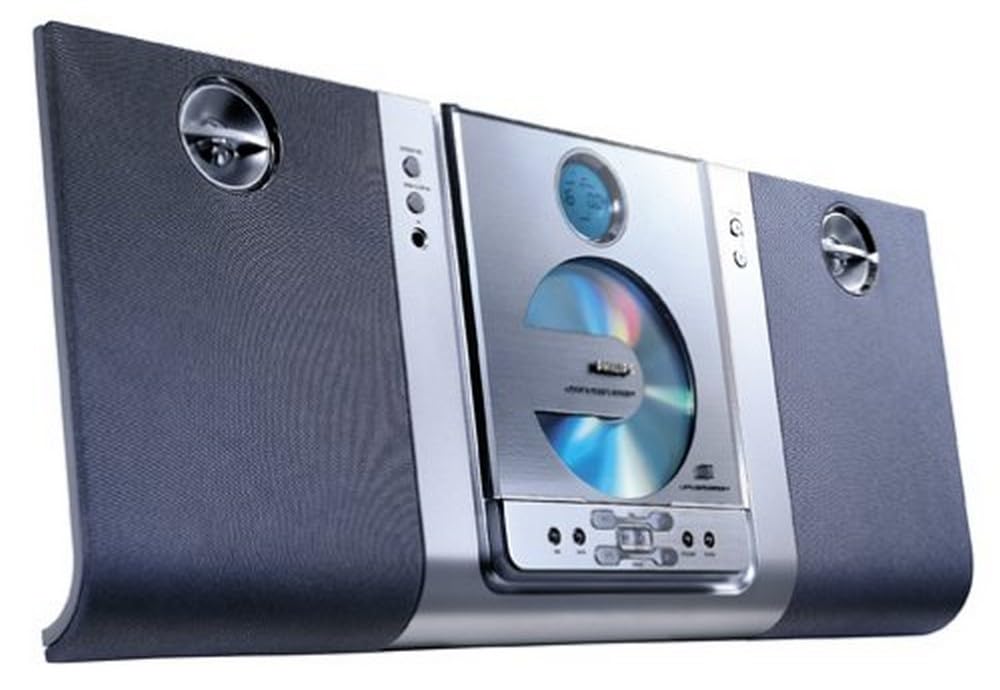
Image 1: Philips MC235 Micro Stereo System. This image shows the compact main unit and its accompanying speakers, illustrating the overall design and size for setup reference.
5. Operating Instructions
5.1 Power On/Off
Press the POWER button on the front panel or remote control to turn the unit on or off. When off, the unit enters standby mode.
5.2 Source Selection
Press the SOURCE button repeatedly to cycle through available sources: CD, FM, AM.
5.3 Volume Control
Use the VOLUME +/- buttons on the unit or remote control to adjust the sound level.
5.4 CD Playback
- Press the CD button to select the CD source.
- Press the OPEN/CLOSE button to open the CD tray.
- Place a CD (or CD-RW) with the label side up into the tray.
- Press OPEN/CLOSE again to close the tray. Playback will start automatically.
- Use PLAY/PAUSE to pause or resume playback.
- Use SKIP ◀◀/►► to skip tracks.
- Use STOP to stop playback.
5.5 Radio Tuner (FM/AM)
- Press the FM or AM button to select the desired band.
- Automatic Tuning: Press and hold the TUNING ◀◀/►► button for 2 seconds. The tuner will search for the next strong station and stop automatically.
- Manual Tuning: Press the TUNING ◀◀/►► button repeatedly to tune in steps.
- Storing Presets: Tune to a desired station, then press PROGRAM. Use PRESET ◀◀/►► to select a preset number, then press PROGRAM again to confirm.
5.6 Digital Sound Control (DSC)
Press the DSC button repeatedly to select from various preset equalizer settings: Jazz, Rock, Techno, Pop, Classic, or Flat (no effect). This optimizes the sound output for different music genres.
5.7 Dynamic Bass Boost (DBB)
Press the DBB button to activate or deactivate the Dynamic Bass Boost feature. When active, DBB electronically enhances the bass response at low, medium, and high volume levels, providing a richer and deeper sound.
5.8 Sleep Timer
The sleep timer allows the unit to automatically turn off after a preset duration. Press the SLEEP button repeatedly to cycle through available sleep times (e.g., 15, 30, 60, 90, 120, 180, 240 minutes). The unit will turn off after the selected time has elapsed.
5.9 Wakeup Timer
The wakeup timer allows the unit to automatically turn on at a preset time. Refer to the detailed instructions in the full manual for setting the alarm time and desired source (CD or radio).
6. Maintenance
6.1 Cleaning the Unit
Wipe the exterior of the unit with a soft, slightly damp cloth. Do not use abrasive cleaners, alcohol, or benzene, as these can damage the finish. Ensure the unit is unplugged before cleaning.
6.2 CD Care
- Handle CDs by their edges to avoid fingerprints on the playing surface.
- Clean CDs with a soft, lint-free cloth, wiping from the center outwards.
- Do not use solvents or abrasive cleaners on CDs.
- Store CDs in their cases to protect them from dust and scratches.
7. Troubleshooting
Before contacting customer support, please refer to the following table for common issues and their solutions.
| Problem | Possible Cause | Solution |
|---|---|---|
| No power | Power cord not securely connected. | Check if the AC power cord is firmly plugged into the unit and the wall outlet. |
| No sound | Volume is too low or muted. Speakers not connected correctly. | Increase volume. Check speaker connections and ensure polarity is correct. |
| CD not playing | CD inserted incorrectly or is dirty/scratched. | Ensure CD is inserted label-side up. Clean the CD or try another one. |
| Poor radio reception | Antenna not properly positioned or connected. | Adjust the position of the FM wire antenna or rotate the AM loop antenna for better reception. Ensure antennas are securely connected. |
8. Specifications
- Model Number: MC235
- Dimensions (W x H x D): Approximately 25 x 24.5 x 9.6 cm (Main Unit)
- Speaker Type: Stereo
- Total Power Output: 10 Watts (2 x 5 Watts)
- Disc Compatibility: CD, CD-R, CD-RW
- Tuner Bands: FM, AM
- Sound Enhancement: Digital Sound Control (DSC), Dynamic Bass Boost (DBB)
- Timers: Sleep Timer (up to 240 minutes), Wakeup Timer
- Mounting: Wall-mountable
- GTIN: 00037849946343, 00037849948521
9. Warranty and Support
This product is covered by a manufacturer's warranty. Please refer to the warranty card included in your package for specific terms and conditions. For technical support, service, or further inquiries, please visit the official Philips support website or contact their customer service line in your region. Keep your proof of purchase for warranty claims.