
1. Introduction
This manual provides instructions for the installation, operation, and maintenance of your NETGEAR 16-Port Gigabit Ethernet Unmanaged Switch, model GS116NA. This device is designed to expand your network connectivity with high-speed Gigabit Ethernet ports, suitable for home or small office environments. It offers a simple plug-and-play solution without requiring complex software installation or configuration.
2. Package Contents
Verify that your package contains the following items:
- NETGEAR 16-Port Gigabit Ethernet Unmanaged Switch (GS116NA)
- AC Power Adapter
- Wall-Mount Kit
- Installation Guide
- Warranty/Support Information Card
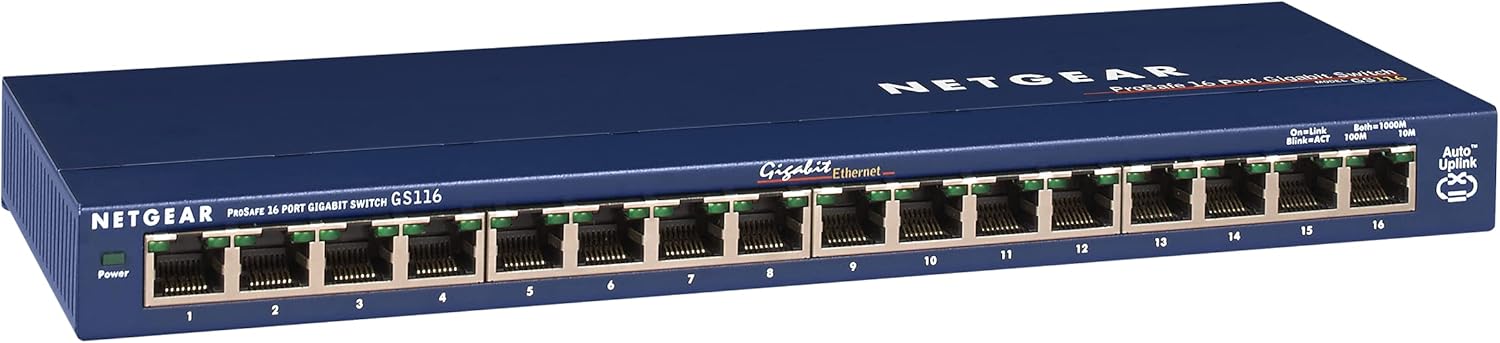
Image 1: NETGEAR GS116NA 16-Port Gigabit Ethernet Unmanaged Switch. This image shows the front view of the switch with all 16 Ethernet ports and LED indicators.
3. Product Overview
The NETGEAR GS116NA is a high-performance unmanaged switch designed for reliable network expansion. Key features include:
- 16 Gigabit Ethernet Ports: Provides high-speed wired connections for multiple devices.
- Plug-and-Play: No software installation or configuration required for immediate use.
- Desktop or Wall Mount: Flexible placement options to suit your environment.
- Energy Efficient: Compliant with IEEE 802.3az Energy Efficient Ethernet standard.
- Silent Operation: Fanless design ensures quiet performance, ideal for noise-sensitive areas.
- Durable Metal Casing: Robust construction for long-term reliability.
Front Panel

Image 2: Front panel of the GS116NA switch, showing 16 RJ-45 Gigabit Ethernet ports, a Power LED, and individual port status LEDs.
The front panel features 16 RJ-45 ports for Ethernet connections. Each port has an associated LED indicator to show link status and activity. A Power LED indicates the device's operational status.
Rear Panel

Image 3: Rear panel of the GS116NA switch, displaying the power input jack and ventilation slots.
The rear panel includes the power input jack for connecting the AC adapter. Ventilation slots are present to ensure proper heat dissipation.
4. Setup Instructions
The NETGEAR GS116NA switch is designed for simple plug-and-play installation. Follow these steps to set up your switch:
- Placement: Choose a suitable location for the switch. It can be placed on a desktop or mounted on a wall using the provided kit. Ensure adequate ventilation around the device.
- Connect Power: Connect the supplied AC power adapter to the power input jack on the rear panel of the switch, then plug the adapter into a power outlet. The Power LED on the front panel will illuminate.
- Connect Devices: Connect your network devices (e.g., computers, servers, network printers, other switches) to the RJ-45 ports on the front panel of the GS116NA using standard Ethernet cables.
- Verify Connection: Once a device is connected, the corresponding port LED on the switch will light up, indicating an active link. If the LED is blinking, it indicates network activity.
No further configuration is typically required for basic network operation. The switch automatically detects network speed and duplex mode for each connected device.
5. Operating Instructions
The GS116NA is an unmanaged switch, meaning it operates automatically without user intervention for most functions.
LED Indicators
The LEDs on the front panel provide visual feedback on the switch's status:
- Power LED:
- Solid Green: The switch is powered on and operating correctly.
- Off: The switch is not receiving power.
- Port LEDs (1-16): Each port has an LED.
- Solid Green: A device is connected to the port at Gigabit (1000 Mbps) speed.
- Solid Amber: A device is connected to the port at Fast Ethernet (100 Mbps) or Ethernet (10 Mbps) speed.
- Blinking: Indicates active data transmission or reception on that port.
- Off: No device is connected to the port, or the connected device is powered off.
6. Maintenance
The NETGEAR GS116NA switch requires minimal maintenance.
- Cleaning: Periodically clean the exterior of the switch with a soft, dry cloth. Do not use liquid or aerosol cleaners.
- Ventilation: Ensure that the ventilation slots are not obstructed to prevent overheating.
- Cable Management: Keep network cables organized to prevent accidental disconnections or damage.
- Power Cycle: If the switch experiences unexpected behavior, try disconnecting the power adapter for 10 seconds and then reconnecting it.
7. Troubleshooting
If you encounter issues with your NETGEAR GS116NA switch, refer to the following common troubleshooting steps:
- No Power:
- Ensure the power adapter is securely connected to the switch and a working power outlet.
- Verify the power outlet is functional by plugging in another device.
- No Link Light:
- Check that the Ethernet cable is securely connected to both the switch port and the connected device.
- Try a different Ethernet cable to rule out a faulty cable.
- Ensure the connected device is powered on and its network adapter is enabled.
- Try connecting the device to a different port on the switch.
- Slow Network Speed:
- Verify that both the switch port LED and the connected device's network adapter indicate a Gigabit (Green) connection. If Amber, the connection is 10/100 Mbps.
- Ensure all connected devices and cables support Gigabit Ethernet for optimal performance.
- Check for excessive network traffic or bandwidth-intensive applications running on connected devices.
- Intermittent Connectivity:
- Inspect Ethernet cables for damage.
- Ensure the switch is placed in a location with good ventilation and is not overheating.
- Temporarily disconnect non-essential devices to see if the issue persists.
For further assistance, refer to the support information provided with your product or visit the NETGEAR support website.
8. Specifications
| Feature | Detail |
|---|---|
| Model Number | GS116NA |
| Number of Ports | 16 |
| Interface Type | RJ45 |
| Data Transfer Rate | 10/100/1000 Mbps (Gigabit Ethernet) |
| Case Material | Metal |
| Product Dimensions (L x W x H) | 16.93" x 6.57" x 2.76" |
| Item Weight | 2.73 pounds |
| Voltage | 120 Volts (AC) |
| Operating Temperature | Up to 104°F (40°C) |
| Energy Efficiency | IEEE 802.3az compliant |
| Manufacturer | Netgear |

Image 4: Dimensional view of the NETGEAR GS116NA switch, illustrating its length, width, and height.
9. Warranty and Support
NETGEAR provides a limited lifetime protection for the switch and a 2-year warranty for the power supply. For detailed warranty information, please refer to the warranty card included in your package or visit the official NETGEAR website.
For technical support and additional resources, including the full user manual in PDF format, please visit the NETGEAR support portal.
Official User Manual (PDF): Download PDF