1. Introduction
This manual provides essential information for the safe and efficient use of your InFocus Ask-Proxima M1 Multimedia DLP Projector. Please read these instructions thoroughly before operating the device and retain them for future reference.
The Ask-Proxima M1 is a compact and powerful XGA (1024 x 768) DLP Multimedia Projector, weighing approximately 1.98 lbs (0.9 kg). It is designed for mobility and offers full projection functionality, making it suitable for various applications including home cinema.
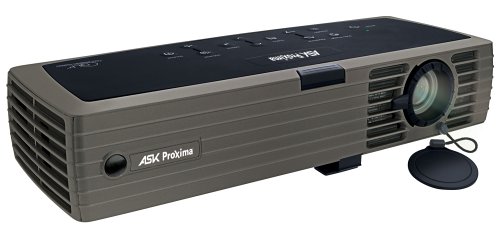
Figure 1: InFocus Ask-Proxima M1 Multimedia DLP Projector. This image shows the compact design of the projector, highlighting its portability.
2. Setup
2.1 Unpacking
Carefully remove the projector and all accessories from the packaging. Verify that all components are present:
- Ask-Proxima M1 Projector
- Power Cord
- Remote Control (if included)
- Documentation
2.2 Placement
Place the projector on a stable, flat surface. Ensure adequate ventilation around the unit to prevent overheating. Position the projector at an appropriate distance from the screen to achieve the desired image size.
2.3 Power Connection
- Connect the power cord to the projector's power input port.
- Plug the other end of the power cord into a grounded electrical outlet.
2.4 Connecting Video Sources
The Ask-Proxima M1 supports various input sources. For USB connectivity, use a compatible USB cable to connect your source device to the projector's USB port.
3. Operating Instructions
3.1 Powering On/Off
- To Power On: Press the Power button on the projector or remote control. The power indicator light will illuminate.
- To Power Off: Press the Power button again. A confirmation message may appear. Press Power again to confirm shutdown. Allow the projector to cool down before unplugging.
3.2 Adjusting the Image
- Focus: Rotate the focus ring on the projector lens until the image appears sharp.
- Digital Keystone: The M1 features digital keystone correction. Use the menu options or dedicated buttons on the projector/remote to adjust the image shape if it appears trapezoidal.
- Input Selection: Use the 'Input' or 'Source' button on the projector or remote to cycle through available input sources (e.g., USB).
3.3 Display Resolution
The native display resolution of the Ask-Proxima M1 is 1024 x 768 (XGA). For optimal image quality, configure your source device to output at this resolution.
4. Maintenance
4.1 Cleaning the Projector
- Exterior: Use a soft, dry cloth to clean the projector's casing. Do not use abrasive cleaners or solvents.
- Lens: Gently wipe the lens with a lens cleaning cloth specifically designed for optical surfaces. Avoid touching the lens with your fingers.
4.2 Lamp Replacement
The projector lamp has a finite lifespan. When the lamp indicator illuminates or the image becomes dim, the lamp may need replacement. Refer to the specific lamp replacement instructions provided with your replacement lamp or consult the manufacturer's website for detailed steps. Always ensure the projector is powered off and cooled down before attempting lamp replacement.
5. Troubleshooting
| Problem | Possible Cause | Solution |
|---|---|---|
| No image on screen |
|
|
| Image is blurry |
|
|
| Image is trapezoidal | Projector not perpendicular to screen | Use Digital Keystone correction feature |
| Projector not powering on |
|
|
6. Specifications
| Feature | Detail |
|---|---|
| Model Number | M1 |
| Display Technology | DLP |
| Native Resolution | 1024 x 768 (XGA) |
| Brightness | 1000 ANSI Lumens |
| Item Weight | 1.98 lb (0.9 kg) |
| Connectivity Technology | USB |
| Special Features | Digital Keystone, Portable |
| Recommended Uses | Home Cinema |
| Manufacturer | Proxima |
| Date First Available | August 20, 2004 |
7. Warranty and Support
For warranty information, please refer to the warranty card included with your product or visit the official InFocus/Proxima website. Technical support may be available through the manufacturer's customer service channels.
Manufacturer: Proxima


