
1. Introduction
Thank you for choosing the Topcom TSH 205 10/100 Mbit Ethernet Switch. This device is designed to expand your network connectivity, allowing multiple computers and network devices to share a single internet connection or communicate within a local network. It features an autosensing function for easy setup and reliable performance.
Package Contents
- Topcom TSH 205 Ethernet Switch
- Power Adapter
- User Manual
Safety Information
- Do not expose the device to water or excessive humidity.
- Do not open the casing; refer all servicing to qualified personnel.
- Use only the provided power adapter.
- Ensure proper ventilation around the device.
2. Setup
Follow these steps to set up your Topcom TSH 205 Ethernet Switch.
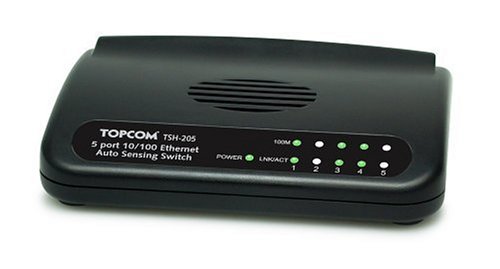
Figure 1: Topcom TSH 205 Ethernet Switch. This image displays the compact design of the switch, highlighting its multiple Ethernet ports and status indicators on the front panel.
2.1 Connecting the Power
- Connect the power adapter to the DC input port on the switch.
- Plug the power adapter into a standard electrical outlet.
- Verify that the power indicator LED on the switch illuminates, indicating the device is receiving power.
2.2 Network Connections
The TSH 205 features an autosensing function, meaning it automatically detects the speed and duplex mode of connected devices, simplifying setup.
- Connect your modem or router to any of the available Ethernet ports on the switch using a standard Ethernet cable.
- Connect your computers, printers, network-attached storage (NAS) devices, or other network devices to the remaining Ethernet ports on the switch.
- Ensure that the corresponding port indicator LEDs on the switch light up for each connected device, indicating an active connection.
3. Operating
The Topcom TSH 205 is a plug-and-play device that requires no software configuration. Once connected, it automatically facilitates data transfer between connected devices.
LED Indicators
- Power LED: Illuminates when the switch is powered on.
- Port LEDs (per port):
- Solid Green: Indicates a stable 100 Mbit connection.
- Solid Amber: Indicates a stable 10 Mbit connection.
- Flashing: Indicates data activity (data being transmitted or received) on that port.
- Off: No device is connected, or the connected device is not powered on.
4. Maintenance
To ensure the longevity and optimal performance of your Topcom TSH 205 Ethernet Switch, follow these simple maintenance guidelines.
Cleaning
- Disconnect the power adapter before cleaning.
- Use a soft, dry cloth to wipe the exterior of the switch.
- Do not use liquid cleaners or aerosol sprays, as they may damage the device.
Environmental Considerations
- Place the switch in a well-ventilated area to prevent overheating.
- Avoid placing the switch near heat sources or in direct sunlight.
- Keep the device away from strong electromagnetic fields.
5. Troubleshooting
If you encounter issues with your Topcom TSH 205, refer to the following common problems and solutions.
No Power
- Ensure the power adapter is securely connected to both the switch and a working electrical outlet.
- Check if the power outlet is functional by plugging in another device.
- Verify that the Power LED on the switch is illuminated.
No Network Connection
- Check that Ethernet cables are securely plugged into both the switch and the connected devices.
- Ensure the connected devices (e.g., computer, router) are powered on and functioning correctly.
- Verify that the corresponding Port LED on the switch is lit for the connected device. If not, try a different Ethernet cable or port.
- Restart the connected devices and the switch.
Slow Network Speed
- Ensure all connected devices are capable of 100 Mbit speeds to maximize performance.
- Check for excessive network traffic or bandwidth-intensive applications running on your network.
- Verify that the Port LEDs are indicating the expected speed (e.g., solid green for 100 Mbit).
6. Specifications
| Feature | Description |
|---|---|
| Model Name | TSH 205 |
| Item Model Number | 211139 |
| Brand | Topcom |
| Connectivity | 10/100 Mbit Ethernet |
| Number of Ports | 8 (for PCs) |
| Key Features | Autosensing function |
| Item Weight | 558 g |
| Package Dimensions | 18 x 14 x 6.4 cm |
| ASIN | B000233OO4 |
| First Available Date | 15 January 2020 |
7. Warranty and Support
Warranty Information
Topcom products are manufactured to the highest quality standards. This product is covered by a limited warranty from the date of purchase against defects in materials and workmanship. Please retain your proof of purchase for warranty claims. The warranty does not cover damage caused by misuse, accident, unauthorized modification, or external causes.
Technical Support
For technical assistance, troubleshooting, or further information regarding your Topcom TSH 205 Ethernet Switch, please visit the official Topcom website or contact their customer support. Contact details can typically be found on the manufacturer's website or on the product packaging.
Please note: Specifications and product appearance are subject to change without prior notice.