
Introduction
This manual provides essential information for the safe and efficient operation of your Royal Machines HT500X 5-Sheet Cross-Cut Shredder. Please read these instructions carefully before using the shredder and retain them for future reference. The HT500X is designed for personal and home office use, offering enhanced security by shredding documents into small cross-cut particles.
Important Safety Instructions
- Read all instructions: Familiarize yourself with the shredder's functions and safety warnings before operation.
- Keep away from children and pets: This shredder is not a toy. Keep hands, hair, and loose clothing away from the paper entry slot.
- Unplug when not in use: Always unplug the shredder before moving, cleaning, or emptying the wastebasket.
- Avoid aerosols: Do not use aerosol products near the shredder, as they may cause fire.
- Proper power source: Connect the shredder to a properly grounded power outlet with the correct voltage as indicated on the label.
- Do not overload: Adhere to the maximum sheet capacity to prevent jams and motor damage.
- No wet or sticky materials: Do not shred wet, sticky, or adhesive-backed materials, as they can damage the cutting blades.
- Credit card shredding: Only shred one credit card at a time through the designated slot, if available.
Setup
- Unpack: Carefully remove all components from the packaging.
- Position the wastebasket: Place the mesh wastebasket on a flat, stable surface.
- Attach shredder head: Carefully place the shredder head onto the rim of the wastebasket, ensuring it sits securely.
- Connect power: Plug the power cord into a standard electrical outlet. The shredder is now ready for use.
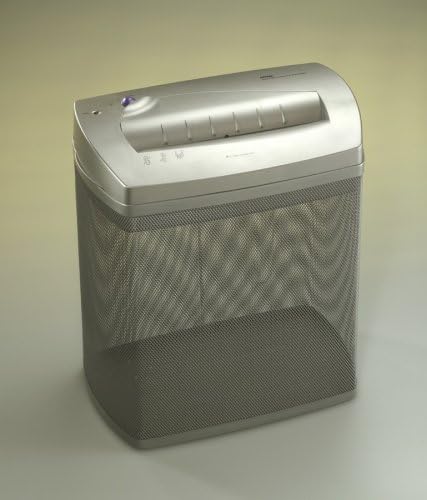
An image showing the Royal Machines HT500X cross-cut shredder. It features a silver-grey shredder head placed on top of a matching mesh wastebasket. The paper entry slot is visible on the top, along with control indicators.
Operating Instructions
Powering On/Off
The HT500X features an Auto Start/Stop function. There is typically a switch or button to select between OFF, AUTO, and REVERSE modes. Set the switch to 'AUTO' for normal operation.
Shredding Documents
- Ensure the shredder is in 'AUTO' mode.
- Insert up to 5 sheets of paper (8.5" x 11", 20 lb bond) into the paper entry slot. The shredder will automatically start and stop once the paper has passed through.
- For optimal performance, feed paper straight into the slot.
Shredding Credit Cards
The HT500X is designed to shred credit cards. Insert one credit card at a time into the center of the paper entry slot. The shredder will process the card and stop automatically.
Reverse Function
In case of a paper jam or to clear an overload, switch the shredder to 'REVERSE' mode. This will reverse the cutting blades, allowing you to pull out the jammed paper. Once cleared, switch back to 'AUTO' or 'OFF'.
Maintenance
Emptying the Wastebasket
Regularly check and empty the mesh wastebasket to prevent paper jams and ensure continuous operation. Always unplug the shredder before lifting the shredder head to empty the basket.
Cleaning
Wipe the exterior of the shredder with a soft, dry cloth. Do not use abrasive cleaners or solvents. For the cutting blades, occasional oiling is recommended to maintain performance and extend the life of the shredder. Use shredder oil specifically designed for paper shredders.
Oiling the Shredder
Apply a thin line of shredder oil across the paper entry slot. Run a few sheets of paper through the shredder to distribute the oil evenly. This should be done after every few hours of operation or when you notice a decrease in performance.
Troubleshooting
- Shredder does not start:
- Ensure the power cord is securely plugged into a working outlet.
- Check if the shredder head is correctly seated on the wastebasket.
- Verify the switch is set to 'AUTO'.
- Paper jam:
- Switch to 'REVERSE' mode to attempt to clear the jam.
- If the jam persists, unplug the shredder and carefully remove the paper manually.
- Avoid exceeding the maximum sheet capacity.
- Shredder stops during operation (overheating):
- The shredder has a thermal overload protection feature. If it overheats, it will automatically shut off.
- Unplug the shredder and allow it to cool down for at least 20-30 minutes before resuming operation.
- Shredder is noisy or slow:
- The wastebasket may be full. Empty it.
- The cutting blades may need oiling. Refer to the 'Oiling the Shredder' section.
Specifications
| Brand | Royal |
| Model Number | HT500 |
| Cut Type | Cross Cut |
| Sheet Capacity | 5 sheets (20 lb bond paper) |
| Shred Size | 1/8" x 1" (approximate) |
| Paper Entry Slot Width | 9 inches |
| Special Feature | Automatic Start/Stop |
| Wastebasket Capacity | 18.5 liters (approximate) |
| Product Dimensions | 7.25 x 13 x 14.5 inches |
| Item Weight | 9.6 pounds |
Warranty Information
Royal products are manufactured to high-quality standards. For specific warranty details, including coverage period and terms, please refer to the warranty card included with your product or visit the official Royal website. Keep your purchase receipt as proof of purchase for any warranty claims.
Customer Support
If you encounter any issues not covered in this manual or require further assistance, please contact Royal customer support. Contact information can typically be found on the Royal website or on the product packaging. When contacting support, please have your model number (HT500) and purchase information ready.


