1. Introduction
This manual provides essential instructions for the safe and effective use, maintenance, and care of your STANLEY Surform Shaver Tool, Model 5-21-115. Please read this manual thoroughly before operating the tool and retain it for future reference.
2. Safety Information
Always observe basic safety precautions when using hand tools to reduce the risk of injury.
- Wear appropriate personal protective equipment (PPE), such as safety glasses and gloves, to protect against debris and sharp edges.
- Inspect the tool before each use for any damage or wear. Do not use a damaged tool.
- Ensure your work area is well-lit and clear of obstructions.
- Maintain a firm grip on the tool during operation.
- Keep hands and fingers away from the blade during use and when changing blades.
- Store the tool safely when not in use, out of reach of children.
3. Product Overview
The STANLEY Surform Shaver Tool is designed for efficient material removal and smoothing tasks. Its compact design and specific blade configuration make it suitable for working in confined or awkward spaces.
3.1 Key Features
- Lightweight plastic moulded body for comfortable handling.
- Curved 62mm (2 1/2in) blade for increased stock removal.
- Side cutting edge for versatile applications.
- Click-action blade replacement mechanism for easy blade changes.
- Designed for effective use on the pull stroke.
- Sharpened and hardened teeth for consistent cut quality.
3.2 Tool Components

Figure 1: Main view of the STANLEY Surform Shaver Tool. This image shows the overall yellow plastic body and the exposed blade at the front.

Figure 2: Side view illustrating the curved profile of the tool and its blade.
The tool consists of a durable yellow plastic handle and body, integrated with a replaceable metal blade. The blade features numerous small, sharp teeth designed to shave material efficiently.
4. Setup
The STANLEY Surform Shaver Tool requires minimal setup before use.
- Unpack the tool: Carefully remove the tool from its packaging.
- Inspect the blade: Ensure the blade is securely seated and free from damage.
- Prepare the work surface: Ensure the material to be worked on is stable and secured.
5. Operating Instructions
The Surform Shaver Tool is designed for effective material removal on the pull stroke.
- Grip the tool firmly: Hold the tool by its handle, ensuring a secure and comfortable grip.
- Position the blade: Place the blade against the material you wish to shave or smooth.
- Apply pressure and pull: Apply moderate, even pressure and pull the tool towards you. The tool is most effective on the pull stroke.
- Utilize the side cutting edge: For intricate work or reaching into corners, use the side cutting edge of the blade.
- Work in layers: For significant material removal, make several passes, removing small amounts of material with each stroke.
- Clean debris: Periodically clear away shaved material to maintain visibility and prevent clogging.

Figure 3: Proper grip for operating the Surform Shaver Tool.
Applications:
- Stripping paint from various surfaces.
- Smoothing down filler or plaster, especially in awkward or curved areas.
- Truing and fine finishing of wood or other soft materials.
6. Maintenance
Regular maintenance ensures the longevity and optimal performance of your Surform Shaver Tool.
6.1 Cleaning
- After each use, clean any accumulated debris from the blade and body. A stiff brush can be used to clear material from the blade teeth.
- Do not use harsh chemicals or abrasive cleaners, as these may damage the tool's plastic body or blade.
- Ensure the tool is dry before storing.
6.2 Blade Replacement
The blade of the Surform Shaver Tool is replaceable. Replace the blade when it becomes dull or damaged to maintain cutting efficiency.
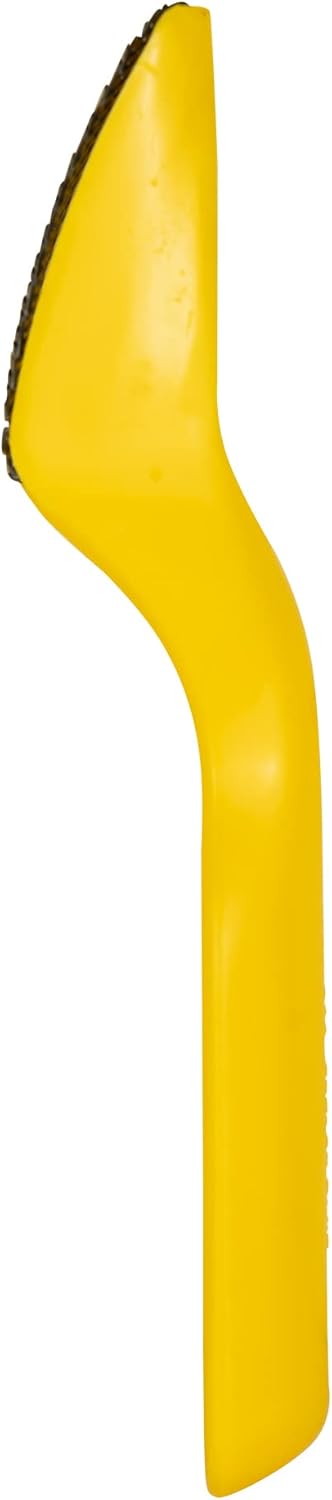
Figure 4: Detail of the Surform blade, showing the individual teeth.
- Identify the blade release mechanism: The tool features a click-action blade replacement system. Locate the mechanism that secures the blade.
- Remove the old blade: Carefully disengage the mechanism and slide out the old blade. Exercise caution as the old blade may still be sharp.
- Insert the new blade: Align the new STANLEY replacement blade (sold separately) with the tool's slot and slide it into place until the click-action mechanism engages, securing it firmly.
- Verify security: Gently tug on the blade to ensure it is properly seated and locked before use.
7. Troubleshooting
| Problem | Possible Cause | Solution |
|---|---|---|
| Tool not shaving effectively | Dull or damaged blade; material buildup on blade. | Clean the blade. If still ineffective, replace the blade (refer to Section 6.2). |
| Blade feels loose | Blade not properly seated or mechanism not engaged. | Re-seat the blade, ensuring the click-action mechanism is fully engaged. |
| Excessive effort required | Incorrect technique (pushing instead of pulling); dull blade. | Ensure you are using the pull stroke. Replace the blade if dull. |
8. Specifications
- Model Number: 5-21-115
- Brand: STANLEY
- Material: Plastic body, Metal blade
- Color: Yellow
- Overall Length: 185mm (7 inches)
- Blade Width: 62mm (2 1/2 inches)
- Item Weight: 40 Grams (1.41 ounces)
- Primary Function: Stripping paint, smoothing filler/plaster, stock removal, truing, fine finishing.
9. Warranty and Support
For specific warranty information regarding your STANLEY Surform Shaver Tool, please refer to the documentation included with your purchase or visit the official STANLEY website.
For further assistance or to explore other STANLEY products, you may visit the STANLEY Store on Amazon.


