
1. Product Overview
The BLACK+DECKER KX3300T-GB 2400W Wallpaper Steamer Stripper is designed for efficient removal of various wallpaper types, including vinyl, multi-layered, painted, and textured coatings. It features a 4-liter water tank, providing approximately 60 minutes of continuous steam, and a large steam plate to cover significant areas quickly.
Key Features:
- Quick and easy removal of wallpaper from walls and other flat surfaces.
- Large steam plate for efficient coverage and time-saving.
- Safety release valves to prevent overheating.
- Boil dry safety cut-out protects the unit from damage.
- Large 4-liter tank with water level indicator offers up to 60 minutes of runtime.

Image 1.1: The BLACK+DECKER KX3300T-GB wallpaper steamer in operation.
2. Important Safety Information
Always read and understand all safety warnings and instructions before operating this appliance. Failure to follow these instructions may result in electric shock, fire, and/or serious injury.
- Electrical Safety: Ensure the power supply matches the rating plate on the appliance. Do not use the appliance with a damaged cord or plug. Keep the power cord away from heat, oil, sharp edges, or moving parts.
- Steam Hazard: This appliance produces hot steam. Always direct the steam plate away from yourself, other people, and animals. Wear appropriate personal protective equipment, including heat-resistant gloves and eye protection.
- Water Tank: Only fill the water tank with clean tap water. Do not add any chemicals, detergents, or perfumed products to the water tank, as this can damage the appliance or create hazardous fumes.
- Overheating Protection: The unit is equipped with safety release valves and a boil-dry safety cut-out. Do not tamper with these safety features. If the unit overheats or runs out of water, it will automatically shut off.
- Ventilation: Ensure adequate ventilation in the work area to prevent the buildup of steam and moisture.
- Children and Bystanders: Keep children and bystanders away from the work area. Do not allow children to operate the appliance.
- Storage: Allow the appliance to cool completely before storing. Store in a dry, secure place out of reach of children.
3. Components
The BLACK+DECKER KX3300T-GB Wallpaper Steamer Stripper consists of the following main components:
- Steamer Unit: The main body containing the water tank and heating element.
- Steam Plate: The large plate that applies steam to the wallpaper.
- Steam Hose: Connects the steamer unit to the steam plate.
- Water Tank Cap: For filling and sealing the water tank.
- Power Cord: For connecting to an electrical outlet.
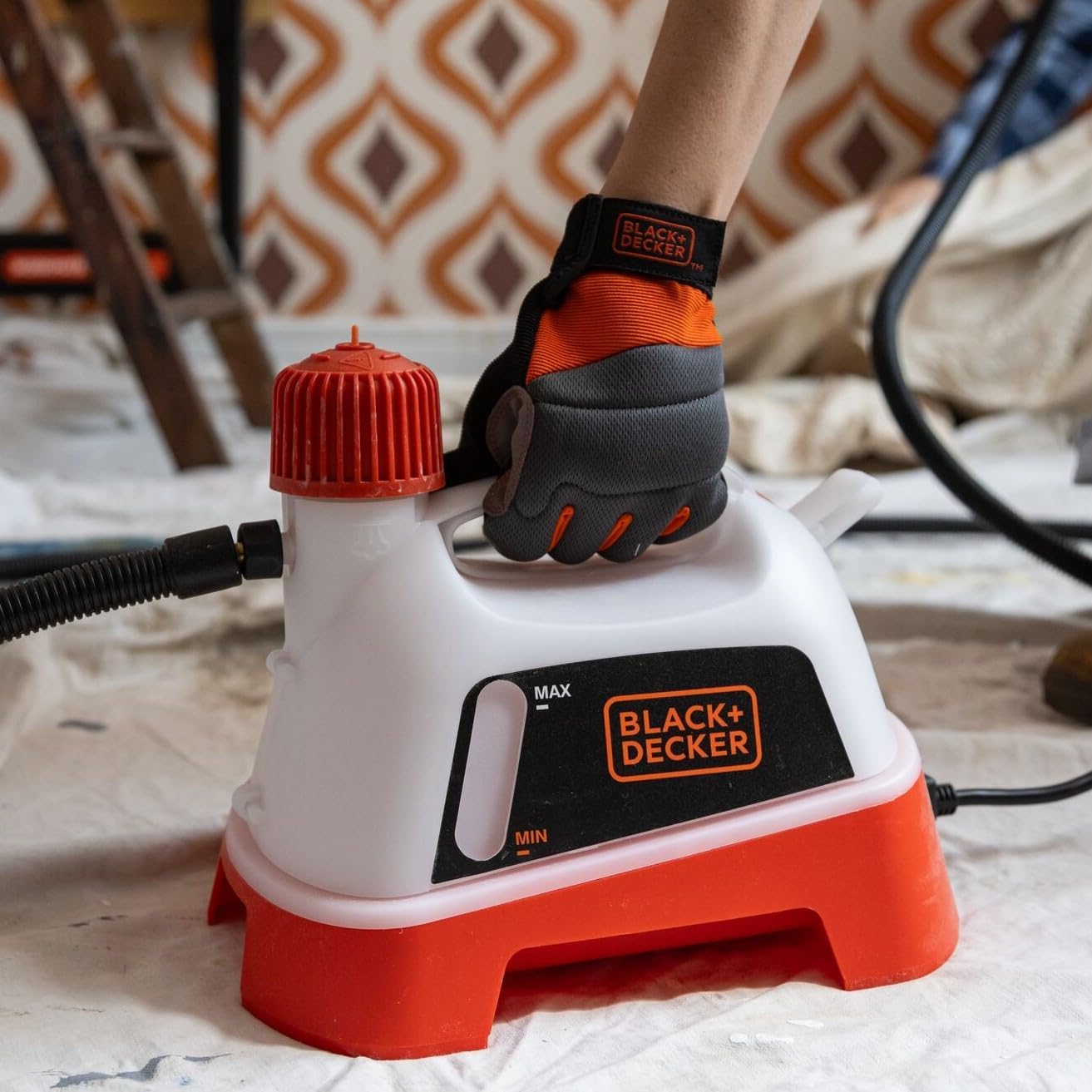
Image 3.1: The main steamer unit with its water tank and hose connection.
4. Setup and Assembly
4.1 Unpacking
- Carefully remove all components from the packaging.
- Inspect the appliance for any damage. Do not use if damaged.
- Retain packaging for future storage or transport.
4.2 Filling the Water Tank
- Ensure the appliance is unplugged from the power outlet.
- Unscrew the water tank cap (usually red or orange) from the top of the steamer unit.
- Fill the tank with clean tap water up to the 'MAX' indicator line. Do not overfill.
- Securely screw the water tank cap back on.
4.3 Connecting the Steam Plate
- Connect one end of the steam hose to the outlet on the steamer unit. Ensure it is firmly attached.
- Connect the other end of the steam hose to the inlet on the steam plate. Ensure a secure connection.
5. Operating Instructions
5.1 Preparation
- Clear the work area of furniture and obstacles.
- Protect floors and adjacent surfaces with drop cloths or plastic sheeting.
- Ensure the room is well-ventilated.
- Wear appropriate safety gear, including gloves and eye protection.
5.2 Steaming Process
- Plug the steamer unit into a suitable power outlet. The unit will begin to heat the water.
- Wait for the water to boil and steam to be produced. This typically takes several minutes.
- Once steam is consistently flowing from the steam plate, place the steam plate firmly against the wallpaper surface.
- Hold the steam plate in position for approximately 10-20 seconds, allowing the steam to penetrate the wallpaper and loosen the adhesive. The exact time may vary depending on the wallpaper type and thickness.
- Carefully remove the steam plate and immediately use a wallpaper scraper to peel away the softened wallpaper.
- Repeat the process, working in small sections, overlapping slightly with previously steamed areas.
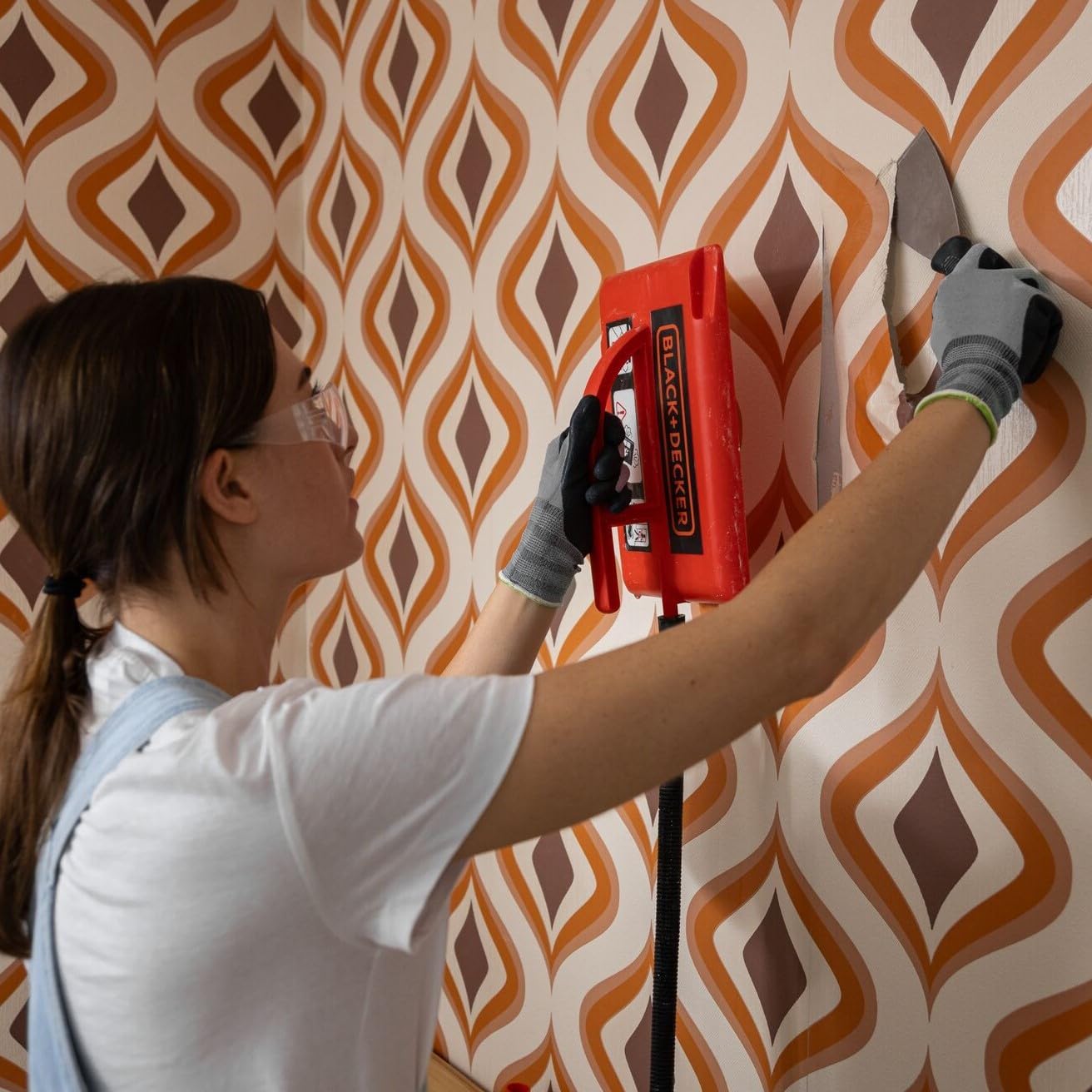
Image 5.1: Demonstrating the use of the steam plate and scraper for wallpaper removal.
5.3 Tips for Effective Wallpaper Removal
- For multi-layered or painted wallpaper, score the surface with a wallpaper scoring tool before steaming to allow steam to penetrate more easily.
- Work from top to bottom on walls to allow gravity to assist in peeling.
- Keep the steam plate moving slightly to avoid concentrating heat in one spot for too long, which could damage the wall surface.
- If the wallpaper is difficult to remove, apply steam for a longer duration or re-steam the area.
6. Maintenance
6.1 Cleaning
- Always unplug the appliance and allow it to cool completely before cleaning.
- Empty any remaining water from the tank.
- Wipe the exterior of the steamer unit and steam plate with a damp cloth. Do not use abrasive cleaners or solvents.
- Descaling: Periodically descale the unit, especially in hard water areas. Consult the full product manual for specific descaling instructions, typically involving a vinegar solution.
6.2 Storage
- Ensure the appliance is clean, dry, and completely cool before storing.
- Store the steamer unit, steam plate, and hose in a dry, secure location, out of reach of children.
- Avoid coiling the hose too tightly to prevent damage.
7. Troubleshooting
| Problem | Possible Cause | Solution |
|---|---|---|
| No steam produced | Unit not plugged in; Water tank empty; Unit not heated sufficiently; Hose not connected properly. | Check power connection; Fill water tank; Allow sufficient heating time (5-10 minutes); Ensure hose connections are secure. |
| Wallpaper not peeling easily | Insufficient steaming time; Wallpaper scored insufficiently; Very thick or old wallpaper. | Increase steaming duration (20-30 seconds); Score wallpaper more thoroughly; Re-steam stubborn areas. |
| Unit automatically shuts off | Water tank empty (boil-dry protection); Unit overheated. | Unplug, allow to cool, then refill water tank; Ensure proper ventilation and clear any obstructions. |
| Water leaking from connections | Hose connections are loose. | Tighten all hose connections securely. |
8. Technical Specifications
| Specification | Detail |
|---|---|
| Model Number | B/DKX3300T |
| Power | 2400 W |
| Water Tank Capacity | 4 Litres |
| Runtime | Up to 60 minutes |
| Item Weight | 5.4 pounds (approx. 2.45 kg) |
| Product Dimensions | 12.6 x 13.19 x 9.45 inches (approx. 32 x 33.5 x 24 cm) |
| Voltage | 12 Volts (Note: This specification might be incorrect or refer to an internal component. The product is a 2400W steamer, typically requiring standard mains voltage for operation. Please verify with product labeling.) |
| Manufacturer | Stanley Black & Decker |
9. Warranty and Customer Support
BLACK+DECKER products are manufactured to high-quality standards. For information regarding your product's warranty, please refer to the warranty card included with your purchase or visit the official BLACK+DECKER website. For technical assistance, spare parts, or repair services, please contact BLACK+DECKER customer support through their official channels.
- Online Support: Visit the official BLACK+DECKER website for FAQs, product registration, and service center locations.
- Contact Information: Refer to your product packaging or the BLACK+DECKER website for regional customer service phone numbers and email contacts.