
1. Introduction
The Nikon SB-800 AF Speedlight is an advanced external flash unit designed for use with Nikon digital and film SLR cameras. It offers versatile lighting control and integrates seamlessly with Nikon's i-TTL flash system for precise exposure in various shooting conditions.

Figure 1.1: The Nikon SB-800 AF Speedlight, showcasing its compact design and integrated diffuser.
Key Features:
- Autofocus Speedlight: Compatible with both digital and film SLR cameras.
- Intelligent i-TTL System: Supports automatic balanced fill-flash for consistent lighting.
- Automatic Light Output Control: Adjusts light output based on distance and aperture settings.
- Dot Matrix LCD: Provides clear and easy-to-read graphics for settings and status.
- Ergonomic Controls: Features conveniently placed buttons and switches for intuitive operation.
2. Safety Information
Please read all safety instructions carefully before using the Nikon SB-800 AF Speedlight to prevent injury or damage to the product or other equipment.
- Do not disassemble or modify the unit. High voltage components are present.
- Keep the unit dry. Do not expose to water or high humidity.
- Avoid direct eye exposure to the flash, especially at close range, as it can cause temporary vision impairment.
- Use only recommended batteries. Incorrect battery types or improper installation can lead to leakage, overheating, or explosion.
- Do not operate the flash in the presence of flammable gases or liquids.
- Keep out of reach of children.
3. Setup
3.1 Unpacking
Carefully remove all components from the packaging. The standard package includes:
- Nikon SB-800 AF Speedlight unit
- Four AA batteries (may be included)
- Optional SD-7 DC Unit (if purchased separately)
- Optional SD-8A Battery Pack (if purchased separately)
- Soft case
- Speedlight Stand (AS-19)

Figure 3.1: The SB-800 Speedlight shown with its soft case and AS-19 stand.
3.2 Battery Installation
- Open the battery compartment cover located on the side of the Speedlight.
- Insert four AA-size batteries (alkaline, Ni-MH, or lithium) according to the polarity indicators (+/-) inside the compartment.
- Close the battery compartment cover securely.
- For extended power and faster recycling, the optional SD-8A Battery Pack can be used.
3.3 Mounting the Speedlight
- Ensure both the camera and the Speedlight are turned off.
- Slide the Speedlight's mounting foot into the camera's hot shoe until it clicks into place.
- Tighten the locking lever on the Speedlight to secure it to the camera.
- To remove, loosen the locking lever and slide the Speedlight out of the hot shoe.
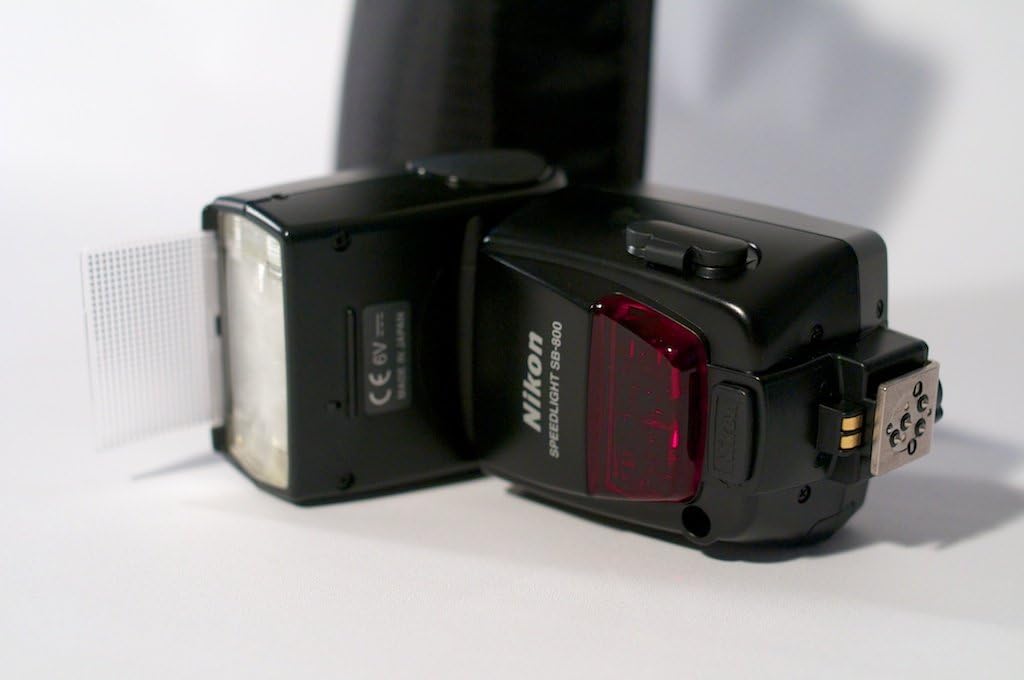
Figure 3.2: Side view of the SB-800, highlighting the hot shoe mount for camera attachment.
4. Operating the SB-800
4.1 Controls and Display
The SB-800 features an intuitive control panel with a dot matrix LCD for easy navigation and setting adjustments.

Figure 4.1: Detailed view of the SB-800's LCD display and control buttons, including MODE, FLASH, ON/OFF, and SELECT.
- ON/OFF Button: Powers the unit on or off.
- MODE Button: Cycles through various flash modes (e.g., i-TTL, Manual, Repeating Flash).
- SELECT Button: Used to navigate menus and confirm selections.
- FLASH Button: Test fires the flash.
- Zoom Head: Manually or automatically adjusts the flash coverage to match the lens focal length.
4.2 Flash Modes
The SB-800 supports several flash modes:
- i-TTL (Intelligent Through-The-Lens): Automatic balanced fill-flash for optimal exposure. This is the default and most commonly used mode with compatible Nikon DSLRs.
- Manual (M): Allows manual control over flash output from full power down to 1/128 power.
- Repeating Flash (RPT): Fires the flash multiple times during a single exposure for stroboscopic effects.
- Auto Aperture (AA): Automatically sets flash output based on the camera's aperture setting and flash sensor.
- Non-TTL Auto (A): Similar to AA but uses the flash's own light sensor.
4.3 Diffuser and Bounce Card
The SB-800 includes a built-in wide-angle diffuser and a bounce card to soften and direct light.

Figure 4.2: The SB-800 with its integrated wide-angle diffuser and bounce card pulled out, used for softening and directing flash light.
- Wide-Angle Diffuser: Pull out the diffuser panel to spread light for wider lens coverage (e.g., 14mm focal length).
- Bounce Card: Pull out the white bounce card to create a catchlight in subjects' eyes or to bounce light off a ceiling when the flash head is tilted.
4.4 Wireless Operation
The SB-800 can be used as a remote flash unit in Nikon's Creative Lighting System (CLS). It can be triggered wirelessly by a master flash (e.g., another SB-800 or a camera's built-in flash with commander mode) or an SU-800 Wireless Speedlight Commander.
- Set the SB-800 to Remote mode via the MODE button.
- Configure the channel and group settings to match the master unit.
- Position the remote flash for desired lighting effects.
5. Maintenance
5.1 Cleaning
- Wipe the Speedlight body with a soft, dry cloth.
- For stubborn dirt, use a cloth lightly dampened with water or a mild cleaning solution, then wipe dry.
- Do not use organic solvents like paint thinner or benzene.
- Clean the flash head and sensor window gently with a lens cleaning cloth.
5.2 Storage
- Remove batteries if the Speedlight will not be used for an extended period to prevent leakage.
- Store the unit in a cool, dry place, away from direct sunlight and extreme temperatures.
- Use the provided soft case for protection during storage and transport.
6. Troubleshooting
If you encounter issues with your SB-800 Speedlight, refer to the following common problems and solutions:
| Problem | Possible Cause | Solution |
|---|---|---|
| Flash does not fire. | Batteries are depleted or incorrectly inserted. Unit is off. Camera is not compatible or not set correctly. | Check battery level and orientation. Turn on the Speedlight. Ensure camera flash settings are appropriate. |
| Flash is too bright or too dim. | Incorrect flash mode or exposure compensation. Subject is too close or too far. | Adjust flash exposure compensation. Change flash mode (e.g., to i-TTL). Ensure subject is within flash range. |
| Flash recycling time is slow. | Batteries are low. High power output setting. | Replace or recharge batteries. Use lower flash power settings. Consider using the optional SD-8A Battery Pack. |
| Wireless flash not working. | Incorrect channel/group settings. Obstruction between master and remote. | Verify channel and group settings on both master and remote units. Ensure clear line of sight for optical communication. |
7. Specifications
| Feature | Detail |
|---|---|
| Brand | Nikon |
| Model Name | SB-800 |
| Model Number | 4801 |
| Compatible Mountings | Nikon |
| Camera Flash Type | Shoe Mount / Studio |
| Flash Sync Speed | Approximately 1/41600 sec (Maximum) |
| Power Source | 4 AA batteries (Alkaline, Ni-MH, Lithium) |
| Wireless Technology | Optical Pulse (Nikon CLS compatible) |
| Mount Type | Hot Shoe Mount |
| Item Dimensions (D x W x H) | 3.6"D x 2.8"W x 5"H |
| Color | Black |
| Exposure Control Type | Manual, i-TTL Balanced Fill-Flash, Manual Flash (with CLS compatible cameras) |
| Water Resistance Level | Not Water Resistant |
| Item Weight | 0.77 Pounds (approx. 350g) |
| UPC | 018208048014 |
| GTIN | 00018208048014, 04960759024152 |
| Compatible Devices | Nikon D3000, D3100, D3200, D3300, D50, D500, D5000, D5100, D5200, D5300, D5500, D60, D600, D70, D700, D7000, D7100, D7200, D80, D90, D750, D200, D3, D300, D300s, D3400, D3s, D3x, D4, D4s, D5600, D610, D70s, D800, D800E, D810, D40, Coolpix P6000, D7500, D850, F6, Coolpix P7000, D5, D1, D100, D40x, D780, Z FC, 1 V1, Z6, Z7, Z7 II, Z8, D3500, Coolpix P7100, Df, Z50, D2hs, D2x, Coolpix P1000, Z9, 1 V2, 1 V3, Z6 II, D6, Z5, D2h, F60, Coolpix P7700, Coolpix P7800, D1x, F5, Z F, D2xs, D810a, D1h, Coolpix P950, F80d, F80s, FM10, Z30 |
8. Warranty & Support
8.1 Warranty Information
The Nikon SB-800 AF Speedlight typically comes with a 1-year warranty from the date of purchase. This warranty covers manufacturing defects and ensures the product functions as intended under normal use. Please retain your proof of purchase for warranty claims.
For specific terms and conditions, refer to the warranty card included with your product or visit the official Nikon website.
8.2 Customer Support
For technical assistance, service, or further inquiries regarding your Nikon SB-800 AF Speedlight, please contact Nikon customer support through their official website or authorized service centers. You can find contact details and support resources on the Nikon website:


