
Lenoxx LYSB00013JUDO-ELECTRNCS
Lenoxx Sound Programmable Personal Compact Disc Player
Model: CD-50
Introduction
Thank you for purchasing the Lenoxx Sound CD-50 Programmable Personal Compact Disc Player. This manual provides essential information for the safe and efficient operation of your new device. Please read it thoroughly before use and retain it for future reference.
Safety Information
- Do not expose the unit to rain or moisture.
- Avoid placing the unit near heat sources such as radiators, heat registers, stoves, or other apparatus (including amplifiers) that produce heat.
- Use only attachments/accessories specified by the manufacturer.
- Refer all servicing to qualified service personnel. Servicing is required when the apparatus has been damaged in any way.
- This device complies with Part 15 of the FCC Rules. Operation is subject to the following two conditions: (1) This device may not cause harmful interference, and (2) This device must accept any interference received, including interference that may cause undesired operation.
- Laser Safety: This product utilizes a Class 1 laser. Do not attempt to open the CD compartment while a disc is spinning.
Package Contents
Verify that all items are present in the package:
- Lenoxx Sound CD-50 Personal Compact Disc Player
- Deluxe Stereo Headphones
- Operating Instructions Manual (this document)

Figure 1: Front view of the Lenoxx Sound CD-50 Personal Compact Disc Player in its original retail packaging, showcasing the player, included deluxe stereo headphones, and key features like "Fully Programmable" and "Extended Battery Life."

Figure 2: Rear view of the Lenoxx Sound CD-50 Personal Compact Disc Player's retail packaging, displaying the "Operating Instructions" label and confirming the inclusion of deluxe stereo headphones and the requirement for 4 AA alkaline batteries.
Product Features
- Fully Programmable Compact Disc Player with Repeat Play function.
- Includes deluxe stereo headphones for personal listening.
- Extended battery life (requires 4 - AA batteries, not included).
- Equipped with 1-Bit DAC (Digital-to-Analog Converter) for quality audio.
- Auxiliary connectivity for versatile use.
Setup
1. Power Source (Batteries)
The CD-50 operates on 4 AA batteries (not included) or an optional 4.5V AC adapter (not included).
- Locate the battery compartment on the bottom of the unit.
- Slide the battery compartment cover open.
- Insert 4 AA batteries, ensuring correct polarity (+/-) as indicated inside the compartment.
- Close the battery compartment cover securely.
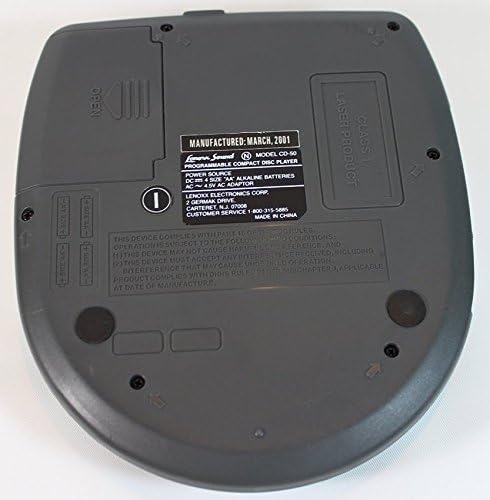
Figure 3: Underside of the Lenoxx Sound CD-50 Personal Compact Disc Player, clearly showing the two battery compartments for AA batteries and the product label with model number, power requirements, and manufacturer details.
2. Connecting Headphones
Plug the stereo headphones into the headphone jack located on the side of the unit.
Operating Instructions
Loading a CD
- Press the "OPEN" button or slide the "OPEN" latch to open the CD compartment lid.
- Place a compact disc onto the center spindle with the label side facing up.
- Gently press the disc down until it clicks into place.
- Close the CD compartment lid by pressing down until it clicks shut. Ensure it is fully closed to begin playback.

Figure 4: Top view of the Lenoxx Sound CD-50 Personal Compact Disc Player with the lid open, revealing the disc spindle and the arrangement of control buttons: OPEN, REPEAT, SKIP, PLAY/PAUSE, STOP/OFF, and PROGRAM. A yellow sticker indicates the power-off procedure.
Basic Playback
- Play/Pause: Press the PLAY/PAUSE button to start playback. Press it again to pause, and press it once more to resume.
- Stop/Off: Press the STOP/OFF button once to stop playback. The unit will automatically turn off after 30 seconds of inactivity.
- Skip Tracks: Press the SKIP button (forward arrow) to advance to the next track. Press the SKIP button (backward arrow) to go back to the beginning of the current track, or press it twice to go to the previous track.
Repeat Function
Press the REPEAT button to cycle through repeat modes:
- Press once for single track repeat.
- Press twice for all tracks repeat.
- Press a third time to cancel repeat mode.
Programming Tracks
The CD-50 allows you to program a sequence of tracks to play in a specific order.
- In stop mode, press the PROGRAM button. The program indicator will flash on the display.
- Use the SKIP buttons to select the desired track number.
- Press the PROGRAM button again to confirm the selection and add it to the program list.
- Repeat steps 2 and 3 to add more tracks to your program.
- Once all desired tracks are programmed, press the PLAY/PAUSE button to start playback of your programmed sequence.
- To clear the program, open the CD compartment lid or press the STOP/OFF button twice.
Maintenance
- Cleaning the Unit: Use a soft, dry cloth to clean the exterior of the unit. Do not use abrasive cleaners or solvents.
- Cleaning the Lens: If the unit experiences playback issues, the laser lens may be dirty. Use a specialized CD lens cleaner disc (not included) to clean the lens. Do not touch the lens directly.
- Battery Care: Remove batteries if the unit will not be used for an extended period to prevent leakage.
Troubleshooting
| Problem | Possible Cause | Solution |
|---|---|---|
| Unit does not power on. | Batteries are dead or inserted incorrectly. | Replace batteries with new ones, ensuring correct polarity. |
| Disc skips or playback is interrupted. | Disc is dirty, scratched, or warped. Unit is subjected to excessive vibration. Laser lens is dirty. | Clean the disc with a soft, lint-free cloth. Use a clean, unscratched disc. Place the unit on a stable surface. Clean the laser lens with a CD lens cleaner. |
| No sound from headphones. | Headphones not fully plugged in. Headphones are faulty. Volume is too low. | Ensure headphones are securely plugged into the jack. Test with another pair of headphones. Increase the volume. |
| CD compartment lid does not close properly. | Disc is not seated correctly. | Ensure the disc is properly placed on the spindle and clicked into place. |
Specifications
| Feature | Detail |
|---|---|
| Model Number | CD-50 (LYSB00013JUDO-ELECTRNCS) |
| Power Source | 4 x AA Batteries (not included) or DC 4.5V AC Adapter (not included) |
| Product Dimensions (L x W x H) | 6.4 x 5.6 x 1.7 inches (approx.) |
| Item Weight | 10.6 ounces (approx.) |
| DAC Type | 1-Bit DAC |
| Included Components | Earphones |
| Connectivity Technology | Auxiliary |
Warranty and Support
For customer service or support, please contact Lenoxx Electronics Corp. at the number provided on the product label or packaging.
Note: The product listing indicates "No returns." Please refer to your point of purchase for specific return and warranty policies.
Manufacturer: Lenoxx Electronics Corp.
Customer Service: 1-800-313-5095
Ask a question about this manual
Ask about setup, troubleshooting, compatibility, parts, safety, or missing instructions. Manuals+ will review the question and use this page’s manual context to help answer it.