
Introduction
This manual provides detailed instructions for the installation, operation, and maintenance of your Infinity INF RA 6006 6-Channel Power Amplifier. Please read this manual thoroughly before attempting to install or operate your amplifier to ensure proper use and to prevent damage to the unit or your vehicle's audio system. Keep this manual for future reference.
Safety Information
Always observe the following safety precautions:
- Disconnect the vehicle's negative battery terminal before starting any installation.
- Ensure all wiring is properly routed and secured to prevent pinching or damage.
- Use appropriate gauge wiring for power and ground connections as specified in the installation section.
- Avoid installing the amplifier in locations exposed to direct sunlight, excessive heat, moisture, or dust.
- Do not operate the amplifier if it is damaged or malfunctioning. Refer to the troubleshooting section or contact qualified service personnel.
- Always use fuses of the specified rating. Never replace a fuse with one of a higher rating.
Setup and Installation
Proper installation is crucial for optimal performance and longevity of your amplifier. If you are unsure about any part of the installation process, consult a professional installer.
1. Unpacking
Carefully remove the amplifier and all accessories from the packaging. Inspect for any signs of damage. If damage is found, contact your dealer immediately.
2. Mounting Location
Choose a mounting location that is dry, well-ventilated, and away from direct heat sources. Ensure there is sufficient space around the amplifier for proper air circulation. Common locations include under a seat, in the trunk, or behind a panel. Secure the amplifier firmly to a solid surface using the provided mounting hardware.
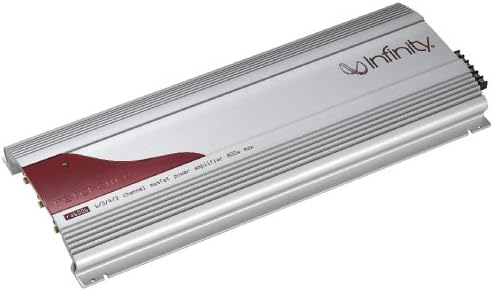
Image: The Infinity INF RA 6006 6-Channel Power Amplifier, showcasing its silver chassis with a red accent panel and the Infinity logo. This view highlights the heat sink fins designed for thermal dissipation.
3. Wiring Connections
All wiring should be performed with the vehicle's battery disconnected.
- Power (B+) Wire: Connect a heavy-gauge power wire (e.g., 4-gauge or 8-gauge depending on system power) directly from the positive terminal of the vehicle's battery to the B+ terminal on the amplifier. Install an in-line fuse holder with an appropriate fuse (not supplied) within 18 inches (45 cm) of the battery.
- Ground (GND) Wire: Connect a heavy-gauge ground wire of the same size as the power wire from the GND terminal on the amplifier to a clean, unpainted metal surface of the vehicle's chassis. Ensure a good electrical connection.
- Remote (REM) Turn-On Wire: Connect a smaller gauge wire (e.g., 18-gauge) from the REM terminal on the amplifier to the remote turn-on output of your head unit. This wire turns the amplifier on and off with your head unit.
- RCA Input Cables: Connect the RCA output cables from your head unit to the corresponding RCA input jacks on the amplifier. Ensure correct channel matching (Front, Rear, Subwoofer).
- Speaker Wires: Connect the speaker wires from your speakers to the appropriate speaker output terminals on the amplifier. Pay close attention to polarity (+ and -) for each speaker. The INF RA 6006 supports 6 channels, allowing for various configurations (e.g., 3-way stereo, 2-way stereo + subwoofer, or bridged configurations). Refer to your speaker impedance and amplifier specifications for safe operation.
4. Initial Settings
Before reconnecting the battery, ensure all connections are secure. After reconnecting the battery:
- Gain Control: Start with the gain controls set to minimum. Turn on your head unit and slowly increase the volume until distortion is audible. Then, slowly increase the amplifier's gain control until the desired volume is reached without distortion.
- Crossover Settings: The amplifier features built-in crossovers. Adjust the High-Pass Filter (HPF) for full-range speakers and the Low-Pass Filter (LPF) for subwoofers to optimize sound quality and protect your speakers. Refer to your speaker manufacturer's recommendations for crossover frequencies.
- Bass Boost: Use the bass boost feature sparingly and with caution to avoid speaker damage. Start with it off and only apply a small amount if desired.
Operating the Amplifier
Once installed and initially configured, the amplifier operates automatically with your head unit. The primary adjustments will be made through your head unit's volume and tone controls.
- Power On/Off: The amplifier will turn on when your head unit is powered on (via the remote turn-on wire) and turn off when the head unit is off.
- Volume Control: Adjust the overall system volume using your head unit. The amplifier's gain control should be set once during initial setup and generally not adjusted during normal operation.
- Sound Customization: Fine-tune your audio experience using the crossover settings and bass boost on the amplifier, or through your head unit's equalizer and sound processing features.
Maintenance
The Infinity INF RA 6006 amplifier is designed for reliable operation with minimal maintenance.
- Cleaning: Periodically wipe the exterior of the amplifier with a soft, dry cloth to remove dust. Do not use harsh chemicals or abrasive cleaners.
- Inspection: Annually inspect all wiring connections for tightness and corrosion. Ensure the amplifier's mounting remains secure. Check for any obstructions to airflow around the heat sink fins.
- Fuse Replacement: If the amplifier stops working, check the in-line fuse near the battery and the fuses on the amplifier itself (if applicable). Always replace a blown fuse with one of the exact same type and rating.
Troubleshooting
If you experience issues with your amplifier, refer to the following common problems and solutions before contacting service.
| Problem | Possible Cause | Solution |
|---|---|---|
| No Power / Amplifier does not turn on |
|
|
| No Sound Output |
|
|
| Distorted Sound |
|
|
| Amplifier Overheating |
|
|
Specifications
The following are key specifications for the Infinity INF RA 6006 6-Channel Power Amplifier:
- Model Number: INF RA 6006
- Brand: Infinity
- Number of Channels: 6
- Mounting Type: Stand Mount (Implied from "Staandmontage")
- Item Weight: 10 g (Note: This seems unusually low for a power amplifier and might be a data entry error, but it's taken directly from the source. Users should verify actual product weight.)
- GTIN: 00506670332798
- UPC: 506670332798
- First Available Date: January 15, 2020
Warranty and Support
Infinity products are designed for durability and performance. For specific warranty terms and conditions, please refer to the warranty card included with your product or visit the official Infinity website. For technical support, service, or replacement parts, please contact your authorized Infinity dealer or customer service department.
Please retain your proof of purchase for warranty claims.


