Product Overview
The Pelican 1600 Case is a rugged, watertight protective case designed to safeguard valuable equipment. This model features easy roller wheels, double throw latches, and a watertight construction. It includes an easy-to-adjust double-layer padded divider set and a convenient mesh organizer in the lid for optimal organization and protection.
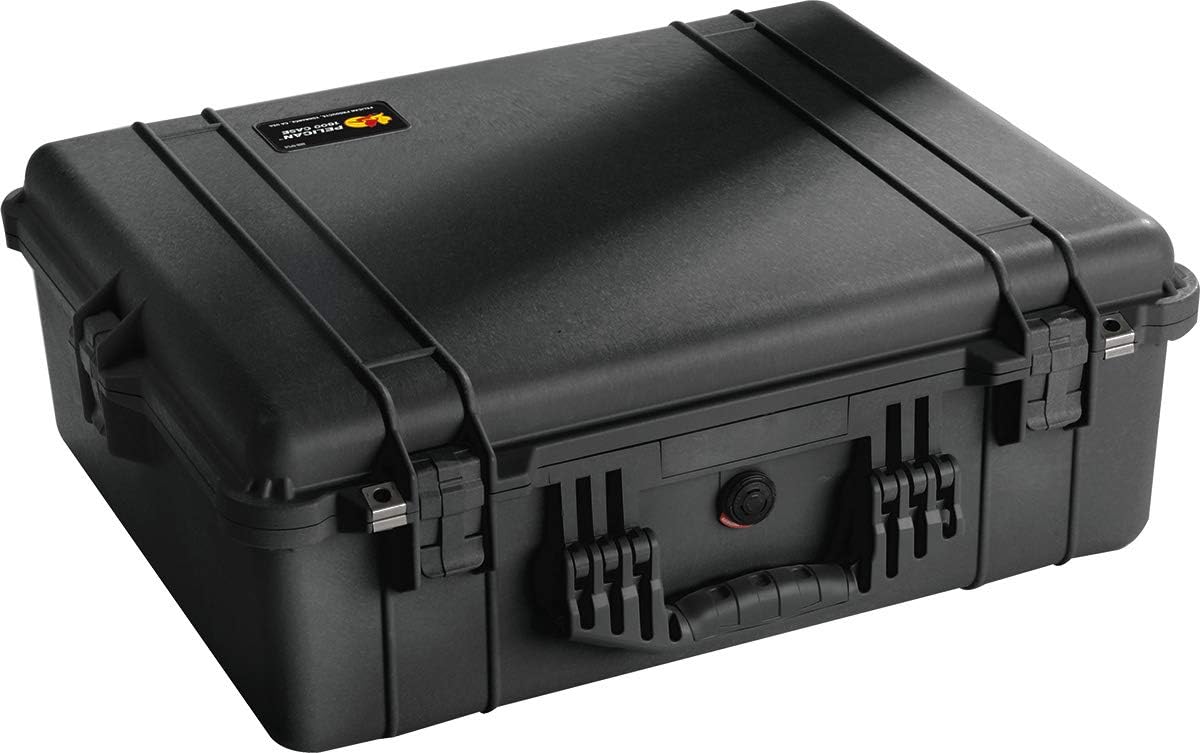
Figure 1: Pelican 1600 Case in closed position, showcasing its robust exterior.
Key Features:
- Watertight with Automatic Pressure Equalization Valve: Ensures contents remain dry and protected from pressure changes.
- Reinforced Padlock Protectors: Provides enhanced security for your valuable items.
- Stainless Steel Ball Bearing Wheels: Facilitates easy transport of the case.
- Double Layer Padded Dividers with Velcro Adjustments: Allows for customizable interior organization and cushioning.
- Convenient Mesh Organizer Securely Fashioned to the Lid: Offers additional storage for smaller accessories.
Setup and Interior Customization
The Pelican 1600 Case comes with a versatile padded divider system, allowing you to customize the interior to fit your specific equipment. This section outlines the steps for setting up and adjusting the dividers.

Figure 2: Pelican 1600 Case shown open, revealing the padded divider system.
- Open the Case: Release the four double throw latches (two on the front, one on each side) by pulling them outwards and then upwards. Lift the lid to fully open the case.
- Access Dividers: The case contains a double layer of padded dividers. These are secured with Velcro, allowing for easy repositioning.
- Customize Layout: Arrange the padded dividers to create compartments that snugly fit your equipment. Ensure adequate cushioning around all items. The Velcro attachments allow for flexible and secure configurations.
- Utilize Mesh Organizer: The mesh organizer located in the lid can be used to store smaller items such as cables, documents, or flat accessories.
Operating the Case
Proper operation ensures the longevity and protective capabilities of your Pelican 1600 Case.
Closing and Sealing:
- Align Lid: Carefully lower the lid, ensuring it aligns correctly with the base of the case.
- Engage Latches: Press down firmly on each of the four double throw latches until they click securely into place. Ensure all latches are fully engaged to maintain the watertight seal.
- Pressure Equalization Valve: The automatic pressure equalization valve (Figure 3) will automatically adjust the internal pressure of the case to match the external atmospheric pressure, preventing vacuum lock and making the case easier to open after changes in altitude or temperature. No manual operation is required for this valve.

Figure 3: Detail of the automatic pressure equalization valve, ensuring internal pressure balance.
Security:
The case features reinforced padlock protectors (Figure 4) at the front. You can insert standard padlocks (not included) through these holes for added security. Ensure the padlock shackle is appropriately sized for the holes.

Figure 4: Reinforced padlock protector for securing the case contents.
Transport:
The Pelican 1600 Case is equipped with stainless steel ball bearing wheels and a retractable handle. Use the handle to pull the case on its wheels for convenient transport. For lifting, use the main handle located on the side of the case.

Figure 5: Pelican case being loaded, demonstrating its portability and ruggedness.

Figure 6: Pelican case enduring harsh conditions on a boat, highlighting its watertight capabilities.
Maintenance
Regular maintenance will help preserve the protective qualities and appearance of your Pelican 1600 Case.
- Cleaning: Clean the exterior of the case with mild soap and water. Avoid abrasive cleaners or solvents that could damage the plastic.
- O-Ring Inspection: Periodically inspect the O-ring seal located inside the lid for any signs of damage, cracks, or debris. A clean, intact O-ring is crucial for maintaining the watertight seal. If necessary, clean the O-ring and its groove with a soft cloth.
- Lubrication: For optimal performance, a thin coat of silicone grease (not petroleum-based products) can be applied to the O-ring once a year to keep it pliable and ensure a proper seal.
- Latch Functionality: Ensure latches operate smoothly and securely. If they become stiff, a small amount of silicone spray can be applied to the hinge points.
Troubleshooting
| Problem | Possible Cause | Solution |
|---|---|---|
| Difficulty opening case | Vacuum lock due to pressure differential; stiff latches. | Allow the automatic pressure equalization valve to equalize pressure. If latches are stiff, apply silicone spray. |
| Case not sealing properly (leaks) | Damaged or dirty O-ring; latches not fully engaged. | Inspect and clean O-ring. Ensure all four latches are securely closed. Replace O-ring if damaged. |
| Padded dividers do not stay in place | Velcro worn out or not properly attached. | Ensure Velcro strips are clean and properly aligned. Contact Pelican support for replacement dividers if Velcro is worn. |
Specifications
- Product Dimensions: 24.25 x 8.68 x 19.43 inches
- Item Weight: 14 pounds
- Model Number: 1600-004-110
- Manufacturer: Pelican Products
- Date First Available: August 28, 2005
- Included: 1604,WL/WD,BLACK (This refers to the case model with wheels/dividers, black color)
Warranty and Support
Pelican Products are known for their robust construction and reliability. Many Pelican cases, including the 1600 series, come with a Lifetime Guarantee against breakage or defects in workmanship. This provides peace of mind regarding the product's durability.
For specific warranty details, claims, or technical support, please refer to the official Pelican Products website or contact their customer service directly. Keep your purchase receipt as proof of ownership.
For further information, you may visit the official Pelican Store: Pelican Store on Amazon.


