
1. Introduction
Thank you for choosing the Breadman TR2200WWC Ultimate Bread Machine. This appliance is designed to simplify the bread-making process, allowing you to enjoy fresh, homemade bread with minimal effort. This manual provides essential information for the safe and efficient operation, maintenance, and troubleshooting of your bread machine. Please read all instructions carefully before first use and retain this manual for future reference.
2. Important Safety Instructions
- Always unplug the bread machine from the power outlet when not in use, before assembling or disassembling parts, and before cleaning.
- Do not immerse the main unit, cord, or plug in water or other liquids to prevent electrical shock.
- Close supervision is necessary when any appliance is used by or near children.
- Avoid contact with moving parts.
- Do not touch hot surfaces. Use oven mitts when removing the baking pan or handling hot bread.
- Do not operate any appliance with a damaged cord or plug, or after the appliance malfunctions or has been damaged in any manner.
- Use only accessories recommended by the manufacturer.
- Do not use outdoors.
- Do not let the cord hang over the edge of a table or counter, or touch hot surfaces.
- Do not place on or near a hot gas or electric burner, or in a heated oven.
- Extreme caution must be used when moving an appliance containing hot oil or other hot liquids.
3. Product Overview
3.1 Components
The Breadman TR2200WWC Ultimate Bread Machine consists of the following main components:
- Main Unit: The housing for the motor, heating element, and control panel.
- Baking Pan: Removable non-stick pan where ingredients are mixed and baked.
- Kneading Paddle: Detachable paddle located inside the baking pan for mixing and kneading dough.
- Lid: Covers the baking chamber, often with a viewing window.
- Control Panel: Located on the top of the unit, featuring a display and various buttons for program selection and settings.
- Measuring Cup and Spoon: (Typically included) For accurate ingredient measurement.

Figure 1: The Breadman TR2200WWC Ultimate Bread Machine in its closed position. This image shows the sleek silver exterior and the control panel on top.

Figure 2: The Breadman TR2200WWC Ultimate Bread Machine with its lid open, revealing the removable baking pan and the interior chamber.
3.2 Control Panel
The control panel allows you to select programs, adjust settings, and monitor the baking process. Refer to Figure 3 for a visual guide.
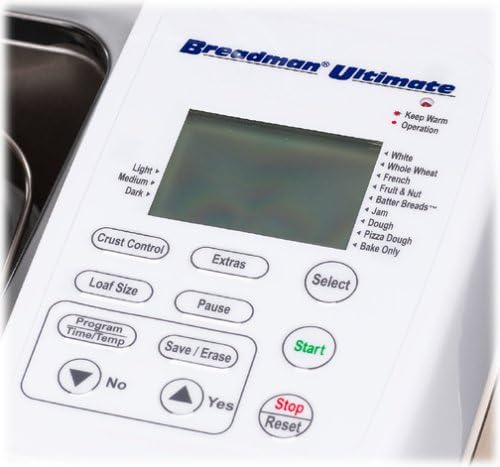
Figure 3: A detailed view of the Breadman TR2200WWC control panel, showing the display, program options, and control buttons.
- Display: Shows selected program, time remaining, and other indicators.
- Crust Control: Selects desired crust darkness (Light, Medium, Dark).
- Loaf Size: Adjusts for 1-pound, 1-1/2-pound, or 2-pound loaves.
- Program/Time/Temp: Used for setting delay timer or specific temperature/time for custom programs.
- No/Yes Arrows (▼ / ▲): Used to navigate options or adjust time/settings.
- Extras: For adding ingredients like fruits or nuts at the appropriate time.
- Pause: Temporarily stops the current program.
- Save/Erase: To save custom settings or clear current selections.
- Select: Cycles through the available baking programs (e.g., White, Whole Wheat, French, Fruit & Nut, Batter Breads, Jam, Dough, Pizza Dough, Bake Only).
- Start: Initiates the selected program.
- Stop/Reset: Stops the current program or resets the machine.
- Indicators: Lights for 'Keep Warm' and 'Operation' status.
4. Setup
- Unpacking: Carefully remove the bread machine and all accessories from the packaging. Retain packaging for storage or shipping if needed.
- Initial Cleaning: Before first use, wash the baking pan and kneading paddle with warm, soapy water. Rinse thoroughly and dry completely. Wipe the exterior of the main unit with a damp cloth. Do not immerse the main unit in water.
- Placement: Place the bread machine on a stable, flat, heat-resistant surface, away from direct sunlight and heat sources. Ensure adequate ventilation around the unit.
- Insert Baking Pan: Place the baking pan into the main unit, ensuring it is securely locked in place. Attach the kneading paddle to the shaft inside the pan.
- Power Connection: Plug the power cord into a grounded electrical outlet. The machine will typically emit a beep and display a default program.
5. Operating Instructions
5.1 Basic Operation
- Add Ingredients: Always add liquids first, followed by dry ingredients, and finally yeast. Refer to your recipe book for precise measurements and order. Ensure the kneading paddle is properly installed.
- Close Lid: Securely close the lid of the bread machine.
- Select Program: Press the 'Select' button repeatedly to cycle through the available programs until your desired program is displayed. The Breadman TR2200WWC offers over 200 settings, including White, Whole Wheat, French, Fruit & Nut, Batter Breads, Jam, Dough, Pizza Dough, and Bake Only.
- Choose Crust Color: Press the 'Crust Control' button to select Light, Medium, or Dark crust.
- Set Loaf Size: Press the 'Loaf Size' button to choose between 1-pound, 1-1/2-pound, or 2-pound loaves.
- Start Baking: Press the 'Start' button. The machine will begin the selected program. The display will show the remaining time.
- End of Cycle: Once the baking cycle is complete, the machine may beep and enter a 'Keep Warm' cycle. Unplug the machine, open the lid, and carefully remove the baking pan using oven mitts.
- Remove Bread: Invert the baking pan onto a wire rack to release the bread. If the kneading paddle remains in the bread, carefully remove it. Allow the bread to cool before slicing.
5.2 Advanced Functions
- 24-Hour Delay Bake: This feature allows you to add ingredients and set a timer for the machine to start baking at a later time, up to 24 hours in advance. This is ideal for fresh bread in the morning.
- 59-Minute Rapid Bake: For quicker baking needs, select the Rapid Bake program. This program is designed to produce a loaf in approximately 59 minutes.
- 60-Minute Power Failure Backup: In the event of a power interruption, the machine has a 60-minute power failure backup. If power is restored within this timeframe, the program will resume from where it left off. For longer power outages, the program will need to be restarted.
- Pause Function: Press the 'Pause' button to temporarily stop the current program. Press 'Pause' again to resume.
- Adding Extras: The machine will beep at a specific point in certain programs to indicate when to add additional ingredients like fruits, nuts, or seeds. Use the 'Extras' button if available to confirm or skip.
6. Recipes
Your Breadman TR2200WWC Ultimate Bread Machine comes with a comprehensive recipe book. It is highly recommended to use the recipes provided with your machine, especially when you are new to bread making. These recipes are specifically formulated for optimal results with this model. Experimenting with other recipes is possible, but may require adjustments to ingredient quantities or program selections.
7. Maintenance and Cleaning
Regular cleaning ensures the longevity and optimal performance of your bread machine.
- Unplug: Always unplug the machine and allow it to cool completely before cleaning.
- Baking Pan and Kneading Paddle: Remove the baking pan and kneading paddle. Wash them with warm, soapy water using a soft sponge. Do not use abrasive cleaners or metal scouring pads, as these can damage the non-stick coating. Rinse thoroughly and dry completely.
- Main Unit: Wipe the exterior of the main unit with a soft, damp cloth. Do not use harsh chemicals or abrasive cleaners. Never immerse the main unit in water.
- Lid and Viewing Window: Wipe the lid and viewing window with a damp cloth. For stubborn stains, a mild detergent can be used.
- Interior: Use a soft brush or damp cloth to remove any crumbs or flour residue from the interior heating chamber.
8. Troubleshooting
If you encounter issues with your bread machine, refer to the following common problems and solutions:
| Problem | Possible Cause | Solution |
|---|---|---|
| Bread does not rise | Expired yeast, incorrect water temperature, too much salt, insufficient sugar. | Check yeast expiration date. Use lukewarm water (38-43°C). Ensure correct ingredient measurements. |
| Bread is too dense | Too much flour, too little liquid, incorrect yeast amount. | Measure ingredients precisely. Ensure proper liquid-to-flour ratio. |
| Bread collapses during baking | Too much liquid, too much yeast, high humidity. | Reduce liquid slightly. Ensure correct yeast measurement. |
| Kneading paddle stuck in bread | Common occurrence. | Allow bread to cool slightly, then carefully remove the paddle using a non-metallic utensil. |
| Machine beeps continuously | Error code or program completion. | Check display for error code (refer to specific error codes in your recipe book). If program completed, it may be the 'Keep Warm' signal. Press 'Stop/Reset'. |
9. Specifications
- Model: TR2200C
- Part Number: TR2200WWC
- Brand: Breadman
- Wattage: 430 watts
- Loaf Sizes: 1-pound, 1-1/2-pound, and 2-pound horizontal loaves
- Programs: Over 200 settings, including various bread types, dough, and jam.
- Delay Timer: Up to 24 hours
- Rapid Bake: 59-minute cycle
- Power Failure Backup: 60 minutes
- Dimensions (L x W x H): Approximately 45.21 x 37.34 x 29.21 cm (15.5 x 8.5 x 12.75 inches)
- Weight: Approximately 7.96 kg
10. Warranty and Support
The Breadman TR2200WWC Ultimate Bread Machine comes with a 1-year limited warranty from the date of purchase. This warranty covers manufacturing defects under normal household use. It does not cover damage resulting from misuse, accident, alteration, neglect, or commercial use.
For warranty claims, technical support, or inquiries regarding your product, please refer to the contact information provided in your original purchase documentation or visit the official Breadman website for customer service details.


