
Clarion DRX 5675 R
Contents
Clarion DRX 5675 R Car Stereo User Manual
Introduction
This manual provides detailed instructions for the installation, operation, and maintenance of your Clarion DRX 5675 R car stereo. Please read this manual thoroughly before using the unit to ensure proper operation and to prevent damage. Keep this manual for future reference.
Product Overview
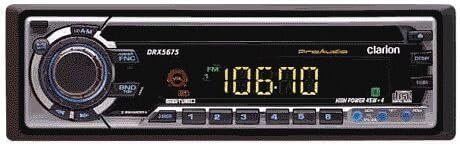
The image displays the front panel of the Clarion DRX 5675 R car stereo. It features a central rotary knob for volume and selection, surrounded by function buttons. The digital display shows radio frequency '106.70 FM'. Below the display are six numbered preset buttons and additional control buttons. The unit has a sleek black finish with silver accents.
The Clarion DRX 5675 R is a 1-DIN car stereo unit designed for in-dash installation. Key features include:
- Integrated CD Player
- RDS (Radio Data System) functionality
- Changer control capability for external CD changers
- Maximum power output of 180 Watts
- Detachable front panel for security
Setup
Installation
The Clarion DRX 5675 R is designed for standard 1-DIN installation. Professional installation is highly recommended to ensure correct wiring and prevent damage to your vehicle's electrical system or the unit. Ensure proper connections for power (constant and switched), ground, speakers, and antenna. Refer to the wiring diagram typically found on the unit's chassis or in a separate installation guide for detailed wiring instructions.
Initial Power-On
After installation, press the [POWER] button to turn on the unit. The display will illuminate, indicating the unit is operational. Adjust the volume using the large central rotary knob to a comfortable listening level.
Operating Instructions
Basic Operation
- Power On/Off: Press the [POWER] button to turn the unit on or off.
- Volume Control: Rotate the large central knob clockwise to increase volume and counter-clockwise to decrease volume.
- Source Selection: Press the [SRC] or [BAND] button to cycle through available audio sources such as FM radio, AM radio, and CD player.
Radio Tuner
- Band Selection: Press the [BAND] button to switch between available radio bands (e.g., FM1, FM2, FM3, AM).
- Tuning: Use the [SEEK] or [TUNE] buttons to automatically or manually tune to radio stations.
- Preset Stations: To store a station, tune to the desired frequency, then press and hold one of the numbered buttons (1-6) until you hear a beep. To recall a stored station, briefly press the corresponding numbered button.
- RDS Functionality: The unit supports RDS (Radio Data System). When tuned to an RDS-enabled station, information such as the station name, program type, or traffic announcements may be displayed.
CD Player
- Loading a CD: Gently insert a CD into the disc slot with the label side facing up. The unit will automatically pull in the disc and begin playback.
- Track Selection: Use the [TRACK UP/DOWN] buttons to skip to the next or previous track.
- Play/Pause: Press the [PLAY/PAUSE] button to temporarily stop playback. Press it again to resume.
Changer Control
This unit is equipped with a control function for an external CD changer. Connect a compatible Clarion CD changer to the dedicated port on the rear of the unit. Once connected, you can control the changer's functions (e.g., disc selection, track selection) directly from the DRX 5675 R. Refer to your CD changer's instruction manual for specific operational details.
Maintenance
Cleaning
Use a soft, dry cloth to clean the unit's front panel. For stubborn dirt or smudges, dampen the cloth lightly with plain water. Do not use abrasive cleaners, solvents, or chemical sprays, as these can damage the finish or internal components.
Care
To ensure the longevity of your car stereo, avoid exposing the unit to extreme temperatures, direct sunlight for prolonged periods, or excessive moisture. Ensure proper ventilation around the unit when installed. When detaching the front panel for security, store it in a protective case to prevent scratches or damage.
Troubleshooting
If you experience issues with your Clarion DRX 5675 R, refer to the following common problems and solutions:
- No Power:
Solution: Check all power connections to the unit. Verify that the vehicle's fuse for the stereo is not blown. Ensure the detachable front panel is securely attached. - No Sound:
Solution: Check all speaker connections. Ensure the volume is not set to minimum or muted. Verify that the correct audio source is selected. - CD Does Not Play:
Solution: Ensure the CD is clean and free of scratches or damage. Check that the CD is inserted correctly with the label side facing up. Try a different audio CD. - Poor Radio Reception:
Solution: Check the antenna connection at the back of the unit. Ensure the antenna is fully extended (if applicable). Move to an area with better signal strength. - Buttons Not Responding:
Solution: Try resetting the unit by briefly disconnecting the vehicle's battery (consult your vehicle's manual first) or by pressing the reset button (if available, usually a small recessed button requiring a pointed object).
Specifications
| Feature | Specification |
|---|---|
| Brand | Clarion |
| Model | DRX 5675 R |
| ASIN | B0000D88TC |
| DIN Size | 1 |
| Output Wattage | 180 Watts |
| CD Player | Yes |
| RDS | Yes |
| Changer Control | Yes |
| Security Feature | Panel Release |
| Audio Output Type | Speakers |
| Global Trade Identification Number | 04961033002392 |
Warranty and Support
For detailed warranty information, terms, and conditions, please refer to the warranty card or documentation included with your original purchase. Keep your proof of purchase (receipt or invoice) as it will be required for any warranty claims. For technical support, service, or inquiries about replacement parts, please visit the official Clarion website or contact their customer service department directly. Contact information can typically be found on the Clarion website or in your product packaging.
Ask a question about this manual
Ask about setup, troubleshooting, compatibility, parts, safety, or missing instructions. Manuals+ will review the question and use this page’s manual context to help answer it.