
1. Introduction
Welcome to the user manual for your Elta 8897 CS Monoblock-HiFi System. This compact home audio system is designed to provide high-quality sound and versatile media playback. This manual will guide you through the setup, operation, and maintenance of your new system, ensuring you get the best possible performance. Please read these instructions carefully before using the product and retain them for future reference.
2. Important Safety Instructions
- Power Source: Ensure the system is connected to a power supply that matches the voltage specified on the unit.
- Ventilation: Do not block any ventilation openings. Allow adequate space around the unit for proper airflow to prevent overheating.
- Water and Moisture: Do not expose the system to rain, moisture, dripping, or splashing. Keep liquids away from the unit.
- Heat: Do not place the system near heat sources such as radiators, heat registers, stoves, or other apparatus (including amplifiers) that produce heat.
- Cleaning: Unplug the system from the wall outlet before cleaning. Use a dry cloth only.
- Servicing: Do not attempt to service this product yourself. Refer all servicing to qualified service personnel.
- Placement: Place the system on a stable, flat surface to prevent it from falling.
3. Package Contents
Please check that all items listed below are included in your package. If any items are missing or damaged, contact your retailer.
- Main Unit (DVD Player/Receiver)
- Subwoofer
- Satellite Speakers (5 units)
- Remote Control
- Power Cable
- Speaker Cables
- Audio/Video Cables (e.g., RCA)
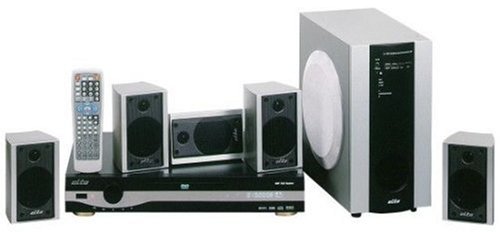
This image displays the complete Elta 8897 CS Monoblock-HiFi system. It includes a central DVD player/receiver unit, a large subwoofer, five compact satellite speakers, and a remote control. All components are silver and black, designed for a cohesive home audio setup.
4. Setup
4.1 Connecting Your System
Follow these steps to correctly connect all components of your Elta 8897 CS system.
4.1.1 Speaker Connection
- Satellite Speakers: Connect the five satellite speakers to the corresponding speaker outputs on the rear of the main unit. Ensure correct polarity (red to red, black to black) for optimal sound.
- Subwoofer: Connect the subwoofer to the dedicated subwoofer output on the main unit using the provided cable.
- Placement: Position the front left, center, and front right speakers at the front of your listening area. Place the rear left and rear right speakers behind your listening position. The subwoofer can be placed anywhere in the room, preferably near a wall for enhanced bass.
4.1.2 Audio/Video Connections
To view video content from the DVD player, you will need to connect the main unit to your television or display.
- Composite Video: Connect the yellow RCA video output from the main unit to the yellow video input on your TV.
- Stereo Audio (Optional): If your TV does not have HDMI, connect the red and white RCA audio outputs from the main unit to the corresponding audio inputs on your TV.
4.1.3 Power Connection
Once all audio and video connections are made, plug the power cable of the main unit into a standard electrical outlet.
5. Operating Instructions
5.1 Basic Operation
5.1.1 Power On/Off
Press the POWER button on the front panel of the main unit or on the remote control to turn the system on or off.
5.1.2 Source Selection
Use the SOURCE or FUNCTION button on the remote control or front panel to cycle through available input sources (e.g., DVD, AUX).
5.1.3 Disc Playback (DVD/CD)
- Press the OPEN/CLOSE button to open the disc tray.
- Place a DVD or CD disc gently onto the tray with the label side facing up.
- Press the OPEN/CLOSE button again to close the tray.
- Playback should begin automatically. If not, press the PLAY button.
5.1.4 Volume Control
Adjust the master volume using the VOLUME +/- buttons on the remote control or the volume knob on the main unit.
5.1.5 Remote Control Functions
The remote control provides full functionality for your system. Refer to the diagram on the remote control itself for specific button functions such as navigation, menu, subtitle, and audio track selection.
6. Maintenance
6.1 Cleaning and Care
- Unit Exterior: Wipe the exterior surfaces of the main unit, subwoofer, and speakers with a soft, dry, lint-free cloth. Do not use abrasive cleaners, waxes, or solvents.
- Discs: Handle discs by their edges. Clean discs with a soft, dry cloth, wiping from the center outwards. Avoid touching the playback surface.
- Ventilation: Periodically check that the ventilation openings are free from dust and debris.
7. Troubleshooting
7.1 Common Issues and Solutions
- No Power:
Solution: Check if the power cable is securely plugged into both the unit and the wall outlet. Ensure the power outlet is functional. - No Sound:
Solution: Verify that all speaker cables are correctly connected and that the volume is not set to minimum or muted. Check the selected audio source. - Disc Not Playing:
Solution: Ensure the disc is clean and free of scratches. Check that the disc is inserted correctly with the label side up. Verify the disc format is supported by the player. - Remote Control Not Working:
Solution: Check and replace the batteries in the remote control. Ensure there are no obstructions between the remote and the main unit's IR sensor. - Poor Picture Quality:
Solution: Check the video connection cables for secure fit. Ensure the correct video input is selected on your television.
8. Specifications
8.1 Technical Data
The following specifications are typical for the Elta 8897 CS Monoblock-HiFi System. Specific values may vary slightly.
- Model: 8897 CS
- Brand: Elta
- Supported Media: DVD, CD, MP3 (specific formats may vary)
- Audio Output: 5.1 Channel Surround Sound
- Video Output: Composite Video
- Power Supply: AC 230V ~ 50Hz (typical for European models)
- Manufacturer: Elta
- ASIN: B0000D81IJ
9. Warranty and Support
9.1 Warranty Information
This product is covered by a limited warranty. Please refer to the warranty card included with your purchase for detailed terms and conditions, including the warranty period and coverage. Keep your proof of purchase for any warranty claims.
9.2 Customer Support
For technical assistance, troubleshooting beyond this manual, or service inquiries, please contact Elta customer support. Contact information can typically be found on the manufacturer's website or on the warranty card.