
Introduction
This manual provides comprehensive instructions for the operation and maintenance of your Minolta 404 SI Dynax 35mm SLR camera. Please read this manual carefully before using the camera to ensure proper handling and to maximize its performance.
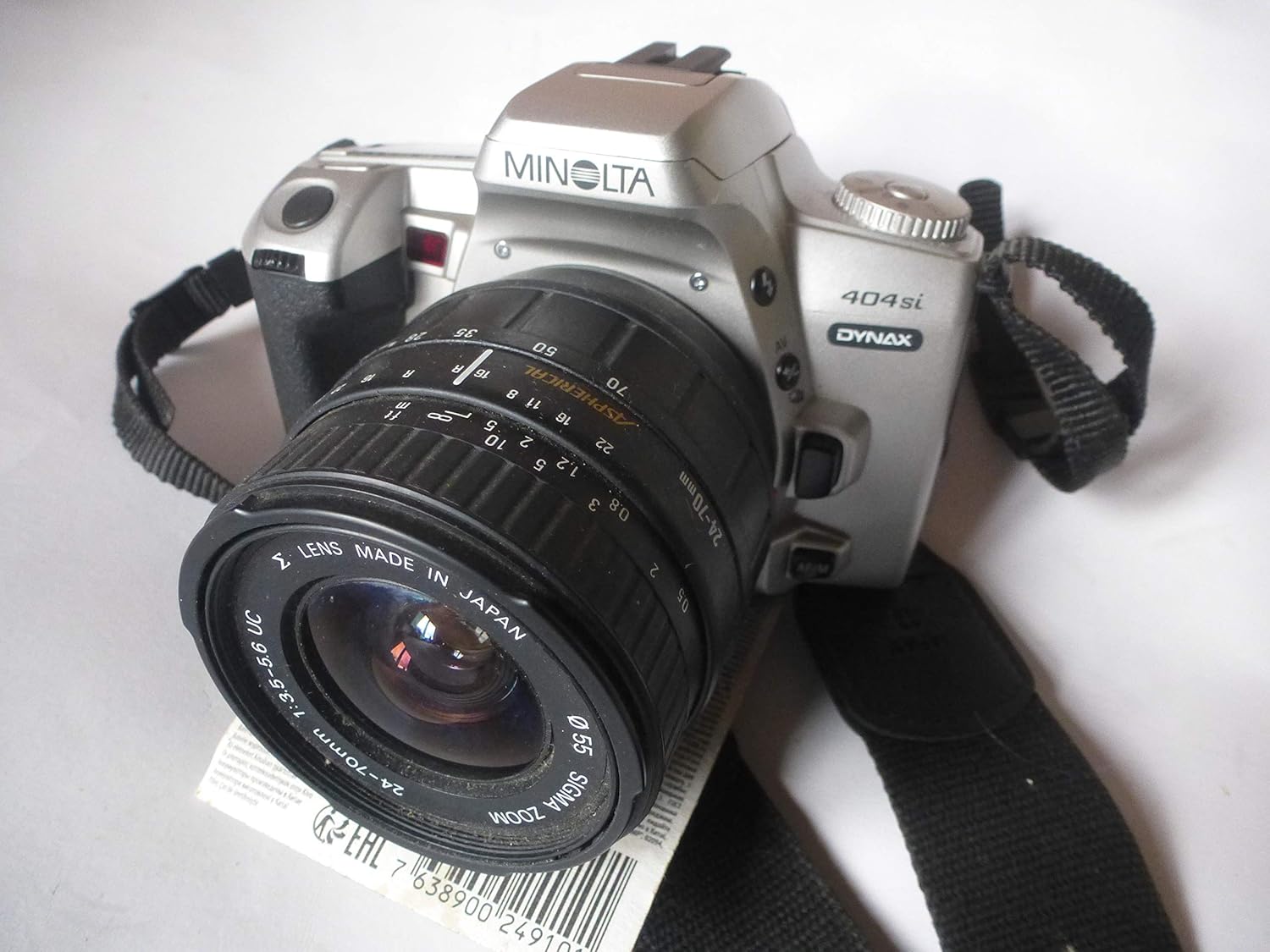
Figure 1: Front view of the Minolta 404 SI Dynax camera with a lens attached, showing the main body, lens, and strap.
Setup
1. Battery Installation
The Minolta 404 SI Dynax camera requires batteries for operation. To install or replace batteries:
- Locate the battery compartment on the bottom of the camera.
- Turn the battery compartment cover counter-clockwise to open it.
- Insert the required batteries, ensuring correct polarity as indicated inside the compartment.
- Close the cover by turning it clockwise until it is securely fastened.

Figure 2: The bottom of the camera, highlighting the battery compartment and tripod mount.
2. Lens Attachment
To attach a compatible Minolta AF lens to your camera:
- Remove the body cap from the camera and the rear lens cap from the lens.
- Align the red dot on the lens barrel with the red dot on the camera's lens mount.
- Gently insert the lens into the camera mount.
- Rotate the lens clockwise until it clicks into place, indicating it is securely locked.

Figure 3: The camera body with the lens removed, showing the lens mount and internal components.

Figure 4: A compatible Sigma Zoom 24-70mm lens, showing its focal length and aperture markings.
3. Film Loading
The Minolta 404 SI Dynax uses 35mm film. To load film:
- Open the camera back by sliding the latch on the side of the camera downwards.
- Place a new 35mm film cassette into the film chamber on the left side.
- Pull the film leader across to the take-up spool on the right side, ensuring it engages with the sprockets.
- Close the camera back firmly until it clicks shut. The camera will automatically advance the film to the first frame.

Figure 5: The camera's film compartment with the back open, ready for film loading.
Operating the Camera
1. Power On/Off
To power on the camera, rotate the main switch located near the shutter button to the "ON" position. To power off, rotate it to "OFF".
2. Focusing
The camera supports both automatic and manual focusing:
- Autofocus (AF): Set the lens to AF mode. The camera will automatically focus when the shutter button is pressed halfway. The built-in AF illuminator assists focusing in low light.
- Manual Focus (MF): Set the lens to MF mode. Rotate the focusing ring on the lens until the subject appears sharp in the viewfinder.
3. Exposure Modes
The Minolta 404 SI Dynax offers various exposure modes:
- Program (P) Mode: Fully automatic exposure. The camera selects both shutter speed and aperture.
- Shutter Priority (S) Mode: You set the shutter speed, and the camera selects the appropriate aperture. Ideal for controlling motion blur.
- Aperture Priority (A) Mode: You set the aperture, and the camera selects the appropriate shutter speed. Ideal for controlling depth of field.
- Manual (M) Mode: You set both shutter speed and aperture for complete creative control.
- Scene Modes: Includes specific modes for portraits, landscapes, close-ups, sports, and night scenes, optimizing settings for common photographic situations.
4. Flash Usage
The camera features a built-in flash and supports external Minolta flash units:
- Built-in Flash: The built-in flash activates automatically when needed (if raised) or can be manually switched on/off. It covers lenses as wide as 28mm.
- Red-eye Reduction: Use this feature to minimize red-eye effect in portraits.
- Wireless Flash (WL): Compatible with suitable Minolta flash units for off-camera flash control.
- TTL Auto Flash Metering: Ensures accurate flash exposures. Can be used for auto fill-in flash in daylight.
5. Film Advance and Rewind
The camera features motor-driven film loading, wind-on, and rewind:
- Wind-on: After each shot, the camera automatically advances the film. Single or continuous modes are available (up to 1 frame per second).
- Rewind: Once the roll is finished, the camera will automatically rewind the film into the cassette. Manual rewind can also be initiated if needed.
6. Self-Timer and Multiple Exposure
- Self-Timer: Activates a delay before the shutter fires, useful for self-portraits or group photos. This feature is cancellable.
- Multiple Exposure: Allows for taking multiple images on a single frame of film for creative effects.
Maintenance
Proper maintenance ensures the longevity and performance of your camera:
- Cleaning the Camera Body: Use a soft, dry cloth to wipe the camera body. For stubborn dirt, slightly dampen the cloth with water. Avoid using harsh chemicals.
- Cleaning the Lens: Use a lens brush or air blower to remove dust. For smudges, use a specialized lens cleaning solution and a microfiber cloth. Never touch the lens surface with your fingers.
- Battery Care: Remove batteries if the camera will not be used for an extended period to prevent leakage. Store batteries in a cool, dry place.
- Film Storage: Store film in a cool, dry place away from direct sunlight and high temperatures.
- Storage: When not in use, store the camera in a dry, dust-free environment, preferably in a camera bag or case.
Troubleshooting
Here are some common issues and their potential solutions:
| Problem | Possible Cause | Solution |
|---|---|---|
| Camera does not power on. | Dead or incorrectly installed batteries. | Check battery polarity; replace with fresh batteries. |
| Film does not advance. | Film not properly loaded or end of roll reached. | Re-load film ensuring leader engages sprockets; check film counter. |
| Flash does not fire. | Flash not raised, disabled, or low battery. | Raise the built-in flash; check flash settings; replace batteries. |
| Autofocus not working. | Lens set to manual focus (MF) or insufficient light. | Set lens to AF; use AF illuminator or switch to manual focus in very low light. |
Specifications
| Feature | Detail |
|---|---|
| Brand | Minolta |
| Model Name | 404 SI |
| Item Model Number | 404si, 35-80mm |
| ASIN | B0000C7AFG |
| UPC | 043325020728 |
| Camera Format | 135 mm |
| Film Format Type | 35mm |
| System | SLR |
| Autofocus | Yes |
| Built-in Flash | Yes |
| Red Eye Reduction | Yes |
| Exposure Control Type | Automatic (Program Reflex) |
| Maximum Shutter Speed | 1/2000th second (0.0005 seconds) |
| Motor | Yes (for film advance/rewind) |
| Special Features | Timer, Multiple Exposure |
| Year of Introduction | 1999 |
| Manufacturer | Minolta |
| Date First Available | 11 October 2012 |
| Package Dimensions | 19 x 16 x 10 cm; 800 g |
Warranty and Support
Specific warranty details and direct support contact information are not provided within this manual. For warranty claims, technical support, or service inquiries, please refer to the official Minolta website or contact your authorized Minolta dealer. Keep your purchase receipt as proof of purchase.