1. Introduction
The Line 6 GuitarPort XT is an advanced hardware and software system designed for guitarists to practice, record, and experiment with a wide range of guitar tones directly through their computer. It integrates a USB audio interface with the powerful GearBox software platform, offering a comprehensive suite of amplifier models, cabinet simulations, and studio-quality effects.

Image 1: Top-down view of the Line 6 GuitarPort XT device, showcasing its compact design and central control knob.
2. Features
The GuitarPort XT system provides a rich set of features for guitarists:
- Extensive Tone Library: Access 18 classic and modern guitar amp models and 24 cabinet models, powered by Line 6's acclaimed digital modeling technology.
- Versatile Effects: Utilize 28 studio and stompbox effects, including delay, chorus, tremolo, flanger, reverb, and more. Effects can be routed pre- or post-amplifier.
- High-Quality Audio: Features 24-bit converters and 32-bit processing for studio-grade audio fidelity via USB.
- Practice Tools: Play along with MP3, WAV, or audio CD files. Includes looping functionality and real-time half-speed playback without pitch alteration for detailed study of musical passages.
- Connectivity: Offers line-level and headphone outputs for flexible monitoring options.
- Integrated Utilities: Built-in chromatic tuner for accurate instrument tuning and a metronome for rhythm practice.
- Software Compatibility: The GearBox software runs on both PC and Mac operating systems, including Intel-based machines.
- Recording Ready: Serves as an ideal guitar front-end for integration with other recording software (DAWs).
- Preset Tone Library: Comes with a library of ready-to-use preset tones.
3. Setup
To begin using your Line 6 GuitarPort XT, follow these steps:
- Software Installation: Install the GearBox software on your compatible PC or Mac computer. Ensure your operating system meets the minimum requirements.
- Hardware Connection: Connect the GuitarPort XT device to your computer using a standard USB cable. The device is powered via USB.
- Instrument Connection: Plug your guitar into the 'Input' jack on the GuitarPort XT.
- Audio Output: Connect headphones to the dedicated headphone output or connect the line-level outputs (L/R) to your audio system or studio monitors.
- Driver Installation: Allow your computer to install any necessary drivers automatically upon first connection, or follow instructions provided with the software for manual driver installation.
- Software Launch: Launch the GearBox software. The software should detect the GuitarPort XT hardware.
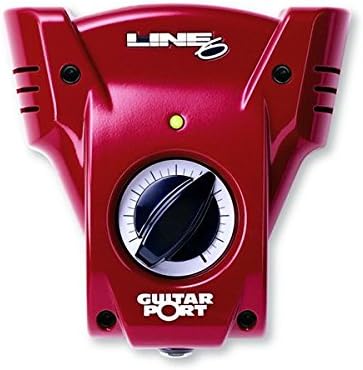
Image 2: Rear panel of the GuitarPort XT, showing the Left/Right outputs, Input, Headphone output, and USB port.
4. Operating Instructions
The GearBox software is the control center for your GuitarPort XT. It allows you to shape your guitar tone and utilize practice features.
Tone Shaping with GearBox
The GearBox interface provides virtual representations of amplifiers, cabinets, and effects pedals. You can select and customize these components to create your desired guitar sound.
- Amp and Cab Models: Browse and select from the available amp and cabinet models. Adjust parameters such as Drive, Bass, Middle, Treble, Presence, and Volume to fine-tune the sound.
- Effects: Activate and configure various stompbox and studio effects. Effects can be placed before or after the amplifier model in the signal chain.
- Saving Tones: Create and save your custom tone presets for quick recall.
Practice Features
Utilize the integrated tools for effective practice sessions:
- Audio Playback: Load MP3, WAV files, or play audio CDs through the software. The GuitarPort XT will process your guitar signal alongside the playback.
- Looping: Select specific sections of an audio track to loop for focused practice.
- Half-Speed Playback: Slow down audio tracks to half speed without altering the pitch, ideal for learning fast passages.
- Chromatic Tuner: Access the built-in tuner to ensure your guitar is perfectly in tune before playing.
- Metronome: Use the metronome feature to practice with precise timing.

Image 3: The Line 6 GuitarPort XT hardware shown alongside the GearBox software interface, illustrating the virtual amplifier and effects controls.
5. Maintenance
To ensure the longevity and optimal performance of your Line 6 GuitarPort XT, follow these general maintenance guidelines:
- Cleaning: Gently wipe the exterior of the device with a soft, dry cloth. Avoid using abrasive cleaners or solvents.
- Storage: Store the device in a cool, dry place away from direct sunlight and extreme temperatures.
- Cable Care: Handle USB and audio cables carefully to prevent damage to connectors and wiring.
- Software Updates: Regularly check the Line 6 website for software and driver updates to ensure compatibility and access to the latest features.
6. Troubleshooting
If you encounter issues with your GuitarPort XT, consider the following troubleshooting steps:
- No Sound:
- Verify all cables are securely connected (USB, guitar input, audio output).
- Check the volume levels in the GearBox software, your computer's operating system, and any connected audio devices (headphones, speakers).
- Ensure the correct audio output device is selected in your computer's sound settings.
- Confirm the GuitarPort XT is recognized by the GearBox software and your computer's device manager.
- Software Not Recognizing Device:
- Try disconnecting and reconnecting the USB cable.
- Restart the GearBox software and your computer.
- Reinstall the drivers for the GuitarPort XT from the Line 6 website.
- Test with a different USB port or cable.
- Poor Audio Quality/Latency:
- Ensure your computer meets the minimum system requirements for the GearBox software.
- Close other applications that may be consuming system resources.
- Adjust buffer size settings within the GearBox software or your computer's audio settings (if applicable) to optimize latency.
- Check for and install the latest drivers.
7. Specifications
| Feature | Detail |
|---|---|
| Item Weight | 1.1 pounds |
| Product Dimensions | 0.62 x 0.18 x 0.79 inches |
| Model Number | 99-gport |
| Compatible Devices | Personal Computer |
| Connector Type | USB |
| Hardware Interface | USB |
| Signal Format | Analog |
| Amperage | 300 Milliamps |
| Audio Output Effects | Headphones |
8. Warranty and Support
For warranty information, technical support, or further assistance, please refer to the official Line 6 website or contact Line 6 customer service directly. Keep your proof of purchase for warranty claims.
Official Line 6 Website: www.line6.com


