
1. General Safety Information
Always read and understand all safety warnings, instructions, illustrations, and specifications provided with this power tool. Failure to follow all instructions listed below may result in electric shock, fire, and/or serious injury.
Work Area Safety
- Keep the work area clean and well-lit. Cluttered or dark areas invite accidents.
- Do not operate power tools in explosive atmospheres, such as in the presence of flammable liquids, gases, or dust. Power tools create sparks which may ignite the dust or fumes.
- Keep children and bystanders away while operating a power tool. Distractions can cause you to lose control.
Electrical Safety
- Power tool plugs must match the outlet. Never modify the plug in any way. Do not use any adapter plugs with earthed (grounded) power tools. Unmodified plugs and matching outlets will reduce risk of electric shock.
- Avoid body contact with earthed or grounded surfaces, such as pipes, radiators, ranges, and refrigerators. There is an increased risk of electric shock if your body is earthed or grounded.
- Do not expose power tools to rain or wet conditions. Water entering a power tool will increase the risk of electric shock.
Personal Safety
- Always wear appropriate personal protective equipment, including safety glasses, hearing protection, gloves, and a dust mask.
- Stay alert, watch what you are doing, and use common sense when operating a power tool. Do not use a power tool while you are tired or under the influence of drugs, alcohol, or medication.
- Prevent unintentional starting. Ensure the switch is in the off-position before connecting to power source, picking up or carrying the tool.
Proposition 65 Warning
This product may contain chemicals known to the State of California to cause cancer and birth defects or other reproductive harm. Always wash hands after handling.
2. Setup and Assembly
Before beginning any work, ensure the tool is unplugged from the power source.
Attaching the Guard
The DEWALT D28499X includes both 7-inch and 9-inch guards. Select the appropriate guard for your grinding or cutting wheel size.
- Align the guard with the gear case, ensuring the guard's tabs fit into the slots on the gear case.
- Rotate the guard until it locks into position. The keyless adjustable guard allows for tool-free adjustments.
- Ensure the guard is securely fastened and positioned to deflect sparks and debris away from you.
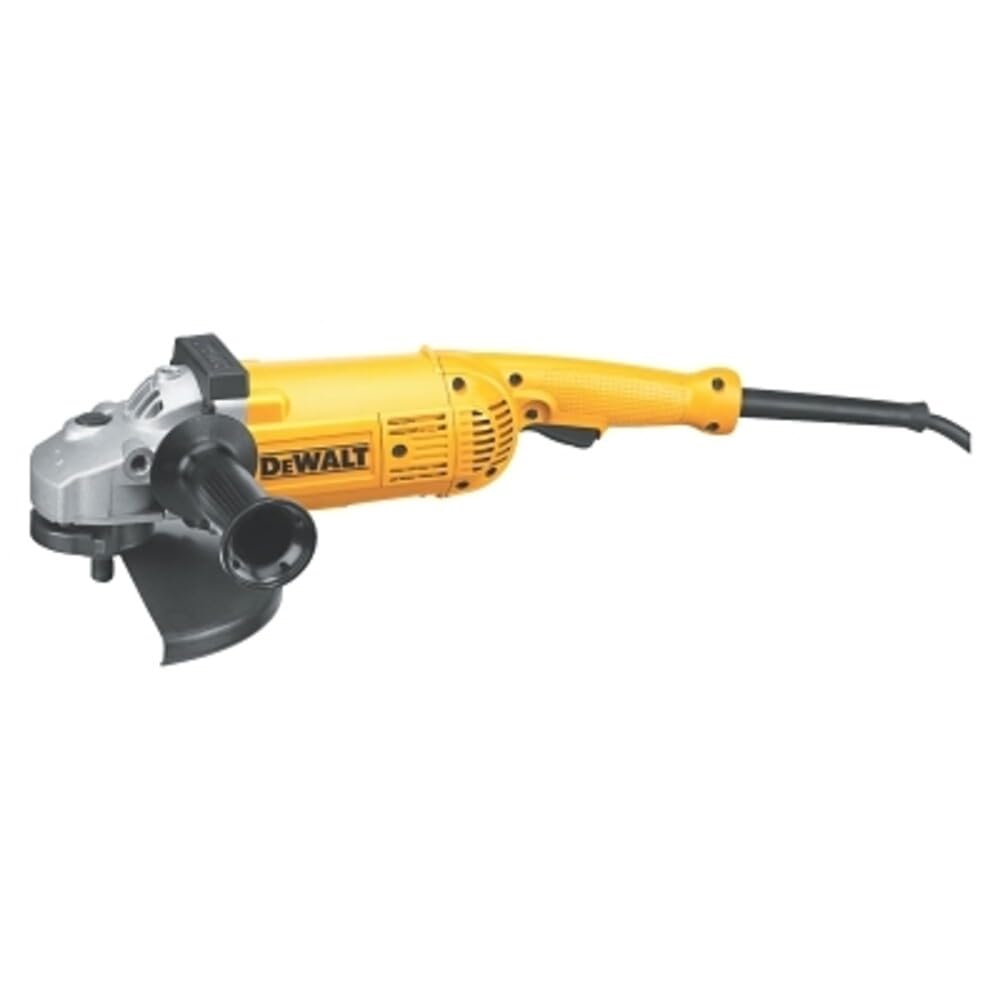
Image: The DEWALT D28499X Angle Grinder shown with a guard and side handle attached, ready for use.
Attaching the Side Handle
The 5-position side handle can be attached to various points on the gear case for optimal control and comfort during different applications.
- Thread the side handle into one of the available mounting holes on the gear case.
- Tighten the handle firmly by hand.
- Adjust the handle position as needed for improved ergonomics based on your specific task.
Installing Grinding/Cutting Wheels
This grinder is designed to accommodate 7-inch and 9-inch grinding or cutting wheels. Note that a flange set and wrench for non-threaded discs may need to be purchased separately.
- Ensure the tool is unplugged.
- Press the spindle lock button to prevent the spindle from rotating.
- Place the inner flange onto the spindle.
- Position the grinding or cutting wheel onto the inner flange, ensuring it sits flat.
- Thread the outer flange onto the spindle and tighten it securely using the appropriate wrench. For wheels with threaded hubs, simply thread the wheel directly onto the spindle.
- Release the spindle lock.
3. Operating Instructions
Always ensure proper safety precautions are in place before operating the grinder.
Powering On and Off
- To turn the grinder ON, depress the trigger switch.
- To turn the grinder OFF, release the trigger switch.
- This tool operates on AC/DC power at 120 volts.
Grinding and Cutting Techniques
- Allow the grinder to reach full speed (6,000 RPM) before contacting the workpiece.
- Apply light, consistent pressure. Do not force the tool, as its 5.3 HP motor is designed for optimal material removal.
- Maintain a firm grip on both the main handle and the side handle. The rotating rear handle can be adjusted for improved ergonomics during various cutting and grinding applications.
- The low-profile gear case allows access to tight areas.
- Always work with the guard positioned to protect you from sparks and debris.
Product Overview Video
Video: An official product overview demonstrating the features and basic operation of the DEWALT D28499X Angle Grinder, including its epoxy coating and 6,000 RPM speed.
4. Maintenance
Regular maintenance ensures the longevity and safe operation of your DEWALT D28499X Angle Grinder.
Cleaning
- Keep the tool's ventilation openings clean and free of debris to prevent overheating.
- Wipe down the exterior of the tool with a clean, damp cloth. Do not use harsh chemicals or abrasive cleaners.
- The epoxy-coated field and armature provide protection against abrasion from airborne debris, contributing to a long service life.
Brush Replacement
This tool features automatic turn-off brushes. When the brushes wear down, the tool will automatically shut down to prevent damage to the motor. This indicates that the brushes need to be changed.
- Unplug the tool from the power source.
- Locate the brush caps on the sides of the motor housing.
- Unscrew the brush caps and remove the old carbon brushes.
- Insert new DEWALT replacement carbon brushes, ensuring they are oriented correctly.
- Screw the brush caps back on securely.
5. Troubleshooting
If you encounter issues with your DEWALT D28499X Angle Grinder, refer to the following common problems and solutions.
Tool Does Not Start
- Check Power Supply: Ensure the tool is properly plugged into a functional 120V AC/DC outlet. Verify that the circuit breaker has not tripped.
- Inspect Power Cord: Check the 2-wire double insulated 'S' jacket rubber cord for any damage. A damaged cord should be replaced by a qualified service technician.
- Brushes Worn: If the carbon brushes are worn out, the tool's automatic shut-off feature will activate. Replace the brushes as described in the Maintenance section.
Excessive Vibration or Noise
- Check Wheel Installation: Ensure the grinding or cutting wheel is correctly installed and securely tightened. An improperly mounted wheel can cause vibration.
- Inspect Wheel Condition: A damaged, chipped, or unbalanced wheel can cause excessive vibration. Replace any damaged wheels immediately.
- Guard Alignment: Ensure the guard is properly aligned and secured.
Reduced Performance / Overheating
- Overload Protection: The grinder has overload protection. If the tool is being forced or used with excessive pressure, it may reduce speed or shut down. Reduce pressure and allow the tool to cool.
- Ventilation: Ensure the ventilation slots are clear of dust and debris to allow for proper motor cooling.
- Dull Wheel: A dull grinding or cutting wheel will require more force and can lead to reduced performance and overheating. Replace with a sharp wheel.
6. Specifications
| Feature | Specification |
|---|---|
| Brand | DEWALT |
| Model Number | D28499X |
| Power Source | Corded Electric |
| Voltage | 120 volts |
| Wattage | 3952.21 watts |
| Horsepower | 5.3 HP (maximum motor HP) |
| Maximum Rotational Speed | 6000 rpm |
| Wheel Diameter | 7-inch / 9-inch |
| Item Weight | 16.4 pounds |
| Product Dimensions (L x W x H) | 9.8"L x 5.06"W x 1"H |
| Included Components | 7" & 9" Guard, 5 Position Side Handle |
7. Warranty and Support
For detailed warranty information, please refer to the official DEWALT warranty statement provided with your product or visit the official DEWALT website.
If you require further assistance, technical support, or service, please contact DEWALT customer service or visit an authorized service center.
An official User Manual PDF is available for download: Download User Manual (PDF)


