
1. Product Overview
The jWIN JX-B32A is a portable AM/FM stereo cassette player designed for mobile listening. It features a slim design, dynamic bass boost, and includes headphones. This manual provides instructions for its proper use and care.
Key Features:
- Stylish compact design
- High sensitivity AM/FM receiver
- Dynamic bass boost system
- DC 3V jack and built-in belt clip
- Uses 2 AA batteries (not included)
- Includes headphones
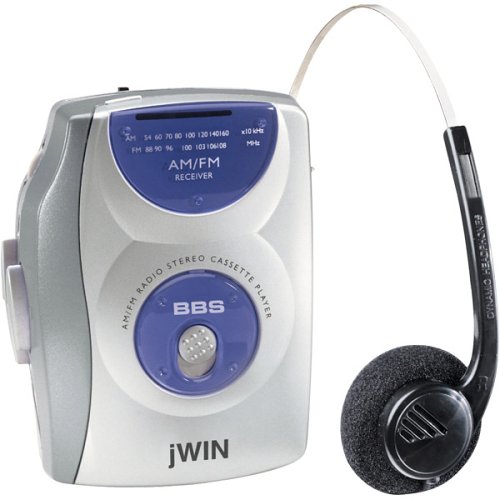
Image 1.1: Front view of the JWIN JX-B32A AM/FM Stereo Cassette Player, showcasing its compact design and controls.
2. Safety Information
- Battery Safety: Do not mix old and new batteries. Do not mix alkaline, standard (carbon-zinc), or rechargeable (nickel-cadmium) batteries. Remove batteries if the unit is not used for extended periods.
- Hearing Protection: Avoid listening at high volume levels for prolonged periods to prevent hearing damage.
- Water and Moisture: Do not expose the unit to rain, moisture, or extreme temperatures.
- Cleaning: Use a soft, dry cloth for cleaning. Do not use liquid or aerosol cleaners.
- Servicing: Do not attempt to service this product yourself. Refer all servicing to qualified service personnel.
3. Setup
3.1 Battery Installation
- Locate the battery compartment on the back of the unit.
- Slide the battery compartment cover open.
- Insert two (2) AA batteries (not included), ensuring correct polarity (+ and -) as indicated inside the compartment.
- Close the battery compartment cover securely.
3.2 Connecting Headphones
Plug the 3.5mm stereo jack of the included headphones (or your preferred headphones) into the headphone output port on the unit. Ensure the plug is fully inserted for proper audio output.
4. Operating Instructions
4.1 Cassette Playback
- Open the cassette compartment door by pressing the 'OPEN' button or sliding the latch.
- Insert a cassette tape with the exposed tape facing upwards and the desired side (A or B) facing the playback head.
- Close the cassette compartment door firmly until it clicks.
- Press the PLAY button to begin playback.
- Adjust the VOLUME control to your desired listening level.
- To fast forward, press the FF button. To rewind, press the REW button.
- To stop playback, press the STOP button. The unit features an auto-stop function that automatically stops the tape at the end of a side.
- Engage the BASS BOOST switch for enhanced low-frequency audio.
4.2 AM/FM Radio Operation
- Slide the function switch to the 'RADIO' position.
- Select either 'AM' or 'FM' using the AM/FM band selector switch.
- Rotate the TUNING dial to find your desired radio station.
- Adjust the VOLUME control to your preferred listening level.
- For optimal FM reception, extend the telescopic antenna. For AM reception, rotate the unit for best signal.
5. Maintenance
5.1 Cleaning the Unit
Wipe the exterior of the unit with a soft, slightly damp cloth. Do not use abrasive cleaners, solvents, or strong chemicals, as these can damage the finish. For the cassette head and pinch roller, use a specialized cassette head cleaning kit periodically to ensure optimal sound quality and tape longevity.
5.2 Battery Care
If the unit will not be used for an extended period (e.g., more than one month), remove the batteries to prevent leakage and potential damage to the unit.
6. Troubleshooting
Common Issues and Solutions:
- No Power:
- Check if batteries are inserted correctly with proper polarity.
- Replace with fresh AA batteries.
- Ensure the unit is switched ON.
- No Sound from Headphones:
- Ensure headphones are fully plugged into the jack.
- Increase the volume level.
- Test with another pair of headphones to rule out faulty headphones.
- Poor Radio Reception:
- For FM, fully extend and adjust the telescopic antenna.
- For AM, rotate the entire unit to find the best signal.
- Move away from sources of interference (e.g., computers, large metal objects).
- Cassette Tape Not Playing/Poor Sound:
- Ensure the cassette tape is inserted correctly and the door is closed.
- Check if the tape is tangled or damaged.
- Clean the cassette head and pinch roller using a cleaning kit.
7. Specifications
| Feature | Specification |
|---|---|
| Brand | jWIN |
| Model Name | JX B32A |
| Model Number | JXB32A |
| Power Source | 2 x AA Batteries (DC 3V) |
| Dimensions (L x W x H) | 9 x 7.6 x 2 inches |
| Weight | 9.28 ounces |
| Recommended Uses | Radio, Cassette Playback |
| Features | AM/FM Receiver, Dynamic Bass Boost, Built-in Belt Clip, DC 3V Jack, Full Auto Stop |
| Included Accessories | Headphones |