
1. Introduction
This manual provides detailed instructions for the safe and effective use of your Fujifilm FinePix S7000 Digital Camera. Please read this manual thoroughly before using the camera and keep it in a safe place for future reference. The FinePix S7000 combines a 6.3-megapixel Super CCD HR sensor with a 6x optical zoom lens, offering advanced photographic capabilities for various users.
2. Safety Information
- Do not expose the camera to water or moisture.
- Avoid direct sunlight or high temperatures.
- Use only recommended batteries and accessories.
- Keep out of reach of children.
- Do not attempt to disassemble or modify the camera.
- Observe proper disposal guidelines for batteries and electronic components.
3. Package Contents
Verify that all items are present in your package:
- Fujifilm FinePix S7000 Digital Camera
- 16 MB xD-Picture Card
- 4 AA Alkaline Batteries
- USB Cable
- A/V Cable
- Lens Cap
- Lens Cap Holder
- Shoulder Strap
- CD-ROM (FinePix View 4.1, Pixela VCD 2 Image Mixer, QuickTime 5, USB drivers)
4. Camera Parts and Controls
Familiarize yourself with the various parts and controls of your FinePix S7000 camera.

Figure 4.1: Top View of Camera Controls
This image displays the top panel of the Fujifilm FinePix S7000, highlighting the mode dial (P, S, A, M, AUTO, SP), the shutter release button, and the power switch. The hot shoe for external flash units is also visible.

Figure 4.2: Rear View of Camera Controls
The rear view of the camera shows the 1.8-inch LCD monitor, the electronic viewfinder (EVF), and various control buttons including the Menu/OK button, Display button, Back button, and zoom controls (W/T).

Figure 4.3: Side View with AF Mode Dial
This image illustrates the side of the camera, featuring the autofocus mode dial (C-AF, S-AF, MF) and the DC IN port for external power.

Figure 4.4: Front Lens Detail
A close-up of the camera's front lens, showing the SUPER-EBC FUJINON LENS with 6x optical zoom capabilities.

Figure 4.5: Bottom View of Camera
The bottom of the camera, showing the closed battery compartment cover and the tripod mount thread.

Figure 4.6: Memory Card Compartment
This image shows the side of the camera where the memory card compartment is located, typically covered by a protective flap.
5. Setup
5.1 Inserting Batteries
- Open the battery compartment cover located on the bottom of the camera.
- Insert four AA batteries, ensuring correct polarity (+/-) as indicated inside the compartment. Rechargeable NiMH batteries are recommended for optimal performance.
- Close the battery compartment cover securely.
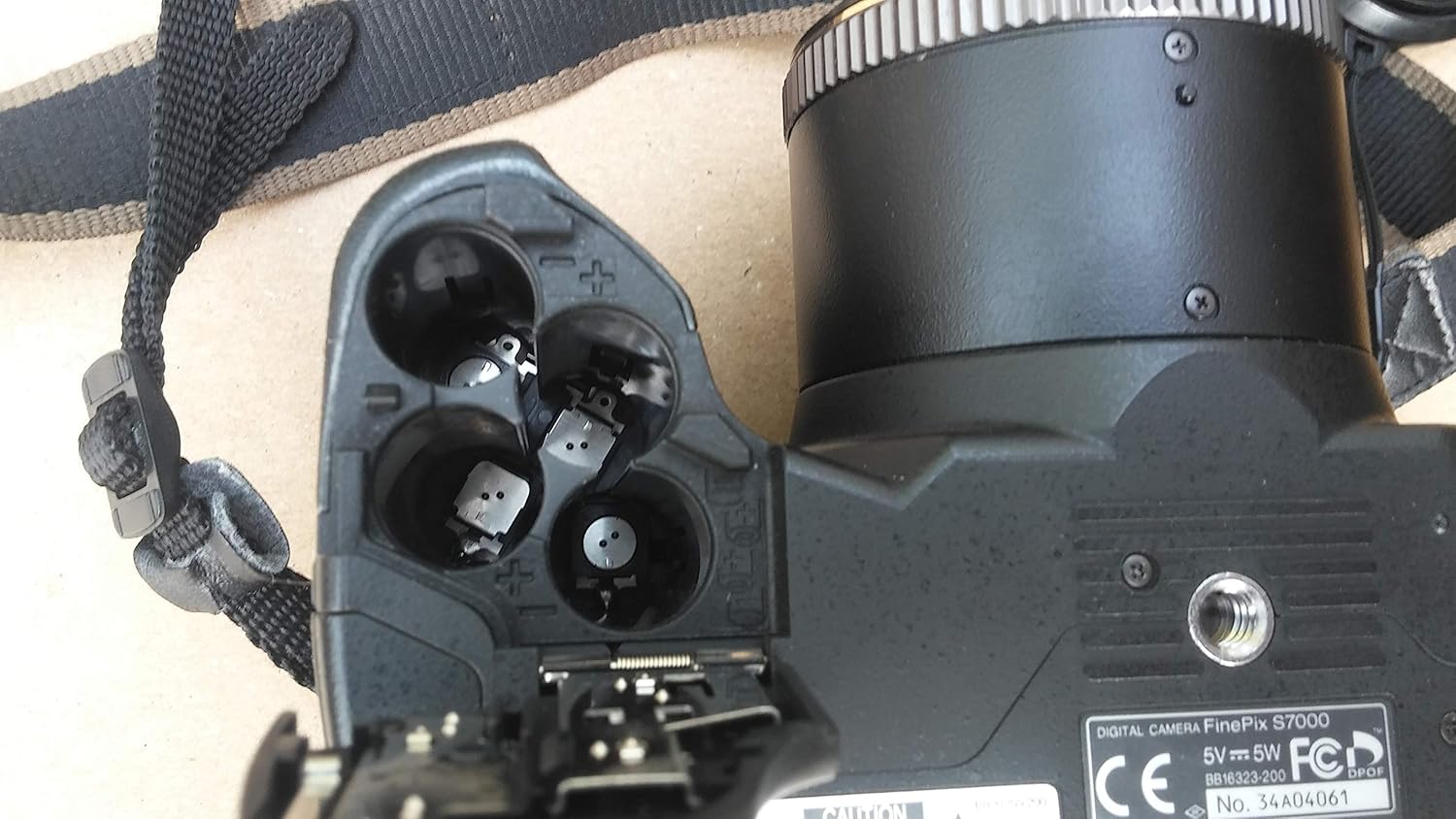
Figure 5.1: Inserting AA Batteries
The image shows the open battery compartment, revealing the four slots for AA batteries. Note the polarity markings for correct insertion.
5.2 Inserting a Memory Card
- Open the memory card compartment cover (refer to Figure 4.6).
- Insert an xD-Picture Card or CompactFlash Type II card (including MicroDrives) into the appropriate slot with the correct orientation until it clicks into place.
- Close the memory card compartment cover securely.

Figure 5.2: 'NO CARD' Display
This image shows the camera's LCD screen indicating 'NO CARD', which appears when no memory card is inserted or if it's not properly recognized.
5.3 Attaching the Shoulder Strap
Thread the shoulder strap through the strap lugs on the camera body as shown in the diagram (not pictured) and secure it firmly.
5.4 Attaching the Lens Cap
Place the lens cap onto the front of the lens when the camera is not in use to protect the lens surface from dust and scratches. Use the provided lens cap holder to prevent loss.
6. Operating the Camera
6.1 Powering On/Off
Slide the power switch (refer to Figure 4.1) to the ON position to turn on the camera. Slide it to OFF to power down.
6.2 Basic Photography (AUTO Mode)
- Turn the mode dial to AUTO (refer to Figure 4.1).
- Frame your shot using the LCD monitor or electronic viewfinder.
- Press the shutter button halfway down to focus. The focus indicator will light up when focus is achieved.
- Press the shutter button fully to take the picture.
6.3 Advanced Shooting Modes
The FinePix S7000 offers various manual controls for creative photography:
- P (Programmed AE): Camera sets aperture and shutter speed for optimal exposure.
- S (Shutter-Priority AE): You set the shutter speed, camera sets aperture.
- A (Aperture-Priority AE): You set the aperture, camera sets shutter speed.
- M (Manual): You set both aperture and shutter speed.
- SP (Scene Position): Pre-programmed modes for specific scenes (e.g., Portrait, Landscape).
Rotate the mode dial (Figure 4.1) to select your desired shooting mode.
6.4 Zoom Operation
Use the zoom lever (W/T buttons, refer to Figure 4.2) to adjust the focal length. The camera features a 6x optical zoom and a 3.2x digital zoom, providing a total of 19x zoom capability.
6.5 Focusing
The camera offers several autofocus modes, selectable via the AF mode dial (Figure 4.3):
- S-AF (Single Autofocus): Focuses when the shutter button is pressed halfway.
- C-AF (Continuous Autofocus): Continuously adjusts focus for moving subjects.
- MF (Manual Focus): Allows manual adjustment of focus.
For close-up shots, activate the Super Macro Mode, which allows focusing as close as 1cm.
6.6 Flash Modes
The built-in pop-up flash offers various modes:
- Auto: Flash fires automatically when needed.
- Red-eye Reduction: Reduces red-eye effect.
- Forced Flash: Flash fires regardless of lighting conditions.
- Suppressed Flash: Flash does not fire.
- Slow Synchro: For night portraits or scenes with ambient light.
Access flash settings through the camera's menu system.
6.7 White Balance
Adjust white balance to ensure accurate color reproduction under different lighting conditions. Options include Automatic, Manual (Fine, Shade), Fluorescent (Daylight, Warm White, Cool White), Incandescent, and Custom.
6.8 Movie Mode
The S7000 can record MPEG video with audio. Select Movie Mode from the mode dial or menu. You can record VGA-quality video at 640 x 480 pixels at 30 frames per second for up to 13 seconds, or 320 x 240 pixels for up to 26 seconds.
6.9 Voice Memo Feature
Attach short audio recordings (up to 30 seconds) to your captured photos. These voice memos are saved as WAV files and can be useful for remembering details about a shot.
6.10 Reviewing Images and Videos
Press the PLAY button (usually indicated by a play icon, refer to Figure 4.2) to enter playback mode. Use the directional pad to navigate through your photos and videos.
7. Maintenance
7.1 Cleaning the Camera and Lens
- Use a soft, dry cloth to clean the camera body.
- For the lens, use a lens brush or a blower to remove dust, then gently wipe with a lens cleaning cloth and lens cleaning solution if necessary.
- Never use organic solvents or strong chemicals.
7.2 Storage
- When not in use for extended periods, remove the batteries to prevent leakage.
- Store the camera in a cool, dry, and well-ventilated place, away from direct sunlight and high humidity.
- Keep the lens cap on to protect the lens.
8. Troubleshooting
| Problem | Possible Cause | Solution |
|---|---|---|
| Camera does not power on. | Batteries are depleted or inserted incorrectly. | Replace with fresh batteries or ensure correct polarity. Recharge NiMH batteries if applicable. |
| "NO CARD" message displayed. | Memory card is not inserted or not recognized. | Insert memory card correctly. Ensure it is compatible and not damaged. |
| Images are blurry. | Camera shake, incorrect focus, or dirty lens. | Hold camera steady, use a tripod, ensure proper focus, clean the lens. |
| Flash does not fire. | Flash mode set to 'Suppressed Flash' or batteries are low. | Change flash mode. Replace or recharge batteries. |
| Cannot transfer images to computer. | USB cable not connected properly, driver issues, or incorrect camera settings. | Ensure USB cable is securely connected. Install necessary drivers from the provided CD-ROM. Check camera's USB mode setting. |
9. Specifications
- Sensor: 6.3-megapixel Super CCD HR (12.3 million recorded pixels)
- Lens: Fujinon 6x Optical Zoom (35-210mm equivalent in 35mm format), f/2.8-3.1
- Digital Zoom: 3.2x (19x total with optical zoom)
- Image Resolution: 4048 x 3040 (12M), 2848 x 2136 (6M), 2016 x 1512 (3M), 1600 x 1200 (2M), 1280 x 960 (1M)
- File Formats: JPEG (Exif 2.2), CCD-RAW
- Movie Recording: 640 x 480 pixels (30 fps, up to 13 sec) or 320 x 240 pixels (30 fps, up to 26 sec) with audio (MPEG)
- Storage Media: xD-Picture Card, CompactFlash Type II (including MicroDrives)
- LCD Monitor: 1.8-inch TFT LCD
- Viewfinder: High-resolution Electronic Viewfinder (EVF)
- ISO Sensitivity: Auto (160-800), Manual (200-1600)
- Shutter Speed: 15 seconds to 1/10,000 second
- Power Source: 4 AA batteries (Alkaline, NiMH recommended)
- Dimensions (W x H x D): Approximately 122 x 97 x 81 mm (4.8 x 3.8 x 3.2 inches)
- Weight: Approximately 500g (17.6 oz) excluding batteries and media
- Interface: USB 2.0, A/V output
10. Warranty and Support
For warranty information and customer support, please refer to the warranty card included in your product package or visit the official Fujifilm website. Keep your purchase receipt as proof of purchase for warranty claims. For technical assistance, contact Fujifilm customer service.
Online resources and FAQs may also be available on the Fujifilm support portal.


