
Introduction
The KINYO VC600 VHS-C Adapter allows you to play your VHS-C camcorder tapes in a standard VHS VCR. This adapter is designed specifically for VHS-C tapes and is not compatible with 8mm cassette tapes. Please read this manual carefully to ensure proper use and to protect your valuable recordings.
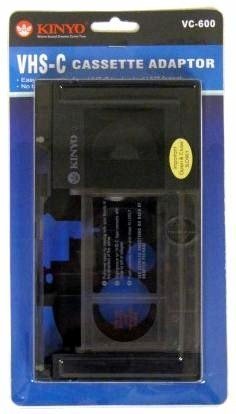
Image: KINYO VC600 VHS-C Adapter. This image shows the adapter in its open state, ready to receive a VHS-C tape.
Safety Information and Important Precautions
- Handle with Care: The KINYO VC600 adapter contains delicate mechanisms. Always handle it gently, especially when inserting or removing VHS-C tapes and operating the adapter's door.
- Avoid Force: Never force a VHS-C tape into the adapter or force the adapter into a VCR. Excessive force can damage both the adapter and your tapes.
- Correct Tape Type: This adapter is exclusively for VHS-C tapes. Attempting to use 8mm, Hi8, Digital8, or MiniDV tapes will cause damage.
- Storage: Store the adapter in a clean, dry, and dust-free environment when not in use.
Product Overview
The KINYO VC600 is a compact and lightweight adapter designed for seamless integration of VHS-C tapes into a standard VHS playback system. Key features include:
- Compatibility: Specifically designed for VHS-C tapes.
- Dual-Sided Playback Support: Accommodates VHS-C tapes for playback of both sides.
- Connector Type: Functions as a male-to-female connector for easy VCR integration.
- Port: Features 1 port for connecting your VHS-C tapes.
Setup Instructions
- Open the Adapter: Gently slide the release latch (if present) or open the adapter's front door to reveal the VHS-C tape compartment.
- Insert VHS-C Tape: Carefully insert your VHS-C cassette into the adapter's compartment. Ensure the tape is oriented correctly, with the tape window facing upwards and the open side of the VHS-C tape facing the adapter's internal mechanism. Do not force the tape.
- Close the Adapter: Slowly and gently close the adapter's front door until it clicks securely into place. Ensure the VHS-C tape is fully seated and the adapter is closed without resistance.
Operating Instructions
- Insert into VCR: With the VHS-C tape securely loaded into the KINYO VC600 adapter, insert the adapter into your standard VHS VCR just as you would a regular VHS tape.
- Playback: Press the PLAY button on your VCR or remote control to begin playback of your VHS-C tape.
- Rewind/Fast Forward: When rewinding or fast-forwarding, it is recommended to first press the PLAY button, then immediately press the REWIND or FAST FORWARD button. Avoid pressing STOP and then REWIND/FAST FORWARD directly, as this can sometimes cause the tape to rewind too quickly or become tangled.
- Eject: When finished, press the EJECT button on your VCR. Carefully remove the adapter from the VCR.
- Remove VHS-C Tape: Open the adapter's door gently and carefully remove your VHS-C tape. Store the tape in its original case to protect it.
Maintenance
- Cleaning: Use a soft, dry, lint-free cloth to gently wipe the exterior of the adapter if it becomes dusty. Do not use liquid cleaners or abrasive materials.
- Internal Cleaning: Avoid attempting to clean the internal mechanisms of the adapter yourself, as this can cause damage.
- Storage: Keep the adapter in its original packaging or a protective case when not in use to prevent dust accumulation and accidental damage.
Troubleshooting
- Tape Twisting/Damage: If you experience tape twisting or damage, it is often due to improper insertion or removal of the VHS-C tape, or rough handling of the adapter. Always be extremely gentle and ensure the tape is fully seated before closing the adapter. If a tape becomes twisted, do not attempt to force it. Carefully open the adapter and gently try to untangle the tape without touching the magnetic film.
- Adapter Not Fitting in VCR: Ensure you are using a standard VHS VCR. This adapter is not compatible with other formats or smaller VCRs.
- No Playback: Check that the VHS-C tape is correctly inserted into the adapter and that the adapter is fully inserted into the VCR. Ensure the VCR is powered on and functioning correctly with other VHS tapes.
- Adapter Door Not Closing: Verify that the VHS-C tape is properly aligned and seated within the adapter. Do not force the door closed.
Specifications
| Model Number | VC-600 |
| Compatibility | VHS-C Tapes Only |
| Item Weight | 6.4 ounces (approximately 0.4 pounds) |
| Package Dimensions | 8.2 x 5.2 x 1.3 inches |
| Number of Ports | 1 |
Warranty and Support
For warranty information and customer support, please refer to the documentation provided at the time of purchase or contact your retailer. You may also visit the official KINYO website for further assistance.