1. Introduction
Thank you for choosing the PHILIPS MAGNAVOX MANT260 Indoor Antenna. This antenna is designed to provide clear reception for VHF, UHF, and FM signals, enhancing your television and radio listening experience. Please read this manual carefully to ensure proper setup, operation, and maintenance of your antenna.
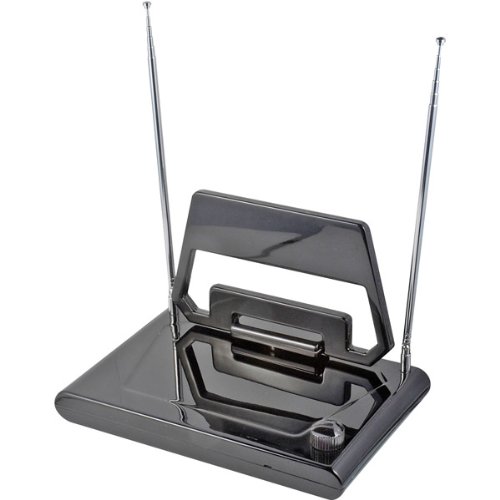
An image of the PHILIPS MAGNAVOX MANT260 Indoor Antenna, featuring two adjustable telescopic rabbit ear antennas and a central loop antenna, designed for optimal reception of VHF, UHF, and FM signals. The antenna has a dark, glossy finish.
2. Important Safety Instructions
- Do not expose the antenna to rain or moisture to prevent fire or electric shock.
- Do not place the antenna near heat sources such as radiators, heat registers, stoves, or other apparatus (including amplifiers) that produce heat.
- Clean only with a dry cloth.
- Do not block any ventilation openings.
- Refer all servicing to qualified service personnel. Servicing is required when the apparatus has been damaged in any way.
3. Package Contents
Please check the package for the following items:
- PHILIPS MAGNAVOX MANT260 Indoor Antenna
- Instruction Manual
4. Setup
4.1 Connecting the Antenna
- Locate the coaxial input (usually labeled "ANT IN" or "RF IN") on the back of your television, digital converter box, or FM receiver.
- Connect the coaxial cable from the PHILIPS MAGNAVOX MANT260 antenna to this input. Ensure the connection is secure.
4.2 Positioning the Antenna
The placement of your indoor antenna significantly impacts reception quality. Experiment with different locations to find the best signal.
- Near a Window: Placing the antenna near a window often provides better reception, especially if the window faces the direction of broadcast towers.
- High Location: Generally, a higher position in the room can improve signal strength.
- Away from Interference: Keep the antenna away from large metal objects, concrete walls, and electronic devices (e.g., microwaves, computers, cordless phones) that can cause interference.
- Adjustable Elements: The MANT260 features telescopic dipoles (rabbit ears) and a loop antenna. Adjust their position and length for optimal reception.
5. Operating Instructions
5.1 Tuning for Best Reception
After connecting and positioning your antenna, you will need to scan for channels on your television or receiver.
- Access your TV's or receiver's menu and navigate to the "Channel Scan," "Auto Program," or "Auto Tune" option.
- Select "Antenna" or "Air" as the input source, if prompted.
- Initiate the channel scan. This process may take several minutes.
- During or after the scan, adjust the telescopic dipoles (rabbit ears) and rotate the loop antenna to fine-tune reception for specific channels. Extend the rabbit ears fully for VHF signals and adjust their angle. For UHF signals, the loop antenna is more effective; rotate it for the best picture/sound.
- If reception is poor for certain channels, try repositioning the antenna slightly and performing another channel scan.
6. Maintenance and Care
- Cleaning: Disconnect the antenna from your TV/receiver before cleaning. Use a soft, dry cloth to wipe the antenna. Do not use liquid cleaners or aerosol cleaners.
- Storage: If not in use for an extended period, store the antenna in a cool, dry place, away from direct sunlight and extreme temperatures.
- Handling: Handle the antenna with care. Avoid dropping it or subjecting it to strong impacts.
7. Troubleshooting
If you experience issues with your antenna, refer to the following table for common problems and solutions:
| Problem | Possible Cause | Solution |
|---|---|---|
| No signal or poor picture/sound quality. | Incorrect antenna positioning. | Adjust the antenna's position, angle, and extend the telescopic dipoles. Try placing it near a window or higher up. |
| Channels are missing after scanning. | Incomplete channel scan or weak signal. | Perform another channel scan on your TV/receiver. Ensure the antenna is connected securely. Try repositioning the antenna. |
| Interference from other devices. | Antenna too close to electronic devices. | Move the antenna away from other electronic equipment (e.g., Wi-Fi routers, microwaves, computers). |
| Antenna not recognized by TV. | Loose coaxial cable connection. | Ensure the coaxial cable is securely connected to both the antenna and the TV/receiver. |
8. Specifications
| Feature | Detail |
|---|---|
| Brand | PHILIPS |
| Model | MANT260 |
| Antenna Type | Indoor VHF/UHF/FM Antenna |
| Impedance | 75 Ohm |
| Package Dimensions | 34.5 x 18.5 x 7.6 cm |
| Item Weight | 984 g |
| Manufacturer | Philips |
| UPC | 026616613038 |
9. Warranty and Support
For warranty information and technical support, please refer to the warranty card included with your product or visit the official Philips support website. Keep your purchase receipt as proof of purchase for any warranty claims.
10. Environmental Protection and Disposal
This product is designed and manufactured with high quality materials and components, which can be recycled and reused. When you see the crossed-out wheelie bin symbol attached to a product, it means the product is covered by the European Directive 2012/19/EU.
Please inform yourself about the local separate collection system for electrical and electronic products. Please act according to your local rules and do not dispose of your old products with your normal household waste. Correct disposal of your old product helps to prevent potential negative consequences for the environment and human health.