
1. Introduction
About the Minolta Maxxum 3000i
The Minolta Maxxum 3000i is an entry-level 35mm Single-Lens Reflex (SLR) camera designed for ease of use with fully automatic exposure control. It offers a high-speed program option, making it suitable for users who desire a system SLR camera with interchangeable lenses and the convenience of point-and-shoot operation. The camera features automatic focus, automatic exposure, a motor drive for film advance, and a timed shutter release.
This camera is engineered to prevent image capture when lighting and focus conditions are not optimal, ensuring consistent results. It supports both auto and manual focus capabilities.
2. What's Included
The Minolta Maxxum 3000i package typically includes:
- Minolta Maxxum 3000i Camera Body
Please note that lenses, a carry strap, a camera case, and the required 2CR5 Lithium Metal battery are generally not included and must be acquired separately.
3. Setup
3.1 Battery Installation
The Minolta Maxxum 3000i requires one 2CR5 Lithium Metal battery for operation. To install the battery:
- Locate the battery compartment cover, typically found on the camera's grip side.
- Open the cover by sliding or rotating it according to the indicator.
- Insert the 2CR5 battery, ensuring the correct polarity (+/-) as indicated inside the compartment.
- Close the battery compartment cover securely until it clicks into place.

This image shows the bottom of the Minolta Maxxum 3000i, where the battery compartment is located. The compartment door is visible on the left side of the camera's base, along with the tripod mount thread.
3.2 Attaching a Lens
The Maxxum 3000i uses Minolta A-mount lenses. To attach a lens:
- Remove the body cap from the camera and the rear cap from the lens.
- Align the red or white mounting index mark on the lens barrel with the corresponding mark on the camera's lens mount.
- Insert the lens into the camera's mount and rotate it clockwise (or counter-clockwise, depending on the lens) until it locks into place with a click. Do not force the lens.

This image displays the front of the Minolta Maxxum 3000i camera body, highlighting the lens mount where compatible Minolta A-mount lenses are attached. The red alignment dot for lens mounting is visible near the top of the mount.
4. Operating the Camera
4.1 Power On/Off
To power on the camera, locate the power switch, typically labeled 'LOCK' and 'ON', near the shutter button. Slide the switch to the 'ON' position. To power off, slide it back to 'LOCK'.
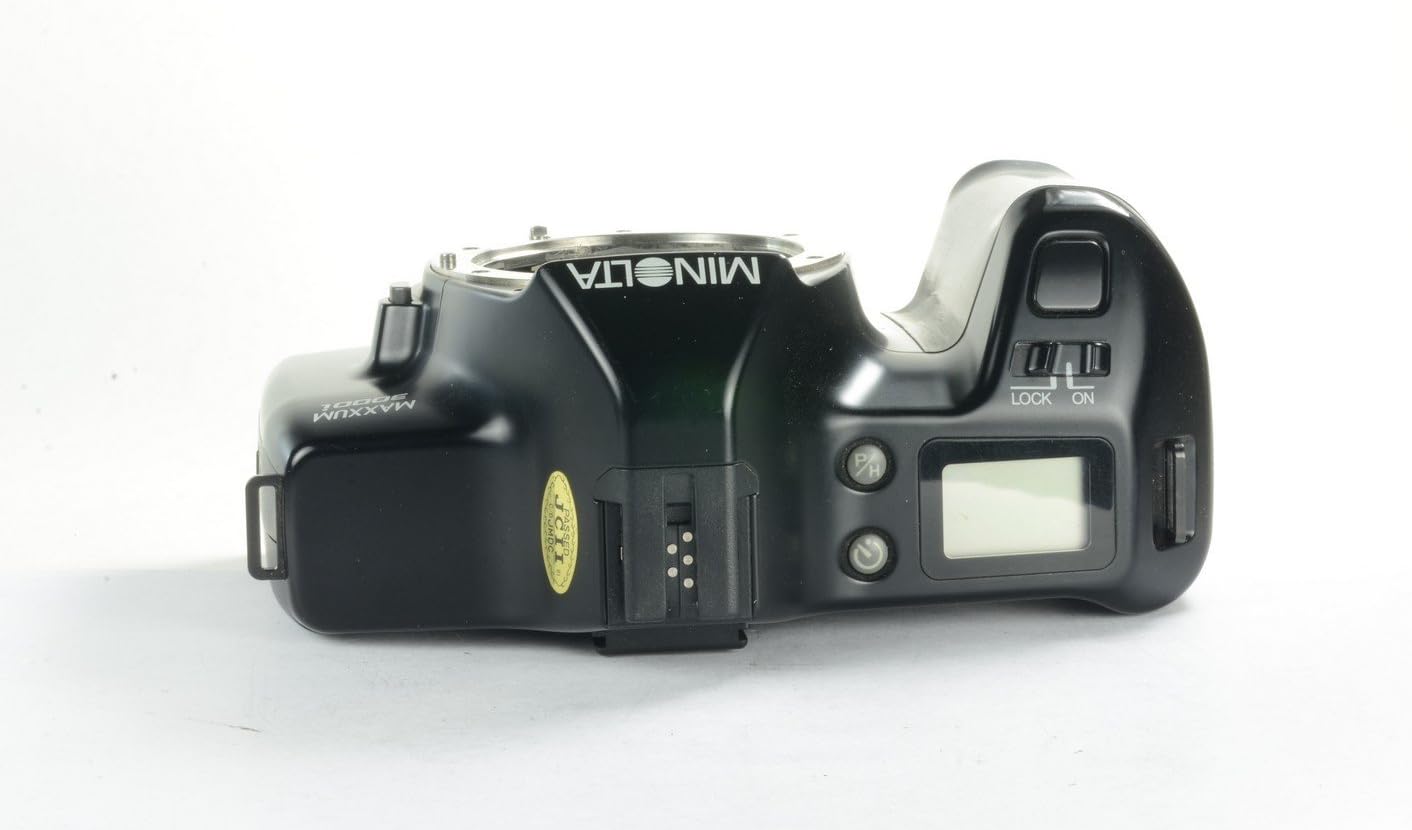
This image shows the top panel of the Minolta Maxxum 3000i. The power switch, marked 'LOCK' and 'ON', is visible to the right of the viewfinder, adjacent to the shutter release button and the LCD information panel.
4.2 Shooting Modes
The Maxxum 3000i operates primarily in fully automatic exposure mode. It also features a high-speed program option for capturing fast-moving subjects. The camera automatically selects the optimal aperture and shutter speed for the given lighting conditions.
4.3 Focusing
The camera supports both Auto Focus (AF) and Manual Focus (M). A switch on the side of the lens mount allows you to select your preferred focusing method.
- Auto Focus: Set the switch to 'AF'. The camera will automatically focus when the shutter button is pressed halfway.
- Manual Focus: Set the switch to 'M'. Rotate the focusing ring on the lens until the subject appears sharp in the viewfinder.

This image shows the left side of the Minolta Maxxum 3000i camera. The 'AF/M' switch, used to select between autofocus and manual focus modes, is clearly visible on the side of the lens mount.
4.4 Taking a Picture
With the camera powered on and a lens attached:
- Look through the viewfinder and compose your shot.
- Press the shutter button halfway down to activate the autofocus and exposure metering systems. The camera will confirm focus and exposure settings.
- Press the shutter button fully down to take the picture. The motor drive will automatically advance the film to the next frame.
5. Maintenance
5.1 Cleaning
- Camera Body: Use a soft, dry cloth to wipe the camera body. For stubborn dirt, slightly dampen the cloth with water. Avoid harsh chemicals.
- Lens Mount: Keep the lens mount free of dust and debris. Use a blower brush to remove loose particles. Avoid touching the internal contacts.
- Viewfinder/LCD: Use a soft, lint-free cloth specifically designed for optics.
5.2 Storage
- When storing the camera for extended periods, remove the battery to prevent leakage.
- Store the camera in a cool, dry place, away from direct sunlight, extreme temperatures, and high humidity.
- Attach the body cap and lens caps to protect the sensor and lens elements.
6. Troubleshooting
Common Issues and Solutions
- Camera does not power on: Check if the battery is correctly installed and fully charged. Replace the battery if necessary.
- Shutter does not release: The camera is designed to prevent shots when lighting or focus conditions are not optimal. Ensure the subject is in focus and there is sufficient light. Check if the lens is properly attached.
- Film does not advance: Ensure film is correctly loaded and the camera is powered on. If the issue persists, check the film compartment for any obstructions.
- Images are blurry: Verify that the lens is clean. If using autofocus, ensure the camera has locked onto the subject. If using manual focus, adjust the focus ring carefully.
7. Specifications
| Feature | Specification |
|---|---|
| Model Name | Maxxum 3000i |
| Item Model Number | V2479-101A |
| Brand | Minolta |
| Film Format Type | 35mm |
| Film Color | Color |
| Special Feature | Aspheric, Interchangeable-lens |
| Min Shutter Speed | 1/1000 second |
| Compatible Devices | Camera (Minolta A-mount lenses) |
| Batteries Required | 1x 2CR5 Lithium Metal battery |
| Product Dimensions (L x W x H) | 5.5 x 3.5 x 5 inches |
| Item Weight | 2 pounds |
| Included Components | Camera Body Only |
8. Warranty and Support
Specific warranty information for the Minolta Maxxum 3000i is not provided in the product data. For details regarding warranty coverage, please refer to the documentation provided at the time of purchase or contact your retailer.
For technical support or service inquiries, it is recommended to consult Minolta's official support channels or a qualified camera repair specialist.


