Introduction
This manual provides essential instructions for the safe and efficient operation of your Philips AZ 1080 CD-Radiorecorder. Please read these instructions carefully before using the device and retain them for future reference. The Philips AZ 1080 is a portable audio system featuring a CD player, radio tuner, and cassette deck, designed for versatile audio playback.
Product Overview
The Philips AZ 1080 CD-Radiorecorder combines multiple audio functionalities in a compact, portable design. It features a bass reflex speaker system for enhanced audio quality.
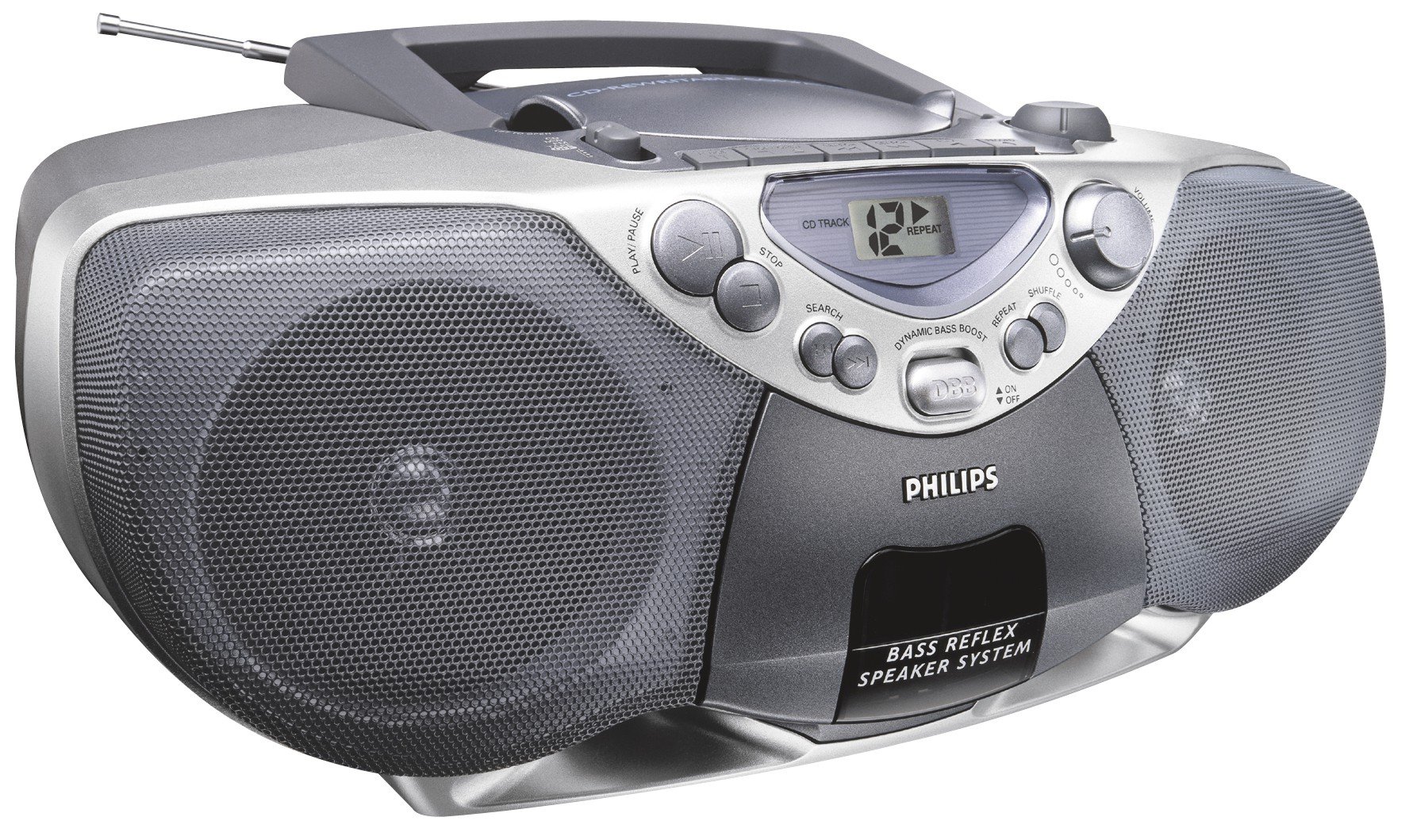
Figure 1: Front view of the Philips AZ 1080 CD-Radiorecorder. This image displays the front of the Philips AZ 1080 CD-radiorecorder, highlighting its silver and dark gray design. Key features visible include the CD compartment on top, the LCD display, control buttons for CD playback (Play/Pause, Stop, Search, Repeat, Shuffle), a volume knob, the Dynamic Bass Boost (DBB) button, and the two large speaker grilles on either side. An extendable antenna is also visible at the top rear.
Setup
Power Connection
The Philips AZ 1080 can be powered by AC mains or batteries.
- AC Power: Connect the supplied AC power cord to the AC mains socket on the unit and then to a wall outlet.
- Battery Power: Open the battery compartment cover on the bottom of the unit. Insert the required number of batteries (not included), ensuring correct polarity (+/-). Close the cover securely.
Antenna Setup
For optimal radio reception:
- FM: Extend the telescopic antenna fully and adjust its position for the best reception.
- AM: The unit has a built-in AM antenna. Rotate the entire unit for optimal AM reception.
Operating Instructions
General Controls
- Power On/Off: Press the POWER button to turn the unit on or off.
- Volume Control: Rotate the VOLUME knob to adjust the sound level.
- Dynamic Bass Boost (DBB): Press the DBB button to activate or deactivate the dynamic bass enhancement feature.
CD Playback
- Open the CD compartment cover.
- Place a CD with the label side facing up.
- Close the CD compartment cover.
- Press the PLAY/PAUSE button to start playback.
- Press STOP to halt playback.
- Use the SEARCH buttons (<< / >>) to skip tracks or search within a track.
- Press the REPEAT button to repeat the current track or the entire CD.
- Press the SHUFFLE button for random track playback.
Radio Operation
- Select the desired band (FM/AM) using the BAND selector.
- Rotate the TUNING knob to tune into a radio station.
Cassette Playback and Recording
The unit features a stereo cassette deck.
- Playback: Open the cassette compartment, insert a cassette, and press the PLAY button.
- Fast Forward/Rewind: Use the F.FWD / REW buttons.
- Recording (CD Synchronized): To record from a CD to a cassette, ensure a blank cassette is inserted. Start CD playback, then press the RECORD button on the cassette deck. The recording will start automatically, synchronized with the CD playback.
Auxiliary Input
Connect external audio devices (e.g., MP3 player, smartphone) to the AUX-IN jack using a 3.5mm audio cable (not supplied). Select the AUX function on the unit to play audio from the connected device.
Maintenance
Proper care ensures the longevity of your device.
- Cleaning: Use a soft, dry cloth to clean the exterior. Do not use abrasive cleaners or solvents.
- CD Lens Care: Avoid touching the CD lens. If necessary, use a specialized CD lens cleaner.
- Cassette Head Cleaning: Periodically clean the cassette heads with a cotton swab lightly moistened with isopropyl alcohol.
- Storage: When not in use for extended periods, remove batteries and disconnect from AC power. Store in a cool, dry place.
Troubleshooting
If you encounter issues, refer to the following common problems and solutions:
| Problem | Possible Cause | Solution |
|---|---|---|
| No power | AC cord not connected; Batteries depleted or incorrectly inserted. | Check AC cord connection; Replace batteries or ensure correct polarity. |
| No sound | Volume too low; Incorrect source selected; Headphones connected. | Increase volume; Select correct function (CD, Radio, Tape, AUX); Disconnect headphones. |
| CD skips or does not play | CD dirty or scratched; CD inserted incorrectly; Unit is subject to strong vibrations. | Clean or replace CD; Insert CD correctly; Place unit on a stable surface. |
| Poor radio reception | Antenna not extended/adjusted; Weak signal. | Extend and adjust FM antenna; Rotate unit for AM; Try moving the unit to a different location. |
| Cassette playback issues | Cassette tape tangled or damaged; Dirty tape heads. | Check cassette tape; Clean tape heads as described in Maintenance section. |
Specifications
| Feature | Detail |
|---|---|
| Brand | Philips |
| Model Number | AZ 1080 (Part No. 8710895736428) |
| Product Type | CD-Radiorecorder / Boombox |
| Audio Output Mode | Stereo |
| Supported Audio Formats | CD audio (CD-DA) |
| Supported Media | CD, Cassette Tape, Radio (FM/AM) |
| Power Source | Corded Electric, Battery (Batteries not included) |
| Wattage | 80 watts |
| Connector Type | Auxiliary (3.5mm jack) |
| Bluetooth Compatible | No |
| Special Features | Bass Reflex Speaker System, Dynamic Bass Boost (DBB), CD Synchronized Recording |
| Color | Silver |
Warranty and Support
For warranty information and customer support, please refer to the warranty card included with your product or visit the official Philips website. Keep your proof of purchase for any warranty claims.


