
1. Introduction
The Dremel 670 Mini Saw Rotary Tool Attachment is designed to convert your Dremel rotary tool into a precision circular saw. This attachment facilitates fine, clear, and straight cuts in various materials such as wood, laminate, wood flooring, thin wood plates, and paneling. It allows for clean, perpendicular cuts up to 1/4 inch (6.35 mm) thick, making it suitable for DIY projects, hobbies, crafts, and model-making.

Image 1.1: The Dremel 670 Mini Saw Rotary Tool Attachment. This image displays the clear housing and compact design of the attachment, ready for connection to a Dremel rotary tool.
2. Safety Information
Always prioritize safety when operating power tools and attachments. Read and understand all instructions before use. Failure to follow safety warnings and instructions may result in electric shock, fire, and/or serious injury.
- Wear appropriate personal protective equipment, including eye protection, hearing protection, and gloves.
- Ensure the workpiece is securely clamped before cutting to prevent movement.
- Keep hands and fingers away from the rotating blade. The lower guard retracts during use for safety.
- Disconnect the rotary tool from the power source before changing accessories or making adjustments.
- Do not force the tool; allow the blade to cut at its own pace.
- Ensure the Dremel rotary tool is compatible with 230 volts if operating in regions requiring this voltage.
Proposition 65 Warning:
This product may contain chemicals known to the State of California to cause cancer and birth defects or other reproductive harm. For more information, visit www.P65Warnings.ca.gov.
3. Package Contents
Verify that all components are present in the package:
- Dremel 670 Mini Saw Attachment
- Drive Adapter
- Rip/Crosscut Blade (High Speed Steel, 24 teeth)
- Instruction Manual (this document)
4. Setup and Installation
The Dremel 670 Mini Saw Attachment features a quick-connect system for easy installation onto compatible Dremel rotary tools. Follow these steps to attach the mini saw:
- Ensure your Dremel rotary tool is unplugged or has its battery removed.
- Remove any existing accessories or collet nuts from the rotary tool's shaft.
- Insert the provided drive adapter into the rotary tool's collet and tighten it securely.
- Screw the Dremel 670 Mini Saw Attachment onto the threaded collar of your Dremel rotary tool until it is firmly seated. The attachment should be oriented correctly for cutting.
- Insert the Rip/Crosscut blade into the attachment's arbor and secure it with the provided screw. Ensure the blade's teeth are oriented correctly for cutting.
Compatibility: This attachment is compatible with Dremel rotary tool models: 100, 200, 3000, 4000, 4300, 8220, 8240, 8250, and 8260.

Image 4.1: Diagram illustrating the Dremel 670 Mini Saw Attachment's features, including the clear housing, angled neckline for perpendicular cuts, easy screw-on installation, and retractable lower guard. It also indicates the maximum cutting depth of 1/4 inch (0.635 cm).
5. Operation
Once the Dremel 670 Mini Saw Attachment is securely installed, you can begin cutting. This attachment is designed for precise, straight, and perpendicular cuts in materials such as plastic and wood.
- Prepare Workpiece: Securely clamp the material you intend to cut. This prevents movement and ensures a straight cut.
- Set Up Tool: Ensure the rotary tool is set to an appropriate speed for the material being cut. Refer to your Dremel rotary tool's manual for recommended speed settings.
- Align Cut: Position the attachment so the directional guide aligns with your desired cut line. The clear housing provides better visibility of your project and the cutting path.
- Begin Cutting: Turn on the Dremel rotary tool. Gently lower the spinning blade into the material. The lower guard will retract as the blade engages the workpiece. Apply steady, even pressure, allowing the tool to do the work. Do not force the cut.
- Maintain Straightness: Utilize the angled throat design to maintain straight, perpendicular cuts.
- Maximum Cut Depth: The attachment is designed for cuts up to 1/4 inch (6.35 mm) thick. Do not attempt to cut materials exceeding this thickness.

Image 5.1: A Dremel rotary tool with the 670 Mini Saw Attachment being used to cut wood flooring. The user is guiding the tool along a straight line.

Image 5.2: The Dremel 670 Mini Saw Attachment in use for cutting a rectangular opening in a wall, demonstrating its precision for specific applications.

Image 5.3: An operator using the Dremel 670 Mini Saw Attachment to make a precise cut on a piece of laminate material.

Image 5.4: The Dremel 670 Mini Saw Attachment being used to cut a piece of clear plastic, highlighting its versatility across different materials.
6. Maintenance
Proper maintenance ensures the longevity and optimal performance of your Dremel 670 Mini Saw Attachment.
- Cleaning: After each use, disconnect the attachment from the rotary tool and clean it thoroughly. Use a soft brush or cloth to remove dust and debris from the housing, blade, and moving parts. Do not use harsh chemicals or abrasive cleaners.
- Blade Inspection: Regularly inspect the Rip/Crosscut blade for sharpness and damage. A dull or damaged blade can affect cutting performance and safety. Replace blades as needed.
- Storage: Store the attachment in a clean, dry place, away from direct sunlight and extreme temperatures.
7. Troubleshooting
If you encounter issues with your Dremel 670 Mini Saw Attachment, consider the following general troubleshooting steps:
- Poor Cut Quality:
- Check if the blade is dull or damaged. Replace if necessary.
- Ensure the rotary tool speed is appropriate for the material.
- Verify the workpiece is securely clamped and not moving during the cut.
- Attachment Not Securing Properly:
- Ensure the drive adapter is correctly inserted and tightened in the rotary tool's collet.
- Confirm the attachment is fully screwed onto the rotary tool's threaded collar.
- Check for any debris preventing a secure connection.
- Excessive Vibration:
- Inspect the blade for damage or imbalance.
- Ensure all connections (blade, drive adapter, attachment) are tight.
If problems persist, refer to the Dremel rotary tool's instruction manual or contact Dremel customer support.
8. Specifications
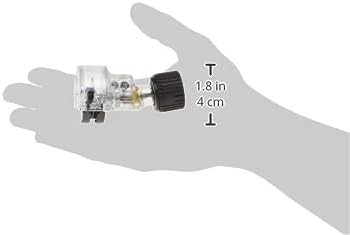
Image 8.1: The Dremel 670 Mini Saw Attachment held in a hand, with approximate dimensions indicated for scale (1.8 inches / 4 cm in height).
| Feature | Specification |
|---|---|
| Brand | Dremel |
| Model Number | 670 |
| Product Dimensions (L x W x H) | 3.13" x 2.25" x 1.75" (7.95 cm x 5.72 cm x 4.45 cm) |
| Item Weight | 4.2 ounces (119 grams) |
| Blade Material | High Speed Steel |
| Blade Length | 4 Inches (10.16 cm) |
| Number of Teeth | 24 |
| Cutting Angle | 90 Degrees |
| Maximum Cut Depth | 1/4 inch (6.35 mm) |
| Surface Recommendation | Plastic, Wood |
| Special Feature | Clear housing for better visibility |
| Included Components | Drive adapter, Instruction Manual, Mini Saw attachment, Rip/Crosscut blade |
| Voltage (Rotary Tool) | 230 Volts (tool dependent) |
9. Warranty and Support
The Dremel 670 Mini Saw Rotary Tool Attachment comes with a Limited Manufacturer Warranty. For specific details regarding the warranty coverage, terms, and conditions, please refer to the warranty documentation included with your purchase or visit the official Dremel website.
For technical assistance, replacement parts, or warranty claims, please contact Dremel Customer Service. Contact information can typically be found on the Dremel website or in the packaging materials.


