
Celestron 71009
Celestron SkyMaster 15x70 Astronomy Binoculars Instruction Manual
Model: 71009
Introduction
The Celestron SkyMaster 15x70 binoculars are designed for astronomical viewing and long-range terrestrial observation. Featuring 15x magnification and large 70mm objective lenses, these binoculars provide bright, clear images, especially in low-light conditions. This manual provides instructions for proper setup, operation, and maintenance to ensure optimal performance and longevity of your binoculars.
What's in the Box
Upon unpacking, please verify that all items listed below are present:
- Celestron SkyMaster 15x70 Binoculars
- Tripod Adapter
- Objective Lens Caps
- Rainguard (Eyepiece Cover)
- Neck Strap
- Lens Cloth
- Instruction Manual (this document)
- Deluxe Carrying Case

Image: All components included with the Celestron SkyMaster 15x70 binoculars, neatly laid out.
Product Overview
Familiarize yourself with the main components of your SkyMaster 15x70 binoculars:
- Objective Lenses: The large front lenses that gather light.
- Eyepieces: The lenses you look through.
- Focus Wheel: Central knob for adjusting focus.
- Diopter Adjustment Ring: Located on the right eyepiece, used to compensate for differences in vision between your eyes.
- Interpupillary Distance (IPD) Hinge: Allows adjustment of the distance between the eyepieces to match your eye spacing.
- Tripod Adapter Socket: Located under the central hinge, used for mounting the binoculars on a tripod.
- Eyecups: Rubber cups that can be folded down for eyeglass wearers.

Image: Front view of the binoculars, highlighting the objective lenses.
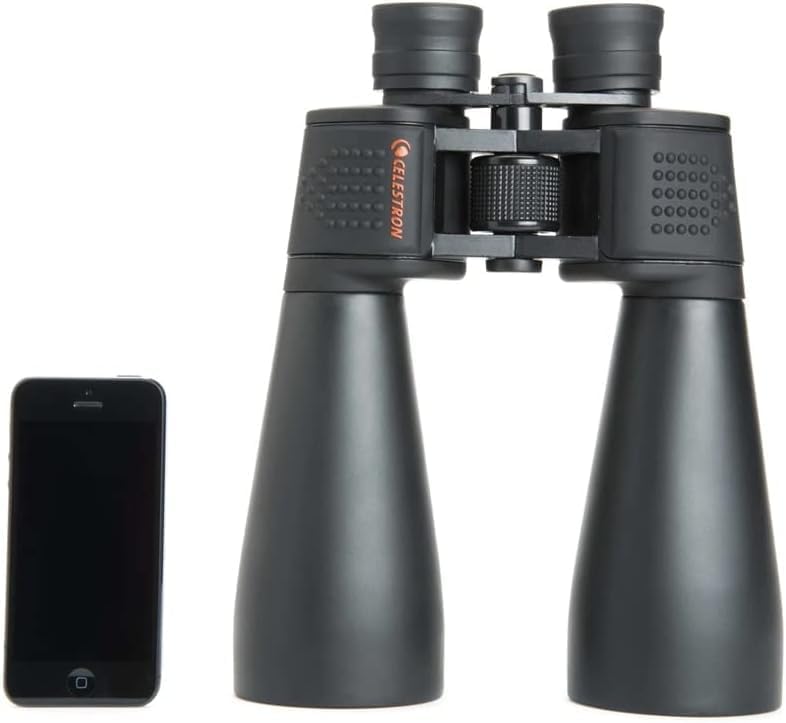
Image: Top view of the binoculars, illustrating the central focus mechanism and eyepieces.
Setup
1. Adjusting Interpupillary Distance (IPD)
The interpupillary distance is the distance between the centers of your pupils. To set the correct IPD:
- Hold the binoculars up to your eyes.
- Move the two halves of the binoculars closer together or further apart until you see a single, clear circular field of view.
This adjustment is crucial for comfortable viewing and to prevent eye strain.
2. Focusing the Binoculars
Your SkyMaster binoculars have a central focus system and a diopter adjustment on the right eyepiece.
- Choose a distant object to focus on.
- Cover the right objective lens (the large front lens) with your hand.
- Look through the binoculars with your left eye and rotate the central focus wheel until the object is sharp and clear.
- Uncover the right objective lens and cover the left objective lens.
- Look through the binoculars with your right eye and rotate the diopter adjustment ring on the right eyepiece until the object is sharp and clear. Do not use the central focus wheel for this step.
- Once both eyes are focused, the binoculars are set for your vision. For subsequent viewing, you will only need to use the central focus wheel.
3. Eyecup Adjustment
The rubber eyecups can be adjusted for comfortable viewing:
- If you wear eyeglasses, fold down the eyecups to bring your eyes closer to the eyepiece lenses, allowing you to see the full field of view.
- If you do not wear eyeglasses, leave the eyecups in the up position for proper eye relief.
4. Tripod Mounting
Due to their size and weight, the SkyMaster 15x70 binoculars are best used with a tripod for extended viewing periods to ensure stability and reduce arm fatigue. A tripod adapter is included.
- Locate the threaded tripod adapter socket under the central hinge of the binoculars.
- Screw the included tripod adapter into this socket.
- Attach the tripod adapter to your standard photographic tripod (not included).
- Ensure the binoculars are securely fastened to the tripod before use.

Image: The binoculars securely mounted on a tripod, demonstrating the use of the tripod adapter.
Operating the Binoculars
Once set up, using your binoculars is straightforward:
- Hold the binoculars firmly and bring them to your eyes.
- Locate your desired object.
- Adjust the central focus wheel until the image is sharp.
- For astronomical observations, choose a dark location away from city lights for the best viewing experience.
Maintenance
Proper care will extend the life and performance of your binoculars.
Cleaning the Lenses
Handle lenses with care. Avoid touching optical surfaces with your fingers.
- Remove Dust: Use a soft brush or compressed air to gently remove any loose dust or debris from the lens surfaces.
- Remove Smudges: For fingerprints or smudges, use the included lens cloth or a high-quality optical cleaning cloth. Breathe lightly on the lens to create a fine mist, then gently wipe with the cloth in a circular motion.
- Avoid Harsh Chemicals: Never use abrasive cloths, paper towels, or household cleaning solutions, as these can scratch or damage the lens coatings.
Storage
- Store the binoculars in their protective carrying case when not in use.
- Keep them in a cool, dry place, away from direct sunlight and extreme temperatures.
- Avoid storing in areas with high humidity, which can lead to mold growth on optical surfaces.
Troubleshooting
| Problem | Possible Cause | Solution |
|---|---|---|
| Blurred image | Incorrect focus or diopter setting. | Adjust the central focus wheel. Re-adjust the diopter setting for your right eye as described in the "Setup" section. |
| Double image or eye strain | Interpupillary distance (IPD) is not correctly set. | Adjust the IPD by moving the binocular halves until a single circular field of view is achieved. |
| Dark edges in the field of view | Eyecups are not correctly positioned for eyeglass wearers. | If wearing eyeglasses, fold down the eyecups. If not, ensure they are in the up position. |
| Image appears dim | Low light conditions or dirty objective lenses. | Use in brighter conditions or clean the objective lenses carefully. |
Specifications
| Feature | Detail |
|---|---|
| Model Number | 71009 |
| Magnification | 15x |
| Objective Lens Diameter | 70mm |
| Prism Type | BaK-4 |
| Optical Coatings | Multi-Coated |
| Water Resistance | Yes |
| Product Dimensions | 11 x 8 x 3 inches |
| Item Weight | 3.28 pounds |
Warranty and Support
Celestron provides a Limited Lifetime US Warranty for this product. For technical assistance or warranty claims, please contact Celestron customer support.
Additional resources:
- Official User Guide (PDF): Download
- Official User Manual (PDF): Download
- Warranty Information (PDF): Download
For more information, visit the official Celestron website or contact their US-based expert tech support.
Related documents71009


Ask a question about this manual
Ask about setup, troubleshooting, compatibility, parts, safety, or missing instructions. Manuals+ will review the question and use this page’s manual context to help answer it.