
1. Introduction
This manual provides comprehensive instructions for the installation, operation, and maintenance of the Super Micro PWS-0035 500W 3X RPS ATX Power Supply. Please read this manual thoroughly before using the product to ensure proper and safe operation.
The Super Micro PWS-0035 is a robust 500W power supply designed for specific Super Micro server chassis, providing reliable power delivery with its redundant power supply (RPS) capabilities.
2. Safety Information
Always observe the following safety precautions to prevent injury and damage to the equipment:
- Ensure the power supply is disconnected from the main power source before installation or maintenance.
- Do not open the power supply unit. There are no user-serviceable parts inside.
- Operate the power supply in a well-ventilated area to prevent overheating.
- Use only the specified power cables and connectors.
- Avoid exposing the unit to moisture or extreme temperatures.
- Professional installation is recommended for optimal performance and safety.
3. Package Contents
Verify that all items are present in the package:
- Super Micro PWS-0035 500W Power Supply Unit
- Power Cables (quantity may vary based on region)
- Mounting Screws (if applicable)
- This User Manual
4. Setup and Installation
Follow these steps to properly install the PWS-0035 power supply:
- Prepare the Chassis: Ensure the server chassis (e.g., SC742X) is powered off and disconnected from all power sources. Open the chassis to access the power supply bay.
- Insert the Power Supply: Carefully slide the PWS-0035 unit into the designated power supply bay in the chassis. Ensure it is fully seated and aligned with the mounting holes.
- Secure the Unit: Use the appropriate screws to secure the power supply unit to the chassis. Ensure it is firmly attached to prevent movement.
- Connect Power Cables: Connect the necessary internal power cables from the power supply to the motherboard, hard drives, and other components as required by your system configuration.
- Connect External Power: Connect the external AC power cables to the power supply unit(s) and then to a grounded power outlet. For redundant configurations, connect each power supply module to a separate power source if possible.
- Verify Connections: Double-check all connections to ensure they are secure and correctly oriented.
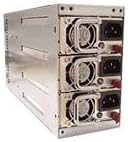
Figure 4.1: The Super Micro PWS-0035 500W power supply unit, showing its modular design with multiple power modules. This unit is designed for redundant power supply configurations in compatible server chassis.
5. Operating Instructions
Once installed, the PWS-0035 operates automatically with your server system.
- Power On: After all connections are secure, power on your server system. The power supply will automatically provide power to the components.
- Redundancy: In a redundant power supply configuration, if one power module fails, the other module(s) will seamlessly take over the load, ensuring continuous operation.
- Status Indicators: Refer to your server chassis manual for specific LED indicators related to power supply status (e.g., power good, fault).
6. Maintenance
Regular maintenance helps ensure the longevity and reliability of your power supply.
- Dust Removal: Periodically clean dust from the power supply's fan vents and surrounding areas using compressed air. Ensure the system is powered off and unplugged before cleaning.
- Ventilation: Ensure that the server chassis and the power supply's vents are not obstructed to allow for proper airflow and cooling.
- Cable Management: Keep internal cables tidy to avoid obstructing airflow within the chassis.
- Environmental Conditions: Operate the power supply within recommended temperature and humidity ranges to prevent premature failure.
7. Troubleshooting
If you encounter issues with your PWS-0035 power supply, refer to the following common problems and solutions:
| Problem | Possible Cause | Solution |
|---|---|---|
| System does not power on. | Power cable not connected or loose. | Check all power cable connections, both internal and external. Ensure the power outlet is functional. |
| Power supply fan is excessively loud. | Dust accumulation or fan malfunction. | Clean fan vents. If noise persists, contact Super Micro support. |
| System powers off unexpectedly. | Overheating or power supply failure. | Ensure proper ventilation. Check for fault indicators. If issues persist, consider replacing the power supply. |
| Redundant power supply module shows fault. | Module failure or improper seating. | Reseat the module. If fault persists, the module may need replacement. The system should continue to operate on the remaining module(s). |
For more complex issues, please refer to the Super Micro technical support resources or consult a qualified technician.
8. Specifications
Key technical specifications for the Super Micro PWS-0035 500W Power Supply:
- Model: PWS-0035
- Output Wattage: 500 Watts
- Form Factor: ATX (designed for specific Super Micro chassis like SC742X)
- Redundancy: 3X RPS (Redundant Power Supply) capable
- Input Voltage: Standard AC input (specific range not provided, typically 100-240V)
- Item Weight: Approximately 12 pounds (5.44 kg)
- Manufacturer: Super Micro Computer Inc
- UPC: 672042620388
9. Warranty Information
Super Micro products typically come with a limited warranty. The exact terms and duration of the warranty for the PWS-0035 power supply may vary based on your region and point of purchase. Please retain your proof of purchase for warranty claims.
For detailed warranty information, please visit the official Super Micro website or contact your vendor.
10. Technical Support
If you require technical assistance or have questions not covered in this manual, please contact Super Micro technical support.
- Super Micro Official Website: www.supermicro.com/support
- Contact Information: Refer to the support section of the Super Micro website for phone numbers and email contacts specific to your region.


