Introduction
This manual provides instructions for the setup and operation of your La Crosse Technology WS-7075UF Wireless Forecast Station. This device offers accurate time, indoor and outdoor temperature, indoor humidity, and a 12-20 hour weather forecast.
Key Features:
- Wireless weather forecasting for 12- to 20-hour periods.
- Displays indoor temperature, indoor humidity, and remote outdoor temperature.
- Includes one remote transmitter; supports up to three sensors (additional sensors sold separately).
- Radio-controlled time and date for automatic synchronization.
- Compact base unit dimensions: 7 inches (H) x 4.5 inches (L) x 1 inch (W).
Package Contents
- WS-7075UF Wireless Forecast Station (Main Unit)
- Removable Stand
- TX6U Wireless Outdoor Transmitter
Setup
1. Battery Installation
Main Unit: Insert batteries into the main unit. Observe polarity. (Note: Batteries are not included.)
Outdoor Transmitter (TX6U): Insert batteries into the outdoor transmitter. Observe polarity. (Note: Batteries are not included.)
2. Initial Synchronization
Place the outdoor transmitter within 80 feet of the main unit. The main unit will automatically search for the transmitter signal. Allow a few minutes for synchronization.
Once synchronized, the outdoor temperature will display on the main unit.
3. Atomic Time Synchronization
The station will automatically attempt to synchronize with the NIST atomic time standard daily. This process ensures accurate time and date display.
4. Placement
The main unit can be wall-mounted or placed on a flat surface using the removable stand.
Position the outdoor transmitter in a shaded, dry location away from direct sunlight and precipitation for accurate temperature readings.
Operating Instructions
1. Display Overview
The main unit's LCD displays the following information:
- Current Time and Date
- Weather Forecast Icon
- Indoor Temperature
- Indoor Humidity (%RH)
- Outdoor Temperature (from TX6U transmitter)
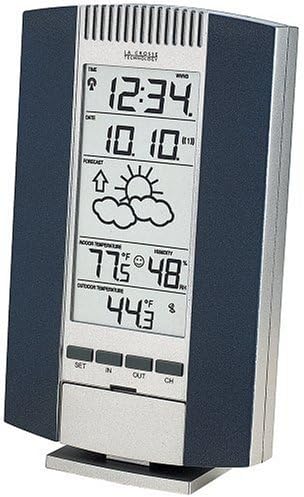
Image: Front view of the La Crosse Technology WS-7075UF Wireless Forecast Station, showing the LCD display with time, date, forecast icon, indoor temperature, indoor humidity, and outdoor temperature. Control buttons are visible below the display.
2. Button Functions
The main unit features several control buttons:
- SET: Used to enter settings mode and confirm selections.
- IN: Toggles between indoor temperature/humidity display or adjusts values in settings.
- OUT: Toggles between outdoor temperature display or adjusts values in settings.
- CH (Channel): Used to switch between multiple outdoor transmitters (if more than one is connected).
3. Time and Date Settings
While the atomic clock automatically sets the time, manual adjustments may be necessary or desired. Refer to the full manual for detailed steps on manual time and date setting.
Toggle between 12-hour and 24-hour time display modes using the appropriate button (refer to specific button labels on your device).
4. Temperature and Humidity Display
The station displays indoor temperature and humidity, and outdoor temperature. You can select between Celsius (°C) and Fahrenheit (°F) display for all temperatures.
5. Weather Forecast
The forecast is represented by an icon (e.g., sun, clouds, rain) and predicts weather trends for the next 12 to 20 hours based on barometric pressure changes detected by the outdoor transmitter.

Image: Angled view of the La Crosse Technology WS-7075UF Wireless Forecast Station, highlighting its slim profile and the side panels. The display shows similar weather information as the main image.
6. Alarm Functions
The unit includes dual time alarms with a snooze function. Consult the full manual for detailed instructions on setting and activating alarms.
7. Multiple Transmitters
The main unit can receive data from up to three outdoor transmitters. Use the CH button to cycle through the readings from different channels.
Maintenance
1. Battery Replacement
Replace batteries in both the main unit and the outdoor transmitter when the low battery indicator appears on the display. Always replace all batteries at the same time with new ones of the same type.
2. Cleaning
Clean the unit and transmitter with a soft, damp cloth. Do not use abrasive cleaners or solvents.
Troubleshooting
No Outdoor Temperature Display
- Ensure batteries are correctly installed in both units.
- Check that the outdoor transmitter is within the 80-foot transmission range.
- Relocate the outdoor transmitter to a different position to avoid interference.
- Press the CH button on the main unit to ensure it's on the correct channel for your transmitter.
Inaccurate Temperature Readings
- Ensure the outdoor transmitter is placed in a shaded area, away from direct sunlight or heat sources.
- Verify that the main unit is not near heat-emitting appliances.
Time Not Synchronizing
- Ensure the main unit is placed in an area with good reception for the atomic time signal.
- Avoid placing the unit near electronic devices that may cause interference.
Specifications
- Model: WS-7075UF
- Brand: La Crosse Technology
- Power Source: Battery Powered (Batteries not included)
- Display Type: LCD
- Material: Plastic
- Main Unit Dimensions: 7" (H) x 4.5" (L) x 1" (W)
- Outdoor Transmitter Dimensions: 3.25" (H) x 2.25" (L) x 1" (W)
- Transmission Range: Up to 80 feet (line of sight)
- Frequency: 433MHz
- Special Features: Alarm, Atomic Time Synchronization, Celsius/Fahrenheit Select
Warranty and Support
For warranty information and technical support, please refer to the documentation included with your product or visit the official La Crosse Technology website.


