1. Introduction
Welcome to the instruction manual for your Canon EOS 10D Digital SLR camera. This manual provides essential information for the safe and effective use of your camera. The EOS 10D is designed for photographers seeking superior performance and advanced features, equipped with a 6.3-megapixel CMOS sensor and Canon's DIGIC technology for enhanced image quality and speed.
Key features include:
- 6.3-megapixel CMOS image sensor for high-resolution images.
- Durable magnesium alloy body construction.
- Simultaneous RAW and JPEG image saving.
- High-speed 7-point AF system.
- Continuous shooting at 3 frames per second (fps) for up to 9 shots.
- Selectable Adobe RGB and sRGB color spaces.
- ISO speed range from 100 to 3200.
- Direct printing capabilities with compatible Canon printers.
Please read this manual thoroughly before using your camera and keep it handy for future reference.
2. Setup
2.1. Installing the Battery
The Canon EOS 10D uses a rechargeable lithium-ion battery (BP-511). Ensure the battery is fully charged before first use.
- Open the battery compartment cover located at the bottom of the camera.
- Insert the charged battery pack firmly until it locks into place.
- Close the battery compartment cover securely.

Image: Bottom view of the Canon EOS 10D, showing the battery compartment and tripod mount.
2.2. Inserting a CompactFlash Card
The camera supports CompactFlash Type I and II cards. A memory card is not included with the camera body.
- Open the CompactFlash card slot cover on the side of the camera.
- Insert the CompactFlash card with the correct orientation until it clicks into place.
- Close the card slot cover securely.
2.3. Attaching a Lens
The EOS 10D is compatible with Canon EF lenses.
- Remove the body cap from the camera and the rear lens cap from the lens.
- Align the red index mark on the lens with the red index mark on the camera body.
- Turn the lens clockwise until it clicks into place.
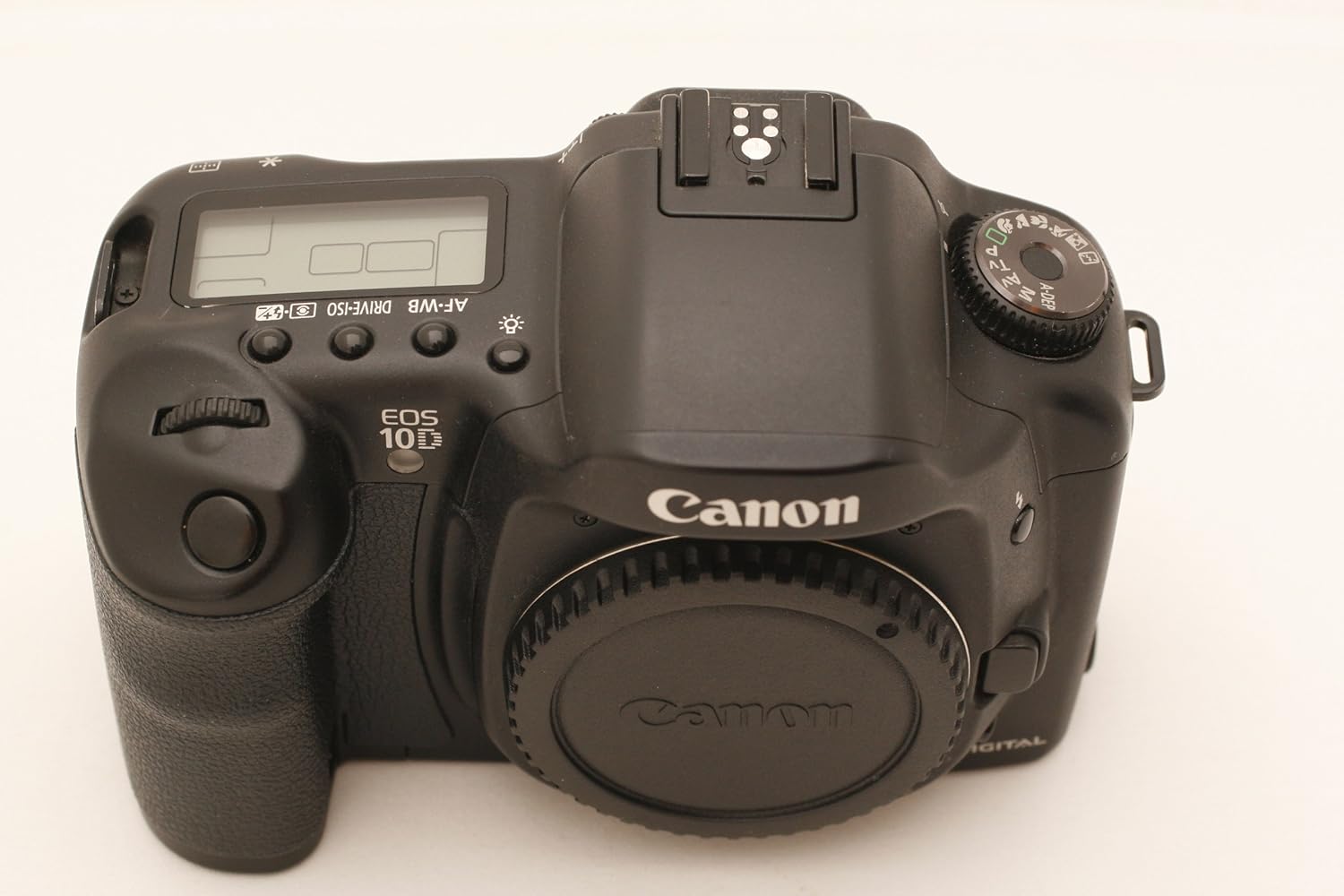
Image: Front view of the Canon EOS 10D camera body, showing the lens mount and various controls.
2.4. Initial Power On
After installing the battery and memory card, turn the camera on using the power switch.

Image: Rear view of the Canon EOS 10D, showing the LCD screen and control buttons.
Set the date, time, and language as prompted on the LCD screen.
3. Operation
3.1. Shooting Modes
The EOS 10D offers various shooting modes to suit different photographic situations. Select your desired mode using the Mode Dial.
- Full Auto: Camera automatically sets all parameters.
- Program AE (P): Camera sets aperture and shutter speed, but you can shift the combination.
- Shutter-priority AE (Tv): You set the shutter speed, camera sets aperture.
- Aperture-priority AE (Av): You set the aperture, camera sets shutter speed.
- Manual (M): You set both aperture and shutter speed.
- Depth-of-field AE (A-DEP): Camera automatically sets aperture to achieve maximum depth of field.
- Scene Modes: Close-up, Flash Off, Landscape, Night Portrait, Portrait, Sports.
3.2. Focusing
The camera features a 7-point AF system for precise focusing.
- Autofocus (AF): Half-press the shutter button to activate autofocus. The selected AF point will illuminate.
- Manual Focus (MF): Set the lens to MF and rotate the focusing ring on the lens.
- AF Point Selection: You can manually select an AF point using the multi-controller or allow the camera to select automatically.
3.3. Exposure Control
Control the brightness of your images using various settings.
- ISO Speed: Adjust sensitivity to light. Available settings: 100, 200, 400, 800, 1600, 3200. Auto ISO is available in certain modes.
- Metering Modes: Evaluative, Partial, Spot, Center-weighted average. Select the mode appropriate for your scene.
- Exposure Compensation: Adjust exposure manually to make images brighter or darker.
3.4. White Balance
Adjust white balance to ensure accurate color reproduction under different lighting conditions.
- Automatic White Balance (AWB): Camera automatically sets the optimal white balance.
- Preset White Balance: Daylight, Shade, Cloudy, Tungsten, Fluorescent, Flash.
- Custom White Balance: Manually set white balance using a white or gray object.
- Color Temperature: Set Kelvin values from 2800K to 10000K in 100K increments.
- White Balance Bracketing: Capture three images with different white balance settings with a single shot.
3.5. Image Quality and Recording
Choose your preferred image quality and file format.
- JPEG: Standard image format with various compression levels (Fine, Normal). Ideal for sharing and smaller file sizes.
- RAW: Unprocessed image data for maximum post-processing flexibility.
- RAW + JPEG: Record both RAW and JPEG images simultaneously.
3.6. Continuous Shooting
For capturing fast-moving subjects, the EOS 10D can shoot continuously at approximately 3 frames per second (fps) for up to 9 shots.
- Set the drive mode to continuous shooting.
- Press and hold the shutter button completely down.
3.7. Using the Built-in Flash
The camera features a built-in flash for low-light situations or to fill in shadows.
- In Full Auto mode, the flash may pop up automatically.
- In creative modes, you can manually raise the flash using the flash button.
- Flash modes include E-TTL for automatic flash exposure.
3.8. Image Playback and Review
Review your captured images on the camera's 1.8-inch LCD screen.
- Press the PLAY button to enter playback mode.
- Use the directional buttons to navigate through images.
- Enlarge images up to 10x in 15 steps for detailed analysis.
- Scroll horizontally and vertically within enlarged images.
- View nine images simultaneously in the reduced view.
3.9. Direct Printing
You can print images directly from the EOS 10D to compatible Canon photo printers.
- Connect the camera to a compatible Canon photo printer using a USB cable.
- Follow the on-screen instructions on the camera's LCD to select images and print settings.
4. Maintenance
4.1. Cleaning the Camera
- Camera Body: Use a soft, dry cloth to wipe dust and smudges. For stubborn dirt, lightly dampen the cloth with water or a mild cleaning solution.
- Lens: Use a lens blower to remove dust, then a lens brush. For smudges, use a lens cleaning solution and a microfiber cloth. Avoid touching the lens surface with your fingers.
- CMOS Sensor: Sensor cleaning should be performed with extreme care. It is recommended to have this done by a professional Canon service center to avoid damage.
- LCD Screen: Use a soft, dry cloth. Avoid harsh chemicals.
4.2. Battery Care
- Always use genuine Canon battery packs and chargers.
- Store batteries in a cool, dry place when not in use.
- Do not expose batteries to extreme temperatures or direct sunlight.
- If the camera will not be used for an extended period, remove the battery.
4.3. Storage
- Store the camera in a dry, well-ventilated area, away from dust and humidity.
- Use a desiccant (silica gel) in the camera bag or storage container to absorb moisture.
- Remove the battery and memory card before long-term storage.
- Attach the body cap and lens caps to protect the sensor and lens elements.
5. Troubleshooting
If you encounter issues with your Canon EOS 10D, refer to the following common problems and solutions:
5.1. Camera Does Not Power On
- Ensure the battery is fully charged and correctly inserted.
- Check if the battery compartment cover is securely closed.
- Try using a different, fully charged battery if available.
5.2. Cannot Take Pictures
- Check if a CompactFlash card is inserted and has sufficient free space.
- Ensure the lens is properly attached and the lens cap is removed.
- Verify that the camera is not in playback mode.
- If the flash is set to forced off, it may prevent shooting in very dark conditions.
5.3. Images Are Blurry
- Check if the lens is set to autofocus (AF) or if manual focus is correctly adjusted.
- Ensure the shutter speed is fast enough to prevent camera shake, especially in low light or with long lenses.
- Clean the lens if it is smudged or dirty.
5.4. Flash Does Not Fire
- Check if the flash is raised (if applicable for built-in flash).
- Ensure the flash mode is not set to "Flash Off".
- The flash may not fire if the battery level is low.
5.5. Error Messages
If an error message appears on the LCD, refer to the camera's on-screen help or consult the Canon support website for specific error code meanings.
6. Specifications
Below are the key technical specifications for the Canon EOS 10D DSLR camera:
| Feature | Specification |
|---|---|
| Model Name | 10D |
| Image Sensor | 6.3 MP CMOS (APS-C size) |
| Effective Still Resolution | 6.3 MP |
| Maximum Image Size | 3072 Pixels |
| Compatible Mountings | Canon EF |
| Supported File Format | JPEG, RAW |
| ISO Speed Range | 100 - 3200 (Expanded) |
| Autofocus Points | 7 |
| Continuous Shooting Speed | 3 fps |
| Shutter Speed | 30 seconds to 1/4000 seconds |
| LCD Screen Size | 1.8 Inches |
| Storage Media | Compact Flash |
| Connectivity | USB |
| Power Source | Rechargeable Lithium-ion Battery (BP-511) |
| Body Material | Magnesium Alloy |
| Item Weight | 1.9 Pounds |
| Model Number | 8363A002 |
| UPC | 750845811339, 013803023787 |
7. Warranty & Support
7.1. Warranty Information
This Canon EOS 10D camera body comes with:
- A full 14-day satisfaction guarantee.
- A full 90-day parts and labor warranty.
Please retain your proof of purchase for warranty claims. The warranty covers defects in materials and workmanship under normal use.
7.2. Customer Support
For technical assistance, service, or further inquiries, please contact Canon customer support. You can find contact information on the official Canon website or through your local Canon service center.
Before contacting support, please have your camera's model number (10D) and serial number ready.


