
Important Safety Instructions
Please read all instructions carefully before using the appliance. Keep this manual for future reference.
- Always ensure the appliance is unplugged before cleaning or when not in use.
- Do not immerse the appliance, cord, or plug in water or other liquids.
- Keep the appliance out of reach of children.
- Do not operate the appliance with a damaged cord or plug.
- Ensure the appliance is placed on a stable, heat-resistant surface.
- Avoid touching hot surfaces. Use oven mitts or handles.
- This appliance is for household use only.
Product Overview
The Cloer 181 Waffle Maker is designed for preparing delicious waffles with ease. It features heavy baking plates for even heat distribution, a non-stick coating for low-fat preparation, and an acoustic signal with indicator lights to notify you when your waffle is ready.

Image: The Cloer 181 Waffle Maker in its closed position, showcasing its compact design.

Image: Top-down view of the closed Cloer 181 Waffle Maker, highlighting the brand logo.
Setup
1. Unpacking
- Carefully remove the waffle maker from its packaging.
- Remove all packaging materials, stickers, and labels.
2. First Use Preparation
- Wipe the baking plates with a damp cloth to remove any dust.
- Dry thoroughly.
- For the first use, it is recommended to lightly grease the non-stick plates with a small amount of cooking oil or butter. This helps to season the plates and ensures optimal non-stick performance.
3. Power Connection
- Place the waffle maker on a stable, flat, and heat-resistant surface.
- Ensure the power cord is fully extended and plug it into a suitable 230V electrical outlet.
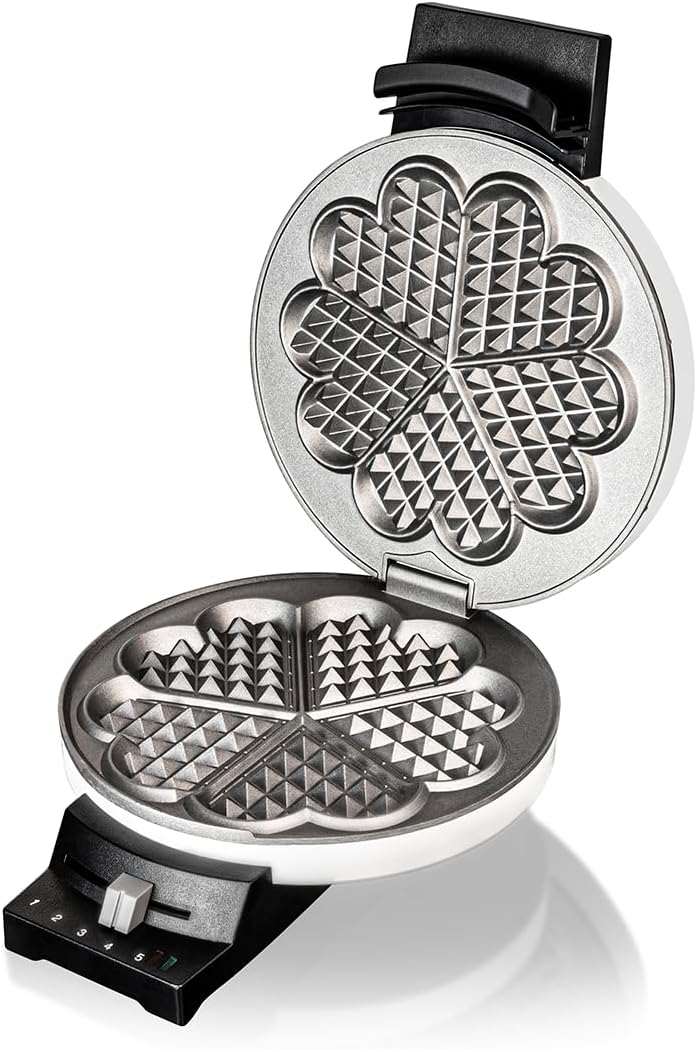
Image: The waffle maker opened, showing the empty heart-shaped baking plates ready for use.
Operating Instructions
1. Preheating
- Close the waffle maker and plug it in. The red indicator light will illuminate.
- Set the desired browning level using the control dial (1-5). A higher number indicates darker waffles.
- Allow the appliance to preheat. The green indicator light will turn on, and an acoustic signal will sound when the waffle maker has reached the optimal temperature.
2. Adding Batter
- Once preheated, open the waffle maker.
- Pour the waffle batter evenly onto the lower baking plate. Do not overfill, as the batter will expand during cooking.
- Close the lid gently.
3. Cooking Process
- The green indicator light will turn off during cooking.
- When the waffle is cooked to your selected browning level, the green indicator light will turn on again, and an acoustic signal will sound.

Image: A waffle being cooked inside the Cloer 181 Waffle Maker, showing the golden-brown texture.
4. Removing Waffles
- Open the lid and carefully remove the waffle using a heat-resistant plastic or wooden utensil. Avoid using metal utensils, as they can damage the non-stick coating.
- Close the lid to maintain heat for the next waffle.
Maintenance and Cleaning
Regular cleaning ensures the longevity and optimal performance of your waffle maker.
1. Before Cleaning
- Always unplug the appliance from the power outlet.
- Allow the waffle maker to cool down completely before cleaning.
2. Cleaning Baking Plates
- Wipe the non-stick baking plates with a damp cloth or sponge. For stubborn residue, use a small amount of mild dish soap.
- Do not use abrasive cleaners, scouring pads, or metal brushes, as these can damage the non-stick coating.
- The flexible hinges allow for better access during cleaning.
3. Cleaning Exterior
- Wipe the exterior of the waffle maker with a soft, damp cloth.
- Do not immerse the appliance in water.
4. Cord Storage
- The appliance features a convenient cord winding mechanism with a plug storage compartment for easy storage.

Image: The waffle maker shown with its power cord neatly wrapped around the base for compact storage.
Troubleshooting
If you encounter any issues with your Cloer 181 Waffle Maker, please refer to the following common problems and solutions:
| Problem | Possible Cause | Solution |
|---|---|---|
| Waffles stick to the plates. | Plates not sufficiently greased or non-stick coating worn. | Lightly grease plates before each use. Ensure plates are clean. |
| Waffle maker does not heat up. | Not plugged in or power outlet issue. | Check if the plug is securely inserted. Test the outlet with another appliance. |
| Waffles are too light or too dark. | Browning level setting is incorrect. | Adjust the browning control dial to a higher or lower setting as desired. |
If the problem persists after attempting these solutions, please contact customer support.
Specifications
- Model: Cloer 181
- Power: 930 Watts
- Voltage: 230 Volts
- Waffle Size: 16 cm diameter
- Dimensions (D x W x H): 20 x 25.5 x 8.5 cm
- Weight: 2.28 Kilograms
- Material: Metal
- Special Features: Non-stick coating, Acoustic signal, Indicator lights, Flexible hinges, Cord storage

Image: The waffle maker with key dimensions (depth, width, height) labeled for reference.
Warranty and Support
Warranty Information
This Cloer 181 Waffle Maker comes with a standard manufacturer's warranty. Please refer to the warranty card included in your product packaging for specific terms and conditions, including the warranty period and coverage details.
Customer Support
For technical assistance, spare parts, or any questions regarding your appliance, please contact Cloer customer service. Contact details can typically be found on the official Cloer website or on the warranty documentation.
When contacting support, please have your model number (181) and purchase date available.


