Introduction
This manual provides instructions for the proper setup, operation, and maintenance of the Nikon FH-835M 35mm Mounted Slide Holder. This accessory is designed to facilitate scanning of 35mm mounted slides using compatible Nikon Super Coolscan 8000 and 9000 ED scanners.
Package Contents
Verify that all items are present in the package:
- Nikon FH-835M 35mm Mounted Slide Holder
Setup
Follow these steps to prepare the FH-835M slide holder for use with your scanner.
- Unpacking: Carefully remove the FH-835M slide holder from its packaging. Inspect for any signs of damage.
- Compatibility Check: Ensure your scanner is a Nikon Super Coolscan 8000 ED or 9000 ED model. The FH-835M is specifically designed for these scanners.
- Inserting Slides:
The FH-835M holds up to five 35mm mounted slides.
Each slide must be between 1.0 mm and 3.2 mm thick, and 49.0 mm to 50.8 mm wide.
Gently open the slide holder mechanism. Insert each mounted slide into its designated slot, ensuring it is seated correctly and securely. Pay attention to the orientation of the slide (emulsion side, image orientation) as required by your scanner's software.
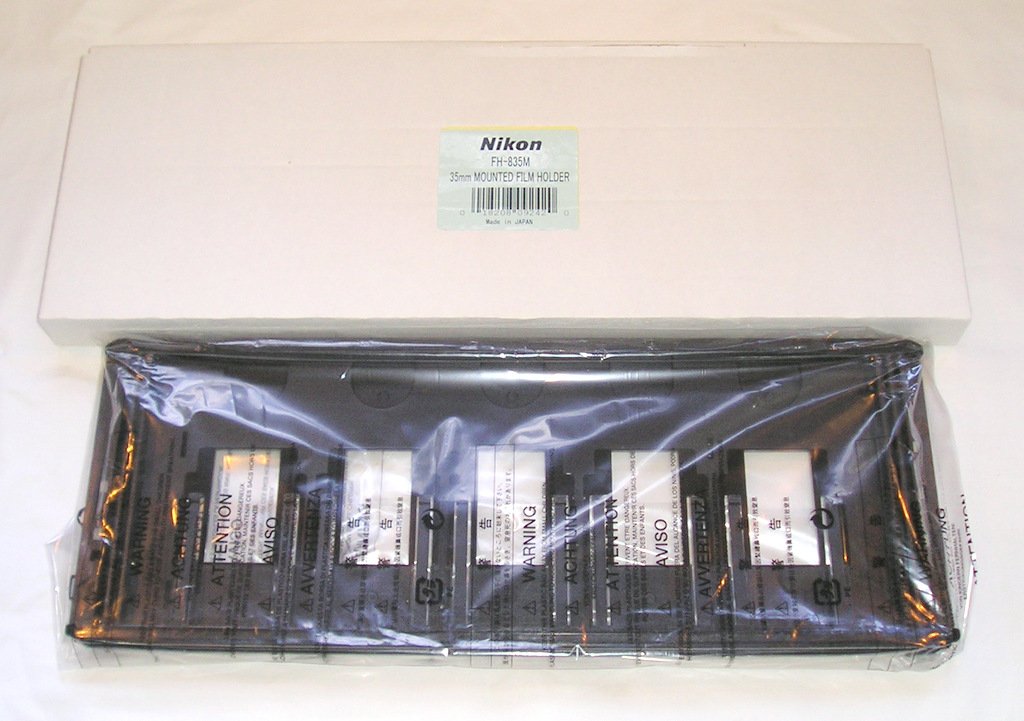
Image: The Nikon FH-835M slide holder, showing the five slots for 35mm mounted slides.
- Loading into Scanner: Refer to your Nikon Super Coolscan 8000 ED or 9000 ED scanner's manual for specific instructions on how to load the FH-835M slide holder into the scanner's film tray or slot. Ensure it clicks into place securely.
Operating
Once the FH-835M is loaded with slides and inserted into the scanner, you can begin the scanning process using your scanner's software.
- Software Launch: Launch the Nikon Scan software (or compatible scanning software) on your computer.
- Select Holder Type: Within the software, select the appropriate film holder type, typically "FH-835M" or "Mounted 35mm Slides."
- Preview and Adjust: Use the software's preview function to check the loaded slides. Make any necessary adjustments to cropping, exposure, color, and other settings.
- Scanning: Initiate the scan. The scanner will automatically advance through the slides in the holder.
- Unloading: After scanning is complete, carefully remove the FH-835M from the scanner. Open the holder and remove the slides.
Maintenance
Proper care ensures the longevity and optimal performance of your FH-835M slide holder.
- Cleaning: Use a soft, lint-free cloth to gently wipe the surfaces of the holder. Avoid abrasive cleaners or solvents. Ensure no dust or debris accumulates in the slide slots, as this can affect scan quality.
- Storage: Store the slide holder in a clean, dry, dust-free environment when not in use.
- Handling: Always handle the holder by its edges to avoid touching the slide-holding areas or introducing fingerprints.
Troubleshooting
If you encounter issues while using the FH-835M, consider the following:
- Slides Not Loading Correctly:
Ensure slides meet the thickness (1.0-3.2 mm) and width (49.0-50.8 mm) requirements.
Check for bent or damaged slide mounts.
Verify slides are inserted fully and correctly into each slot.
- Scanner Not Recognizing Holder:
Ensure the FH-835M is fully and correctly inserted into the scanner's film tray slot.
Restart the scanning software and/or the scanner.
Confirm your scanner model is compatible (Super Coolscan 8000 ED or 9000 ED).
- Poor Scan Quality:
Clean the slide holder and the scanner's film path for dust or debris.
Ensure slides are clean and free of dust.
Check scanner software settings for proper focus and exposure.
Specifications
| Feature | Detail |
|---|---|
| Model | Nikon FH-835M |
| Product Type | 35mm Mounted Slide Holder |
| Compatibility | Nikon Super Coolscan 8000 ED, Nikon Super Coolscan 9000 ED |
| Capacity | Up to 5 mounted slides |
| Supported Slide Thickness | 1.0 mm to 3.2 mm |
| Supported Slide Width | 49.0 mm to 50.8 mm |
| Item Weight | 8.8 ounces (approx. 250g) |
| UPC | 018208092420 |
Warranty Information
The Nikon FH-835M 35mm Mounted Slide Holder comes with a 1-year limited warranty. For detailed terms and conditions, please refer to the warranty card included with your original purchase or visit the official Nikon website. This warranty covers manufacturing defects under normal use.
Support
For further assistance, technical support, or service inquiries, please contact Nikon customer support.
- Nikon Official Website: Visit www.nikonusa.com for product information, FAQs, and support resources.
- Customer Service: Refer to your region-specific Nikon website for contact numbers and service center locations.


